> For the complete documentation index, see [llms.txt](https://docs.abtasty.com/llms.txt). Markdown versions of documentation pages are available by appending `.md` to page URLs; this page is available as [Markdown](https://docs.abtasty.com/account/tag-integration/ab-tasty-tag-compilation.md).
# AB Tasty tag compilation
Compiling your AB Tasty tag enables you to **push the modifications you have made to your AB Tasty campaigns** (since the previous update) **on your website**.\
The tag is **updated automatically when you change the status of a campaign** but you can also ‘force’ compilation by clicking the tag button in the header of the platform.
## Compilation process
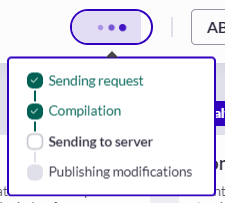
The tag compilation process includes 4 major steps. When the tag is being refreshed, you will be able to follow its progress via an animated tooltip.
| | **Step name** | **Explanation** |
| ------ | ------------------------ | ------------------------------------------------------------------------------------------------ |
| Step 1 | Sending request | AB Tasty has taken your action into account. |
| Step 2 | Processing compilation | All the modifications made to your campaigns are being compiled in a file. |
| Step 3 | Sending to server | The file containing all the modifications is being sent to the AB Tasty server for verification. |
| Step 4 | Publishing modifications | The modifications are being verified and implemented into your website. |
The process may take a few seconds to a few minutes. We recommend waiting until compilation is complete before performing any actions on the platform.
## Compilation result
The compilation can either succeed or fail.\
When all steps are completed successfully, the following tooltip is displayed:
In this case, all the modifications you have made in AB Tasty up until now will be in production on your website.\
If AB Tasty identifies an error on your account or has server issues during one step of the process, the compilation fails. In this case, the modifications made after the last successful update won’t be visible on your website.
### Server issue
If AB Tasty encountered a server issue, the following tooltip will be displayed:
We recommend trying to refresh the tag again and if the problem persists, contacting your dedicated CSM.
### Account issue
If AB Tasty identifies error(s) on your account, you will see the following:
The section displays the list of affected campaign(s) or pages with identified errors for each. AB Tasty suggests solutions to fix the issue.
Different issues can cause these errors, but they are mainly due to incorrect pieces of code in your account or campaigns.
\
**To correct these errors:**
1. Select one error line. Error details are displayed.
2. Read the description of the errors and the suggested solution.
3. Click **Go to campaign** (for a campaign) or **Go to page** (for a settings page).
4. Correct or remove the incorrect piece(s) of code.
5. Repeat the process for all errors and try to refresh your tag again.
Once you have corrected all the identified errors, tag compilation should succeed.
{% hint style="info" %}
The Framework compilation section also shows the date of the last successful tag update. This may be useful if you want to see whether your recent changes are visible on your website or not.
{% endhint %}
---
# Agent Instructions
This documentation is published with GitBook. GitBook is the documentation platform designed so that both humans and AI agents can read, navigate, and reason over technical content effectively. Learn more at gitbook.com.
## Querying This Documentation
If you need additional information that is not directly available in this page, you can query the documentation dynamically by asking a question.
Perform an HTTP GET request on the current page URL with the `ask` query parameter, and the optional `goal` query parameter:
```
GET https://docs.abtasty.com/account/tag-integration/ab-tasty-tag-compilation.md?ask=&goal=
```
`ask` is the immediate question: it should be specific, self-contained, and written in natural language.
`goal` is optional and describes the broader end goal you are ultimately trying to accomplish on behalf of the user. GitBook uses it to tailor the answer towards what is most useful for that goal.
The response will contain a direct answer to the question and relevant excerpts and sources from the documentation.
Use this mechanism when the answer is not explicitly present in the current page, you need clarification or additional context, or you want to retrieve related documentation sections.

 | | **Step name** | **Explanation** |
| ------ | ------------------------ | ------------------------------------------------------------------------------------------------ |
| Step 1 | Sending request | AB Tasty has taken your action into account. |
| Step 2 | Processing compilation | All the modifications made to your campaigns are being compiled in a file. |
| Step 3 | Sending to server | The file containing all the modifications is being sent to the AB Tasty server for verification. |
| Step 4 | Publishing modifications | The modifications are being verified and implemented into your website. |
The process may take a few seconds to a few minutes. We recommend waiting until compilation is complete before performing any actions on the platform.
## Compilation result
The compilation can either succeed or fail.\
When all steps are completed successfully, the following tooltip is displayed:
| | **Step name** | **Explanation** |
| ------ | ------------------------ | ------------------------------------------------------------------------------------------------ |
| Step 1 | Sending request | AB Tasty has taken your action into account. |
| Step 2 | Processing compilation | All the modifications made to your campaigns are being compiled in a file. |
| Step 3 | Sending to server | The file containing all the modifications is being sent to the AB Tasty server for verification. |
| Step 4 | Publishing modifications | The modifications are being verified and implemented into your website. |
The process may take a few seconds to a few minutes. We recommend waiting until compilation is complete before performing any actions on the platform.
## Compilation result
The compilation can either succeed or fail.\
When all steps are completed successfully, the following tooltip is displayed:


