> For the complete documentation index, see [llms.txt](https://docs.abtasty.com/llms.txt). Markdown versions of documentation pages are available by appending `.md` to page URLs; this page is available as [Markdown](https://docs.abtasty.com/assets-library/creating-and-managing-segments/list-of-segment-criteria/cart-abandonment-criterion.md).
# Cart Abandonment criterion
This article will show you how to use this Segment criterion.
The Cart Abandonment criterion is a segmentation criterion that enables defining a [segment](/assets-library/creating-and-managing-segments.md).
To learn how to create a segment, please refer to this [article](/web-experimentation-and-personalization/targeting-step/how-to-create-a-segment-who-section.md).
## 📖 Definition
The **Cart Abandonment** segment criterion allows you to create a segment to restrict the visibility of a campaign to visitors who initiate a card without validating it during the previous session.
## ⚙️ Configuration
This criterion is derived from the transaction tag and specific [***Product Hits integration***](/account/technical-implementation/how-to-integrate-product-hits/product-hits-integration-principles.md), which enables AB Tasty to pinpoint the audience. In order to use this criterion, you need to setup those hits first.
Once done, go to the segment builder and choose the Cart Abandonment criterion in the list of criteria.
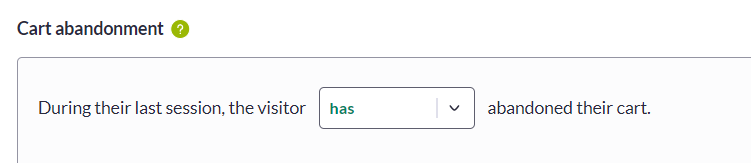 Then you must first select one value from the first drop-down list: `has` or `has not`, depending on which visitors you want to target. You have two options :
1. the ones who abandoned their cart during the previous session,
2. the ones who did not abandon their cart during the previous session, which means visitors who did not engage a cart previously on your website.
Additionally, you can refine the abandoned cart targeting by adding advanced conditions (by clicking the **`+Add condition`** option), which will help you define the audience more precisely.
You have two options here:
* Number of products
* Total cart amount
## 💡 Use case
Then you must first select one value from the first drop-down list: `has` or `has not`, depending on which visitors you want to target. You have two options :
1. the ones who abandoned their cart during the previous session,
2. the ones who did not abandon their cart during the previous session, which means visitors who did not engage a cart previously on your website.
Additionally, you can refine the abandoned cart targeting by adding advanced conditions (by clicking the **`+Add condition`** option), which will help you define the audience more precisely.
You have two options here:
* Number of products
* Total cart amount
## 💡 Use case
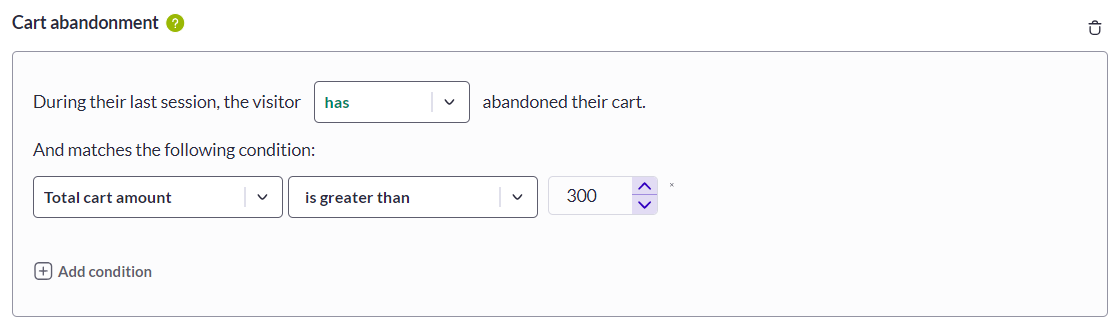 In this example, your campaign will be displayed for visitors who initiated a cart greater than 300€ during their previous session. To reassure your visitors about ordering from your website, you may want to highlight your fidelity/return policies better on your website when they return.
**Need additional information?**
Submit your request at
Always happy to help!
In this example, your campaign will be displayed for visitors who initiated a cart greater than 300€ during their previous session. To reassure your visitors about ordering from your website, you may want to highlight your fidelity/return policies better on your website when they return.
**Need additional information?**
Submit your request at
Always happy to help!
 ---
# Agent Instructions
This documentation is published with GitBook. GitBook is the documentation platform designed so that both humans and AI agents can read, navigate, and reason over technical content effectively. Learn more at gitbook.com.
## Querying This Documentation
If you need additional information that is not directly available in this page, you can query the documentation dynamically by asking a question.
Perform an HTTP GET request on the current page URL with the `ask` query parameter, and the optional `goal` query parameter:
```
GET https://docs.abtasty.com/assets-library/creating-and-managing-segments/list-of-segment-criteria/cart-abandonment-criterion.md?ask=&goal=
```
`ask` is the immediate question: it should be specific, self-contained, and written in natural language.
`goal` is optional and describes the broader end goal you are ultimately trying to accomplish on behalf of the user. GitBook uses it to tailor the answer towards what is most useful for that goal.
The response will contain a direct answer to the question and relevant excerpts and sources from the documentation.
Use this mechanism when the answer is not explicitly present in the current page, you need clarification or additional context, or you want to retrieve related documentation sections.
---
# Agent Instructions
This documentation is published with GitBook. GitBook is the documentation platform designed so that both humans and AI agents can read, navigate, and reason over technical content effectively. Learn more at gitbook.com.
## Querying This Documentation
If you need additional information that is not directly available in this page, you can query the documentation dynamically by asking a question.
Perform an HTTP GET request on the current page URL with the `ask` query parameter, and the optional `goal` query parameter:
```
GET https://docs.abtasty.com/assets-library/creating-and-managing-segments/list-of-segment-criteria/cart-abandonment-criterion.md?ask=&goal=
```
`ask` is the immediate question: it should be specific, self-contained, and written in natural language.
`goal` is optional and describes the broader end goal you are ultimately trying to accomplish on behalf of the user. GitBook uses it to tailor the answer towards what is most useful for that goal.
The response will contain a direct answer to the question and relevant excerpts and sources from the documentation.
Use this mechanism when the answer is not explicitly present in the current page, you need clarification or additional context, or you want to retrieve related documentation sections.