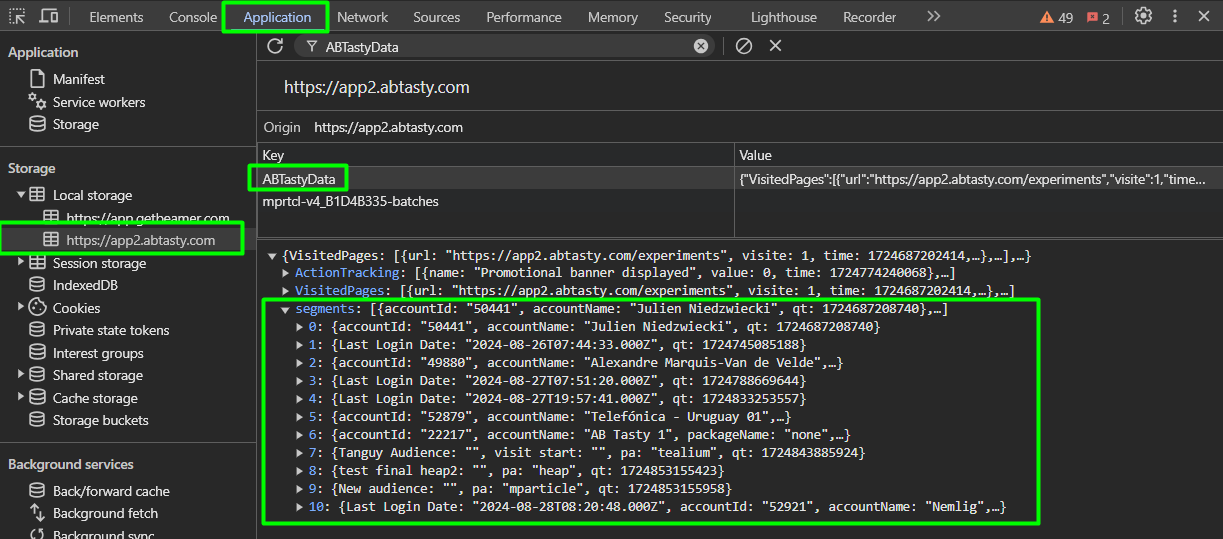
View in the local storage
View in the local storage
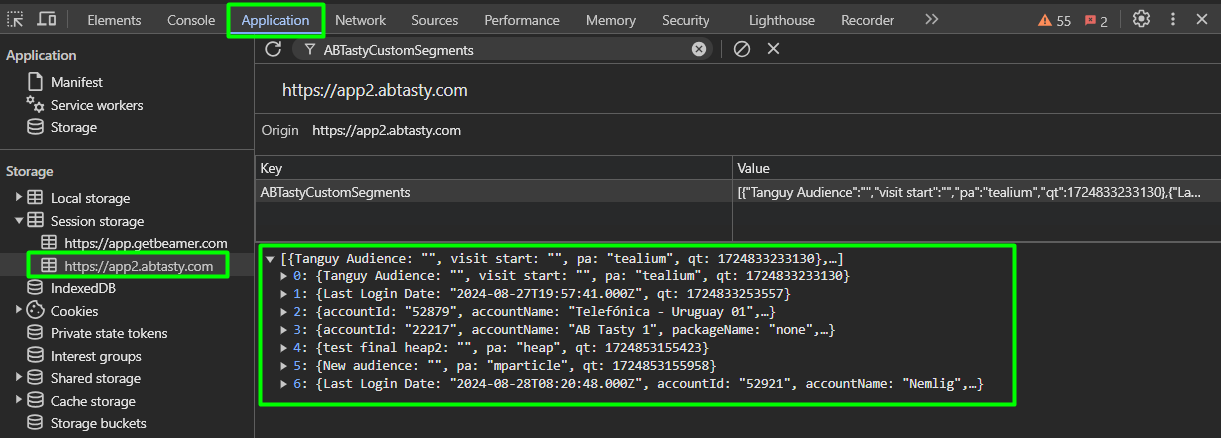
View in the session storage
 As any segment criterion you have the possibility to QA your conditions using our QA Assistant on Mobile and Desktop.
But you will have more detail on the provider’s segment names and values in the console using the `ABTasty.results` command.
You will find below the list of every DMP or specific integration available in AB Tasty.
### **Google Analytics 4**
To connect Google Analytics 4 to AB Tasty, please refer to this [article](/integrations/pull-integrations/google-analytics.md).
* ***Operators available*****:**
* `Is`
* `Is not`
* ***Segment configuration:***
* **`Some`*****/*****`All` *****conditions*** available when multiple conditions are used
### **Segment.io**
To connect segment.io to AB Tasty, please refer to this [article](/integrations/push-integrations/segment.md).
* ***Operators available*****:**
* `Is`
* `Is not`
* ***Segment configuration:***
* **`Some`*****/*****`All` *****conditions*** available when multiple conditions are used
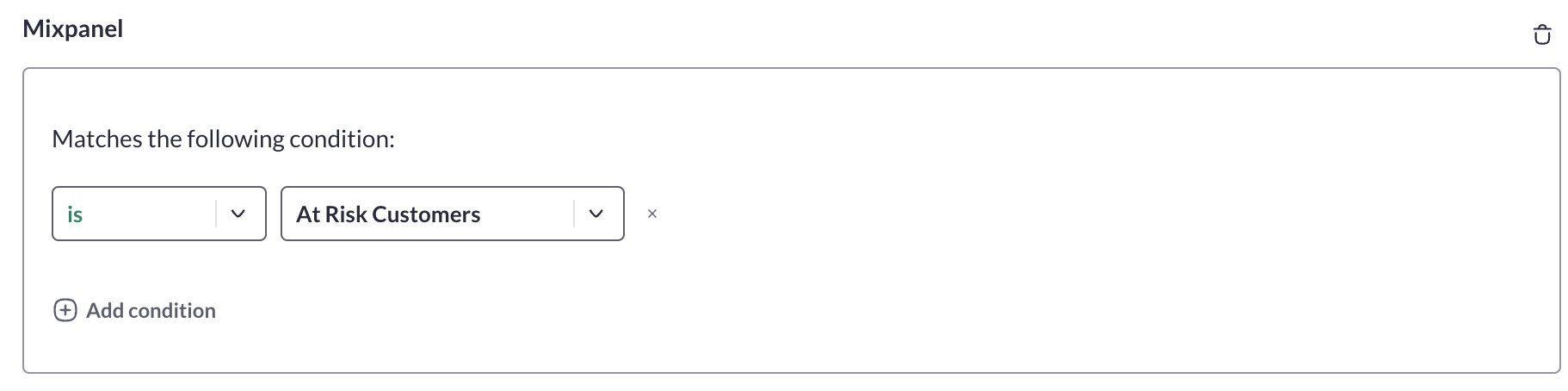
### **Mixpanel**
To connect Mixpanel to AB Tasty, please refer to this [article](/integrations/push-integrations/mixpanel.md).
* ***Operators available*****:**
* `Is`
* `Is not`
* ***Segment configuration:***
* **`Some`*****/*****`All` *****conditions*** available when multiple conditions are used
### **Heap Analytics**
To connect Heap Analytics to AB Tasty, please refer to this [article](/integrations/push-integrations/heap-analytics.md).
* ***Operators available*****:**
* `Is`
* `Is not`
* ***Segment configuration:***
* **`Some`*****/*****`All` *****conditions*** available when multiple conditions are used
### **Tealium Audience Stream**
To connect Tealium to AB Tasty, please refer to this [article](/integrations/push-integrations/tealium.md).
* ***Operators available*****:**
* `Is`
* `Is not`
* ***Segment configuration:***\
Choose whether you want to build your segment on a **Tealium Audience** or **Badge** inside the dedicated dropdown:
* Choose **Audience:** Select the right audience name you want to use in your AB Tasty targeting
* Choose **Badge:** Select the right badge name you want to use in your AB Tasty targeting
* **`Some`*****/*****`All` *****conditions*** available when multiple conditions are used
### **Fullstory**
To connect Fullstory to AB Tasty, please refer to this [article](/integrations/push-integrations/fullstory.md).
* ***Operators available*****:**
* `Is`
* `Is not`
* ***Segment configuration:***
* **`Some`*****/*****`All` *****conditions*** available when multiple conditions are used
### **Ysance**
To connect Ysance to AB Tasty, please refer to [this article](/integrations/integrations-general-information.md).
* ***Operators available*****:**
* `Is`
* `Is not`
* ***Segment configuration:***\
Choose whether you want to build your segment on a **Ysance Segment** or **Attribute** in the dedicated dropdown:
* Choose **Segment**
* Select the right segment name you want to use in your AB Tasty targeting
* Select the right segment value you want to target
* Choose **Attribute**
* Select the right attribute name you want to use in your AB Tasty targeting
* Select the right condition to match the user you want to target
* **`Some`*****/*****`All` *****conditions*** available when multiple conditions are used
### **Krux**
To connect Krux to AB Tasty, please refer to [this article](/integrations/integrations-general-information.md).
* ***Operators available*****:**
* `Is`
* `Is not`
* ***Segment configuration:*** select a value from your Krux account
* **`Some`*****/*****`All` *****conditions*** available when multiple conditions are used
### **Bluekaï**
To connect Bluekaï to AB Tasty, please refer to [this article](/integrations/integrations-general-information.md).
* ***Operators available*****:**
* `Is`
* `Is not`
* ***Segment configuration:*** list of all segments available inside the Bluekai connected account
* **`Some`*****/*****`All` *****conditions*** available when multiple conditions are used
### **Weborama**
To connect Weborama to AB Tasty, please refer to [this article](/integrations/pull-integrations/weborama.md).
* ***Operators available*****:**
* `Is`
* `Is not`
* ***Segment configuration:*** select a value from your Weborama account
* **`Some`*****/*****`All` *****conditions*** available when multiple conditions are used
### **Adobe Audience Manager**
To connect Adobe Audience Manager to AB Tasty, please refer to [this article](/integrations/integrations-general-information.md).
* ***Operators available*****:**
* `Is`
* `Is not`
* ***Segment configuration:*** list of all segments available inside the AAM-connected account
* **`Some`*****/*****`All` *****conditions*** available when multiple conditions are used
### **Commander Act**
To connect Commander Act to AB Tasty, please refer to this [article](/integrations/pull-integrations/commander-act.md).
* ***Operators available*****:**
* `Is`
* `Is not`
* ***Segment configuration:*** select a value from your Commander Act account
* **`Some`*****/*****`All` *****conditions*** available when multiple conditions are used
### **Advalo**
To connect Advalo to AB Tasty, please refer to [this article](/integrations/integrations-general-information.md).
* ***Operators available*****:**
* `Is`
* `Is not`
* ***Segment configuration:***\
Choose whether you want to build your segment on an **Advalo Segment** or **Attribute** in the dedicated dropdown:
* Choose **Segment**
* Select the right segment name you want to use in your AB Tasty targeting
* Select the right segment value you want to target
* Choose **Attribute**
* Select the right attribute name you want to use in your AB Tasty targeting
* Select the right condition to match the user you want to target
* **`Some`*****/*****`All` *****conditions*** available when multiple conditions are used
### **Eulerian**
To connect Eulerian to AB Tasty, please refer to [this article](/integrations/integrations-general-information.md).
* ***Operators available*****:**
* `Is`
* `Is not`
* ***Segment configuration:*** list of all segments available inside the Eulerian connected account
* **`Some`*****/*****`All` *****conditions*** available when multiple conditions are used
### **Air360**
To connect Air360 to AB Tasty, please refer to this [article](/integrations/push-integrations/air.md).
* ***Operators available*****:**
* `Is`
* `Is not`
* ***Segment configuration:***
* **`Some`*****/*****`All` *****conditions*** available when multiple conditions are used
### **Piano Analytics**
To connect Piano Analytics to AB Tasty, please refer to this [article](/integrations/push-integrations/piano-analytics.md).
* ***Operators available*****:**
* `Is`
* `Is not`
* ***Segment configuration:***
* **`Some`*****/*****`All` *****conditions*** available when multiple conditions are used
### **mParticle**
To connect mParticle to AB Tasty, please refer to this [article](/integrations/pull-integrations/mparticle.md).
* ***Operators available*****:**
* `Is`
* `Is not`
* ***Segment configuration:***
* **`Some`*****/*****`All` *****conditions*** available when multiple conditions are used
### 💡 **Use case**
It can be very useful to target certain segments of your DMP when creating on-site personalization campaigns.\
This could help you identify a segment of in-store buyers who later created an online account, for example. You could send them a message to promote your Click & Collect services and encourage them to plan their next trip to their local store.
**Need additional information?**
Submit your request at
As any segment criterion you have the possibility to QA your conditions using our QA Assistant on Mobile and Desktop.
But you will have more detail on the provider’s segment names and values in the console using the `ABTasty.results` command.
You will find below the list of every DMP or specific integration available in AB Tasty.
### **Google Analytics 4**
To connect Google Analytics 4 to AB Tasty, please refer to this [article](/integrations/pull-integrations/google-analytics.md).
* ***Operators available*****:**
* `Is`
* `Is not`
* ***Segment configuration:***
* **`Some`*****/*****`All` *****conditions*** available when multiple conditions are used
### **Segment.io**
To connect segment.io to AB Tasty, please refer to this [article](/integrations/push-integrations/segment.md).
* ***Operators available*****:**
* `Is`
* `Is not`
* ***Segment configuration:***
* **`Some`*****/*****`All` *****conditions*** available when multiple conditions are used
### **Mixpanel**
To connect Mixpanel to AB Tasty, please refer to this [article](/integrations/push-integrations/mixpanel.md).
* ***Operators available*****:**
* `Is`
* `Is not`
* ***Segment configuration:***
* **`Some`*****/*****`All` *****conditions*** available when multiple conditions are used
### **Heap Analytics**
To connect Heap Analytics to AB Tasty, please refer to this [article](/integrations/push-integrations/heap-analytics.md).
* ***Operators available*****:**
* `Is`
* `Is not`
* ***Segment configuration:***
* **`Some`*****/*****`All` *****conditions*** available when multiple conditions are used
### **Tealium Audience Stream**
To connect Tealium to AB Tasty, please refer to this [article](/integrations/push-integrations/tealium.md).
* ***Operators available*****:**
* `Is`
* `Is not`
* ***Segment configuration:***\
Choose whether you want to build your segment on a **Tealium Audience** or **Badge** inside the dedicated dropdown:
* Choose **Audience:** Select the right audience name you want to use in your AB Tasty targeting
* Choose **Badge:** Select the right badge name you want to use in your AB Tasty targeting
* **`Some`*****/*****`All` *****conditions*** available when multiple conditions are used
### **Fullstory**
To connect Fullstory to AB Tasty, please refer to this [article](/integrations/push-integrations/fullstory.md).
* ***Operators available*****:**
* `Is`
* `Is not`
* ***Segment configuration:***
* **`Some`*****/*****`All` *****conditions*** available when multiple conditions are used
### **Ysance**
To connect Ysance to AB Tasty, please refer to [this article](/integrations/integrations-general-information.md).
* ***Operators available*****:**
* `Is`
* `Is not`
* ***Segment configuration:***\
Choose whether you want to build your segment on a **Ysance Segment** or **Attribute** in the dedicated dropdown:
* Choose **Segment**
* Select the right segment name you want to use in your AB Tasty targeting
* Select the right segment value you want to target
* Choose **Attribute**
* Select the right attribute name you want to use in your AB Tasty targeting
* Select the right condition to match the user you want to target
* **`Some`*****/*****`All` *****conditions*** available when multiple conditions are used
### **Krux**
To connect Krux to AB Tasty, please refer to [this article](/integrations/integrations-general-information.md).
* ***Operators available*****:**
* `Is`
* `Is not`
* ***Segment configuration:*** select a value from your Krux account
* **`Some`*****/*****`All` *****conditions*** available when multiple conditions are used
### **Bluekaï**
To connect Bluekaï to AB Tasty, please refer to [this article](/integrations/integrations-general-information.md).
* ***Operators available*****:**
* `Is`
* `Is not`
* ***Segment configuration:*** list of all segments available inside the Bluekai connected account
* **`Some`*****/*****`All` *****conditions*** available when multiple conditions are used
### **Weborama**
To connect Weborama to AB Tasty, please refer to [this article](/integrations/pull-integrations/weborama.md).
* ***Operators available*****:**
* `Is`
* `Is not`
* ***Segment configuration:*** select a value from your Weborama account
* **`Some`*****/*****`All` *****conditions*** available when multiple conditions are used
### **Adobe Audience Manager**
To connect Adobe Audience Manager to AB Tasty, please refer to [this article](/integrations/integrations-general-information.md).
* ***Operators available*****:**
* `Is`
* `Is not`
* ***Segment configuration:*** list of all segments available inside the AAM-connected account
* **`Some`*****/*****`All` *****conditions*** available when multiple conditions are used
### **Commander Act**
To connect Commander Act to AB Tasty, please refer to this [article](/integrations/pull-integrations/commander-act.md).
* ***Operators available*****:**
* `Is`
* `Is not`
* ***Segment configuration:*** select a value from your Commander Act account
* **`Some`*****/*****`All` *****conditions*** available when multiple conditions are used
### **Advalo**
To connect Advalo to AB Tasty, please refer to [this article](/integrations/integrations-general-information.md).
* ***Operators available*****:**
* `Is`
* `Is not`
* ***Segment configuration:***\
Choose whether you want to build your segment on an **Advalo Segment** or **Attribute** in the dedicated dropdown:
* Choose **Segment**
* Select the right segment name you want to use in your AB Tasty targeting
* Select the right segment value you want to target
* Choose **Attribute**
* Select the right attribute name you want to use in your AB Tasty targeting
* Select the right condition to match the user you want to target
* **`Some`*****/*****`All` *****conditions*** available when multiple conditions are used
### **Eulerian**
To connect Eulerian to AB Tasty, please refer to [this article](/integrations/integrations-general-information.md).
* ***Operators available*****:**
* `Is`
* `Is not`
* ***Segment configuration:*** list of all segments available inside the Eulerian connected account
* **`Some`*****/*****`All` *****conditions*** available when multiple conditions are used
### **Air360**
To connect Air360 to AB Tasty, please refer to this [article](/integrations/push-integrations/air.md).
* ***Operators available*****:**
* `Is`
* `Is not`
* ***Segment configuration:***
* **`Some`*****/*****`All` *****conditions*** available when multiple conditions are used
### **Piano Analytics**
To connect Piano Analytics to AB Tasty, please refer to this [article](/integrations/push-integrations/piano-analytics.md).
* ***Operators available*****:**
* `Is`
* `Is not`
* ***Segment configuration:***
* **`Some`*****/*****`All` *****conditions*** available when multiple conditions are used
### **mParticle**
To connect mParticle to AB Tasty, please refer to this [article](/integrations/pull-integrations/mparticle.md).
* ***Operators available*****:**
* `Is`
* `Is not`
* ***Segment configuration:***
* **`Some`*****/*****`All` *****conditions*** available when multiple conditions are used
### 💡 **Use case**
It can be very useful to target certain segments of your DMP when creating on-site personalization campaigns.\
This could help you identify a segment of in-store buyers who later created an online account, for example. You could send them a message to promote your Click & Collect services and encourage them to plan their next trip to their local store.
**Need additional information?**
Submit your request at  ---
# Agent Instructions
This documentation is published with GitBook. GitBook is the documentation platform designed so that both humans and AI agents can read, navigate, and reason over technical content effectively. Learn more at gitbook.com.
## Querying This Documentation
If you need additional information that is not directly available in this page, you can query the documentation by asking a question.
Perform an HTTP GET request on the following URL with the `ask` and `goal` query parameters:
```
GET https://docs.abtasty.com/assets-library/creating-and-managing-segments/list-of-segment-criteria/dmp-cdp-rd-party-tool-criterion.md?ask=
---
# Agent Instructions
This documentation is published with GitBook. GitBook is the documentation platform designed so that both humans and AI agents can read, navigate, and reason over technical content effectively. Learn more at gitbook.com.
## Querying This Documentation
If you need additional information that is not directly available in this page, you can query the documentation by asking a question.
Perform an HTTP GET request on the following URL with the `ask` and `goal` query parameters:
```
GET https://docs.abtasty.com/assets-library/creating-and-managing-segments/list-of-segment-criteria/dmp-cdp-rd-party-tool-criterion.md?ask=