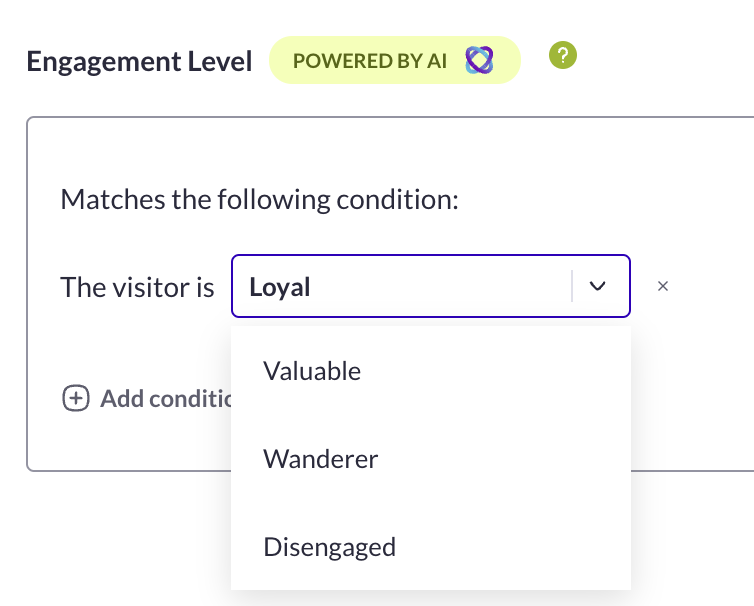
 The category to which the visitor has been assigned is not definitive. It will change over time, depending on their actions on the website. The category affectation will not change during the visit, but it will be updated after the next visit.
The categorization will happen during the **second visit** and will last 7 months. During their first visit, a visitor will not be affected to any of the Engagement Level categories.
Here is the list of data used to dispatch your visitors into four levels:
| **Criteria** | **Explanation** |
| ------------------------------------------------- | ------------------------------------------------------------------------------------------------------------------------------------------------------------------------------------------------------------------------------------------------------------------------------------------------------------------------------------------------------------------------------------------------------------------------------------------------------------- |
| **visitNumber** | Number of sessions performed by the user |
| **highest amount of time on site in one session** |
The category to which the visitor has been assigned is not definitive. It will change over time, depending on their actions on the website. The category affectation will not change during the visit, but it will be updated after the next visit.
The categorization will happen during the **second visit** and will last 7 months. During their first visit, a visitor will not be affected to any of the Engagement Level categories.
Here is the list of data used to dispatch your visitors into four levels:
| **Criteria** | **Explanation** |
| ------------------------------------------------- | ------------------------------------------------------------------------------------------------------------------------------------------------------------------------------------------------------------------------------------------------------------------------------------------------------------------------------------------------------------------------------------------------------------------------------------------------------------- |
| **visitNumber** | Number of sessions performed by the user |
| **highest amount of time on site in one session** | The highest amount of time spent by the user during his last session
For example, if the user had three sessions of 4 minutes, 2 minutes, and 15 minutes each, the value of this metric will be 15.
Average amount of time spent by the user during his last sessions
For example, if the user had four sessions of 4 minutes, 2 minutes, 15 minutes, and 3 minutes each, the value of this metric will be 7.
Another user that would have had three sessions of 5 minutes, 7 minutes, and 8 minutes each would have the same average of 7, but not the same highest time.
| | **highest number of page views in a session** |The highest number of pages viewed by the user during his last sessions
For example, if the user had three sessions of 4 page views, 2 page views, and 15 page views each, the value of this metric will be 15.
| | **average page views per session** |The average number of pages viewed by the user during his last sessions
For example, if the user had four sessions of 4 page views, 2 page views, 15 page views, and 3 page views each, the value of this metric will be 7.
Another user who would have had 3 sessions of 5 page views, 7 page views, and 8 page views each would have the same average of 7, but not the same highest number of page views.
| | **ratio of bounces of the user** |Percentage of bounced sessions
For instance, if the user had three sessions, one session with multiple pageviews, another session with multiple pageviews, and one session which is a bounce (1-page view), the ratio of bounces will be 33%.
Number of transactions made during the user’s last sessions
For instance, if the user had three sessions: 2 sessions with no purchase and 1 with one purchase, the count of transactions will be 1.
This feature is useful to spot loyal visitors who tend to have a low transaction ratio because they often visit the website without buying. But in the end, they are still buying a lot more than other visitors.
| | **ratio of transactions** | Number of sessions with one or more purchases divided by the total number of sessions | | **average number of hits by session** | The average number of hits recorded during the visitor’s last sessions | ### Categories The algorithm creates 4 categories based on the criteria listed above: | **👤 Segment name** | **🔍 Description** | | ------------------- | ----------------------------------------------------------------------------------------------------------------------------------------------------------------------------------------------------------------------------------------------- | | **😒 Disengaged** | Visitors who have either bounced or have very little interaction on your website. Bouncing visitors are visitors who enter a website and then leave (“bounce”) without visiting any other page within the same website. It is the lowest level. | | **😐 Wanderers** | Visitors who are mildly engaged on your website but do not convert or transact. | | **😊 Valuable** | Visitors who are engaged and have converted at least once compared to the overall traffic of the website. | | **😍 Loyal** | Most engaged and highest converting visitors compared to the overall traffic of the website. This is the highest level. | ### How does it work? The Engagement Level segmentation uses a Machine Learning (ML) process to organize visitors into segments: **Disengaged**, **Wanderer**, **Valuable** and **Loyal**. The criteria to start using the Engagement Level segmentation is to have at least two buying cycles of historical data, but the more data you have available to train the AI cluster model, and the more diverse and representative that data is, the more mature and accurate the model is likely to be. The **training part** of the service builds the AI cluster model based on historical data from **the past 190 days** and updates the model every **28 days**. If you have more than 190 days of historical data available, the AI cluster model should be mature enough to be accurate and will continue to improve with each update. For businesses with short buying cycles, like fast fashion, it should take less time to reach that level of maturity. However, it is also important to ensure that the data is of high quality and relevant. The **serving part** of this ML puts visitors into one of the four segments, it is scheduled to run **daily** on visitors that have recent sessions. It is difficult to give a specific timeline for how long it will take for an AI cluster model to mature, as this can depend on a variety of factors, including the quality of the data being used to train the model, the type of business and length of the typical buying cycle. ### Use case Each category can match a specific use case: * **Disengaged**: you can limit the number of bounces by creating a retention modal with a special offer, targeted towards this specific segment * **Wanderers**: you can boost their engagement by creating a feeling of urgency and drawing their attention to the products’s low stock level * **Valuable**: you can activate special offers to encourage another purchase on the website * **Loyal**: take care of this precious cluster by offering to recognize their loyalty with a specific welcoming message --- # Agent Instructions This documentation is published with GitBook. GitBook is the documentation platform designed so that both humans and AI agents can read, navigate, and reason over technical content effectively. Learn more at gitbook.com. ## Querying This Documentation If you need additional information that is not directly available in this page, you can query the documentation dynamically by asking a question. Perform an HTTP GET request on the current page URL with the `ask` query parameter, and the optional `goal` query parameter: ``` GET https://docs.abtasty.com/assets-library/creating-and-managing-segments/list-of-segment-criteria/engagement-level-criterion.md?ask=