> For the complete documentation index, see [llms.txt](https://docs.abtasty.com/llms.txt). Markdown versions of documentation pages are available by appending `.md` to page URLs; this page is available as [Markdown](https://docs.abtasty.com/assets-library/creating-and-managing-segments/list-of-segment-criteria/last-purchase-criterion.md).
# Last Purchase criterion
This article will show you how to use this Segment criterion.
The Last Purchase criterion is a segmentation criterion that enables defining a [segment](https://docs.abtasty.com/assets-library/creating-and-managing-segments.md).
To learn how to create a segment, please refer to this [article](https://docs.abtasty.com/web-experimentation-and-personalization/targeting-step/how-to-create-a-segment-who-section.md).
## 📖 Definition
The Purchase frequency targeting criterion enables you to create a segment of visitors who made their latest purchase within a defined period of time.
The Last purchase criterion is based on the transaction tag, which enables you to collect specific information on the buying patterns of users.
## 🔎 How Does It Work?
Within the tag, we created an object called `ABTastyData` that contains information about your visitors’ journey. Inside this object, we store transactional data in locations called **transaction** and **items**.
This is performed when you integrate the transaction tag on your website. With that integration, the generic tag receives [***hits***](https://developers.abtasty.com/docs/data/universal-collect/uc-hits#transaction) from the transactional tag when your visitor validates a transaction.
## ⚙️ Configuration
To configure the Last purchase criterion, apply the following steps:
1. Select the type of interval from the first drop-down list: `within` (strictly lower), `beyond` (strictly higher) or `between`.
2. In the Day(s) field, manually enter the value(s) depending on the chosen interval.
{% hint style="warning" %}
For data confidentiality reasons, you cannot target visitors who made their last purchase over a year (365 days) ago.\
Keep in mind that this duration is depending on visitors's browser settings and policy.
{% endhint %}
You can also refine targeting by adding advanced conditions, thus defining the last purchase based on the:
* payment method;
* delivery method;
* SKU code of the product;
* product category;
* transaction amount;
* coupon used.
## 💡 Use case
Example: a segment with people who made their last purchase using `Paypal` more than `14 days` ago.
All the values that need to be filled in are your websites’ variables. **You have to enter the exact string (without quotes)**: `Paypal`, `clickandcollect` etc. and match spaces and special characters.\
However, you don’t need to match lowercase and uppercase letters. For example, `Paypal` and `paypal` will both work. You don’t need to specify the currency, just enter the amount in your website’s currency.
**Need additional information?**
Submit your request at
Always happy to help!
---
# Agent Instructions
This documentation is published with GitBook. GitBook is the documentation platform designed so that both humans and AI agents can read, navigate, and reason over technical content effectively. Learn more at gitbook.com.
## Querying This Documentation
If you need additional information that is not directly available in this page, you can query the documentation by asking a question.
Perform an HTTP GET request on the following URL with the `ask` and `goal` query parameters:
```
GET https://docs.abtasty.com/assets-library/creating-and-managing-segments/list-of-segment-criteria/last-purchase-criterion.md?ask=&goal=
```
`ask` is the immediate question: it should be specific, self-contained, and written in natural language.
`goal` is what the user is ultimately trying to achieve, the reason they need the answer. Sharing it helps GitBook give you a better, more relevant answer. A goal is most helpful when it describes the outcome the user wants rather than restating the question. For example, with `ask=how do I create an API token`, a goal like `automate deployments from our CI pipeline` lets GitBook tailor the answer to that use case.
The response will contain a direct answer to the question and relevant excerpts and sources from the documentation.
Use this mechanism when the answer is not explicitly present in the current page, you need clarification or additional context, or you want to retrieve related documentation sections.

 {% hint style="warning" %}
For data confidentiality reasons, you cannot target visitors who made their last purchase over a year (365 days) ago.\
Keep in mind that this duration is depending on visitors's browser settings and policy.
{% endhint %}
You can also refine targeting by adding advanced conditions, thus defining the last purchase based on the:
* payment method;
* delivery method;
* SKU code of the product;
* product category;
* transaction amount;
* coupon used.
## 💡 Use case
Example: a segment with people who made their last purchase using `Paypal` more than `14 days` ago.
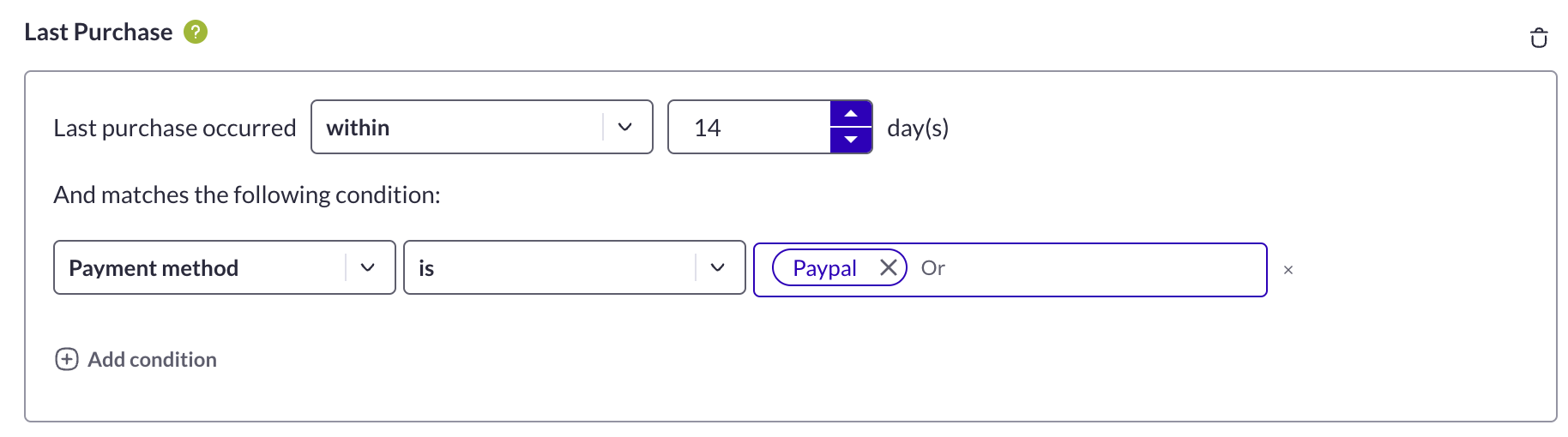 All the values that need to be filled in are your websites’ variables. **You have to enter the exact string (without quotes)**: `Paypal`, `clickandcollect` etc. and match spaces and special characters.\
However, you don’t need to match lowercase and uppercase letters. For example, `Paypal` and `paypal` will both work. You don’t need to specify the currency, just enter the amount in your website’s currency.
**Need additional information?**
Submit your request at