> For the complete documentation index, see [llms.txt](https://docs.abtasty.com/llms.txt). Markdown versions of documentation pages are available by appending `.md` to page URLs; this page is available as [Markdown](https://docs.abtasty.com/assets-library/creating-and-managing-segments/list-of-segment-criteria/nps-criterion-customer-satisfaction.md).
# NPS® criterion (Customer Satisfaction)
This article will show you how to use this Segment criterion.
NPS© is a segmentation criterion that enables defining a [segment](/assets-library/creating-and-managing-segments.md).
To learn how to create a segment, please refer to this [article](/web-experimentation-and-personalization/targeting-step/how-to-create-a-segment-who-section.md).
## Getting the best from your satisfaction monitoring
The [NPS® widget](/web-experimentation-and-personalization/editors-and-widget/list-of-widgets/ab-tasty-prebuilt-widgets/nps-net-promoter-score-widget.md) is a powerful tool to monitor the satisfaction of your visitors. You can use it for long term monitoring, getting feedback from a new webpage, a new service and so on.
But you can also act on the visitors that rated their experience by creating segments based on their score then personalize their future visits on the website.
## ⚙️ Configuration
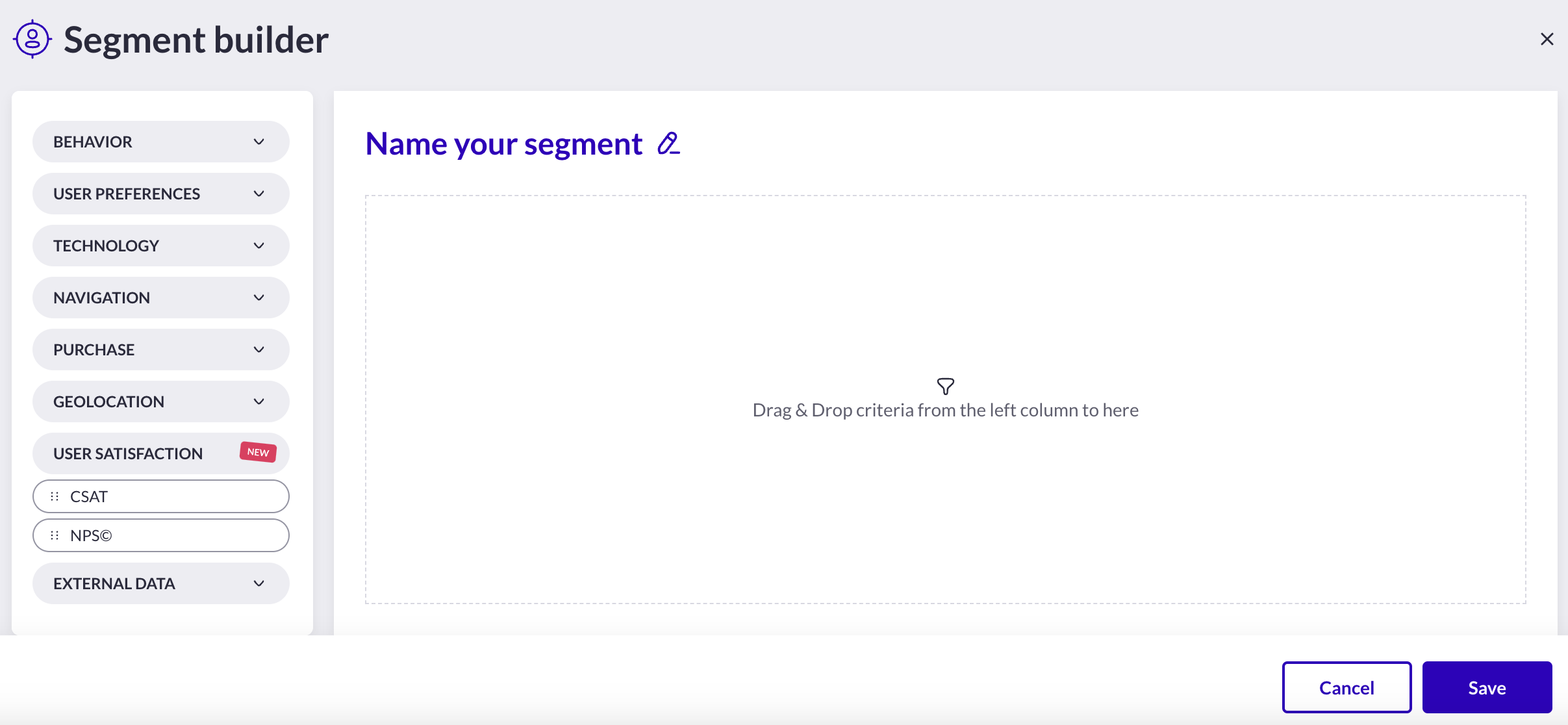
In your segment builder, under the ***User satisfaction*** category, you will find 2 criteria : [CSAT](/assets-library/creating-and-managing-segments/list-of-segment-criteria/csat-criterion-customer-satisfaction.md) and NPS® .\
**Drag and drop** the NPS® criterion in the right panel and let's configure the form.
 The NPS® criterion allows you to target specific visitors that were previously exposed to an NPS© campaign and left a rating.
1. **Select the operator** to verify the condition (`equals`, `is greater`/`lower than`, `is between`). Keep in mind that these operators are inclusive (meaning *equal* `AND` *greater/lower/between* the values you have entered).
2. **Select rating value(s)** to target visitors accordingly: *Promoters* (10 or 9), *Passives* (8 or 7), *Detractors* (6 to 0)..
3. **Specify the campaign type, the campaign and the variation** (variation can be optional) in which the rating has been given.
The NPS® criterion allows you to target specific visitors that were previously exposed to an NPS© campaign and left a rating.
1. **Select the operator** to verify the condition (`equals`, `is greater`/`lower than`, `is between`). Keep in mind that these operators are inclusive (meaning *equal* `AND` *greater/lower/between* the values you have entered).
2. **Select rating value(s)** to target visitors accordingly: *Promoters* (10 or 9), *Passives* (8 or 7), *Detractors* (6 to 0)..
3. **Specify the campaign type, the campaign and the variation** (variation can be optional) in which the rating has been given.
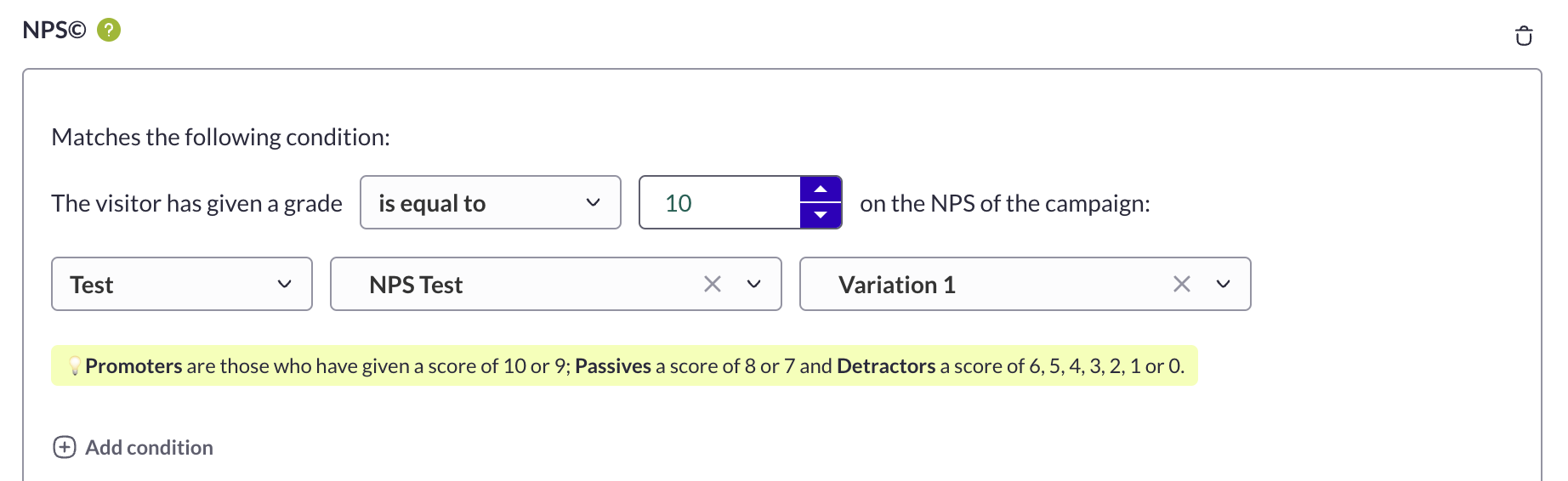 Note that you can also select the **`+add condition` option** if you want an additional condition from another campaign. In this case, the AB Tasty tag will check if one condition **OR** the other is met.\
Do not forget to name your segment properly and save it.
**For the QA**, the segment you have built will return as true or false in the console or as `accepted` or `rejected` in the QA Assistant as any other segment or trigger.
## 🔎 How does it work?
When a visitor gives a rate in an NPS® campaign, the information is stored in their **local storage**.\
So in order to segment your visitors according to NPS® , **a campaign should have run and collected ratings** (obvious so far) and the visitors should not have cleared their local storage.
{% hint style="info" %}
The scoring is erased and updated if a visitor responds differently to the same campaigns
{% endhint %}
You can see the scores when inspecting your webpage :
`Application` > `Local storage` > `websitedomain` > `ABTastyData` > objects `CsatVotes` & `NpsVotes`

More information about NPS® widget in this [article](/assets-library/creating-and-managing-segments/list-of-segment-criteria/nps-criterion-customer-satisfaction.md).
**Need additional information?**
Submit your request at
Always happy to help!
Note that you can also select the **`+add condition` option** if you want an additional condition from another campaign. In this case, the AB Tasty tag will check if one condition **OR** the other is met.\
Do not forget to name your segment properly and save it.
**For the QA**, the segment you have built will return as true or false in the console or as `accepted` or `rejected` in the QA Assistant as any other segment or trigger.
## 🔎 How does it work?
When a visitor gives a rate in an NPS® campaign, the information is stored in their **local storage**.\
So in order to segment your visitors according to NPS® , **a campaign should have run and collected ratings** (obvious so far) and the visitors should not have cleared their local storage.
{% hint style="info" %}
The scoring is erased and updated if a visitor responds differently to the same campaigns
{% endhint %}
You can see the scores when inspecting your webpage :
`Application` > `Local storage` > `websitedomain` > `ABTastyData` > objects `CsatVotes` & `NpsVotes`

More information about NPS® widget in this [article](/assets-library/creating-and-managing-segments/list-of-segment-criteria/nps-criterion-customer-satisfaction.md).
**Need additional information?**
Submit your request at
Always happy to help!
 *"Net Promoter**®**, NPS**®**, NPS Prism**®**, and the NPS-related emoticons are registered trademarks of Bain & Company, Inc., NICE Systems, Inc., and Fred Reichheld. Net Promoter Score**SM** and Net Promoter System**SM** are service marks of Bain & Company, Inc., NICE Systems, Inc., and Fred Reichheld."*
---
# Agent Instructions
This documentation is published with GitBook. GitBook is the documentation platform designed so that both humans and AI agents can read, navigate, and reason over technical content effectively. Learn more at gitbook.com.
## Querying This Documentation
If you need additional information that is not directly available in this page, you can query the documentation dynamically by asking a question.
Perform an HTTP GET request on the current page URL with the `ask` query parameter, and the optional `goal` query parameter:
```
GET https://docs.abtasty.com/assets-library/creating-and-managing-segments/list-of-segment-criteria/nps-criterion-customer-satisfaction.md?ask=&goal=
```
`ask` is the immediate question: it should be specific, self-contained, and written in natural language.
`goal` is optional and describes the broader end goal you are ultimately trying to accomplish on behalf of the user. GitBook uses it to tailor the answer towards what is most useful for that goal.
The response will contain a direct answer to the question and relevant excerpts and sources from the documentation.
Use this mechanism when the answer is not explicitly present in the current page, you need clarification or additional context, or you want to retrieve related documentation sections.
*"Net Promoter**®**, NPS**®**, NPS Prism**®**, and the NPS-related emoticons are registered trademarks of Bain & Company, Inc., NICE Systems, Inc., and Fred Reichheld. Net Promoter Score**SM** and Net Promoter System**SM** are service marks of Bain & Company, Inc., NICE Systems, Inc., and Fred Reichheld."*
---
# Agent Instructions
This documentation is published with GitBook. GitBook is the documentation platform designed so that both humans and AI agents can read, navigate, and reason over technical content effectively. Learn more at gitbook.com.
## Querying This Documentation
If you need additional information that is not directly available in this page, you can query the documentation dynamically by asking a question.
Perform an HTTP GET request on the current page URL with the `ask` query parameter, and the optional `goal` query parameter:
```
GET https://docs.abtasty.com/assets-library/creating-and-managing-segments/list-of-segment-criteria/nps-criterion-customer-satisfaction.md?ask=&goal=
```
`ask` is the immediate question: it should be specific, self-contained, and written in natural language.
`goal` is optional and describes the broader end goal you are ultimately trying to accomplish on behalf of the user. GitBook uses it to tailor the answer towards what is most useful for that goal.
The response will contain a direct answer to the question and relevant excerpts and sources from the documentation.
Use this mechanism when the answer is not explicitly present in the current page, you need clarification or additional context, or you want to retrieve related documentation sections.