> For the complete documentation index, see [llms.txt](https://docs.abtasty.com/llms.txt). Markdown versions of documentation pages are available by appending `.md` to page URLs; this page is available as [Markdown](https://docs.abtasty.com/assets-library/creating-and-managing-triggers/list-of-trigger-criteria/geolocation-criterion.md).
# Geolocation criterion
This article will show you how to use this Trigger criterion.
The Geolocation criterion is both a segmentation criterion and a triggering criterion.\
It enables you to create a [***segment***](/assets-library/creating-and-managing-segments.md) or a [***trigger***](/assets-library/creating-and-managing-triggers.md).\
To learn how to create a segment, please refer to this [***article***](/web-experimentation-and-personalization/targeting-step/how-to-create-a-segment-who-section.md).\
To learn how to create a trigger, please refer to this [***article***](/web-experimentation-and-personalization/targeting-step/how-to-create-a-trigger-how-section.md).
## **📖** Definition
The Geolocation criterion enables you to restrict the visibility of a campaign to visitors based on their geographical location.
The location of a visitor is determined by an IP geolocation database provided by an external service and can be collected as soon as the visitor give their consent.
We use an external service called [MaxMind](https://www.maxmind.com/en/home).
{% hint style="warning" %}
The accuracy of the IP is determined by the service coverage and Internet provider of each country. It can vary.
{% endhint %}
## **⚙️** Configuration
The configuration of the Geolocation criterion is the same for segments and triggers.
You must choose from the following operators to configure your criterion, which will determine the operation behind the value you will declare:
* **`is`:** to include the location. If you include a specific location, all the other locations will automatically be excluded from the targeting.
* **`is not`:** to exclude the location. If you exclude a specific location, all the other locations will automatically be included in the targeting.
Then, select the country from the second drop-down list. You can also refine criteria by selecting a specific region, sub-region, and city (depending on the country you are targeting). You can save your configuration at every step depending on your needs (at a country/region/sub-region/city level).
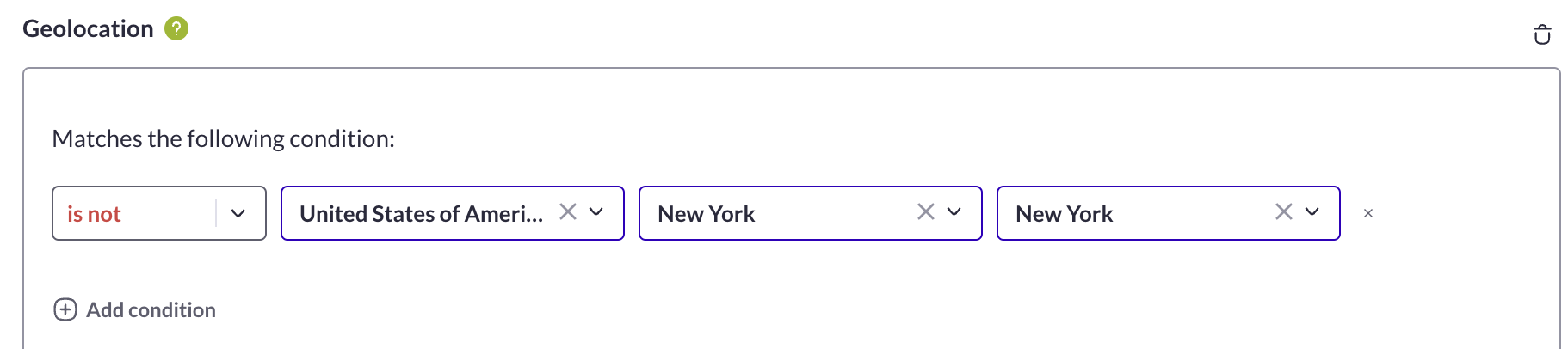
To include a country except for a specific zone, you need to exclude this zone from the targeting. For example, if you want to target your visitors located in the US except for those located in New York City, select `is not` >*United States of America* > *New York*(region) > *New York*(city). This way, all countries will be included in the targeting, including people located outside of New York city.
 On the contrary, if you want to exclude a specific country, the other countries will be included in the targeting of your campaign.
{% hint style="info" %}
If you want to include France and exclude Belgium, you don’t need to configure the inclusion and the exclusion in the targeting of your campaign.\
Indeed, if you select *is* > *France*, Belgium will be automatically excluded and if you select *is not* > *Belgium*, France will be automatically included.
{% endhint %}
## **💡** Use case
For example, if you want to display a popup on your website to inform users located in Florida that there is a physical store in Miami, you need to display the personalization campaign to users located in this specific area.\
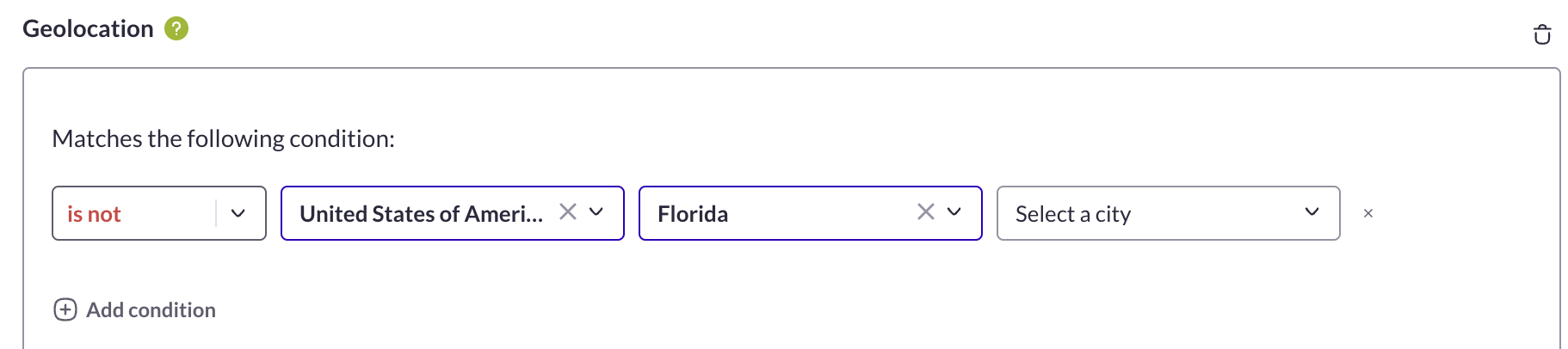
To do so, select `is` > *United States of America* > *Florida* in the segment of your campaign.
On the contrary, if you want to exclude a specific country, the other countries will be included in the targeting of your campaign.
{% hint style="info" %}
If you want to include France and exclude Belgium, you don’t need to configure the inclusion and the exclusion in the targeting of your campaign.\
Indeed, if you select *is* > *France*, Belgium will be automatically excluded and if you select *is not* > *Belgium*, France will be automatically included.
{% endhint %}
## **💡** Use case
For example, if you want to display a popup on your website to inform users located in Florida that there is a physical store in Miami, you need to display the personalization campaign to users located in this specific area.\
To do so, select `is` > *United States of America* > *Florida* in the segment of your campaign.
 ### Troubleshooting area
In case you need support, follow the instructions given in the articles below:
💡[\[Troubleshooting\] QA a campaign with a geolocation targeting](/help-center/troubleshooting/troubleshooting-qa-a-campaign-with-a-geolocation-targeting.md)
**Need additional information?**
Submit your request at
Always happy to help!
### Troubleshooting area
In case you need support, follow the instructions given in the articles below:
💡[\[Troubleshooting\] QA a campaign with a geolocation targeting](/help-center/troubleshooting/troubleshooting-qa-a-campaign-with-a-geolocation-targeting.md)
**Need additional information?**
Submit your request at
Always happy to help!
 ---
# Agent Instructions
This documentation is published with GitBook. GitBook is the documentation platform designed so that both humans and AI agents can read, navigate, and reason over technical content effectively. Learn more at gitbook.com.
## Querying This Documentation
If you need additional information that is not directly available in this page, you can query the documentation dynamically by asking a question.
Perform an HTTP GET request on the current page URL with the `ask` query parameter, and the optional `goal` query parameter:
```
GET https://docs.abtasty.com/assets-library/creating-and-managing-triggers/list-of-trigger-criteria/geolocation-criterion.md?ask=&goal=
```
`ask` is the immediate question: it should be specific, self-contained, and written in natural language.
`goal` is optional and describes the broader end goal you are ultimately trying to accomplish on behalf of the user. GitBook uses it to tailor the answer towards what is most useful for that goal.
The response will contain a direct answer to the question and relevant excerpts and sources from the documentation.
Use this mechanism when the answer is not explicitly present in the current page, you need clarification or additional context, or you want to retrieve related documentation sections.
---
# Agent Instructions
This documentation is published with GitBook. GitBook is the documentation platform designed so that both humans and AI agents can read, navigate, and reason over technical content effectively. Learn more at gitbook.com.
## Querying This Documentation
If you need additional information that is not directly available in this page, you can query the documentation dynamically by asking a question.
Perform an HTTP GET request on the current page URL with the `ask` query parameter, and the optional `goal` query parameter:
```
GET https://docs.abtasty.com/assets-library/creating-and-managing-triggers/list-of-trigger-criteria/geolocation-criterion.md?ask=&goal=
```
`ask` is the immediate question: it should be specific, self-contained, and written in natural language.
`goal` is optional and describes the broader end goal you are ultimately trying to accomplish on behalf of the user. GitBook uses it to tailor the answer towards what is most useful for that goal.
The response will contain a direct answer to the question and relevant excerpts and sources from the documentation.
Use this mechanism when the answer is not explicitly present in the current page, you need clarification or additional context, or you want to retrieve related documentation sections.