> For the complete documentation index, see [llms.txt](https://docs.abtasty.com/llms.txt). Markdown versions of documentation pages are available by appending `.md` to page URLs; this page is available as [Markdown](https://docs.abtasty.com/client-side/tag/tag-debug-module.md).
# Debug Module
In our generic tag warning, logs and error messages that were displayed by default in browser console have been removed for more clarity and to avoid confusion between AB Tasty logs and other logs.
However, logs can be useful to understand what is happenning in case of issue so using debug module could help.
The following documentation explains how to activate or deactivate the debug module.
### Modes for the module
* **Default mode:** the debug module is deactivated and logs nothing in the console *(default behaviour)*.
* **Simple mode:** the debug module is activated and logs `info`, `error`, `warning` and `success` logs.
### Using the debug module
To activate the debug module there are 2 different methods:
1. using a cookie named `abTastyDebug` with a value equal to `true`. This method allows you to activate the debug module on all pages until the cookie is removed. The page needs to be refreshed in order to detect the cookie.
*Creating the cookie:*
```javascript
document.cookie="abTastyDebug=true;path=/;";
```
*Removing the cookie:*
```javascript
document.cookie="abTastyDebug=true;path=/;expires=Thu, 01 Jan 1970 00:00:00 GMT;";
```
2. using a global variable named `abTastyDebug` with a value equal to `true`. This method allows you to activate the debug module on the current page until a refresh or a page change.
*Creating the variable:*
```javascript
window.abTastyDebug = true;
```
*Removing the variable:*
```javascript
delete window.abTastyDebug;
```
#### Using the appropriate log level
:::caution The debug module should be activated to make the logs work. :::
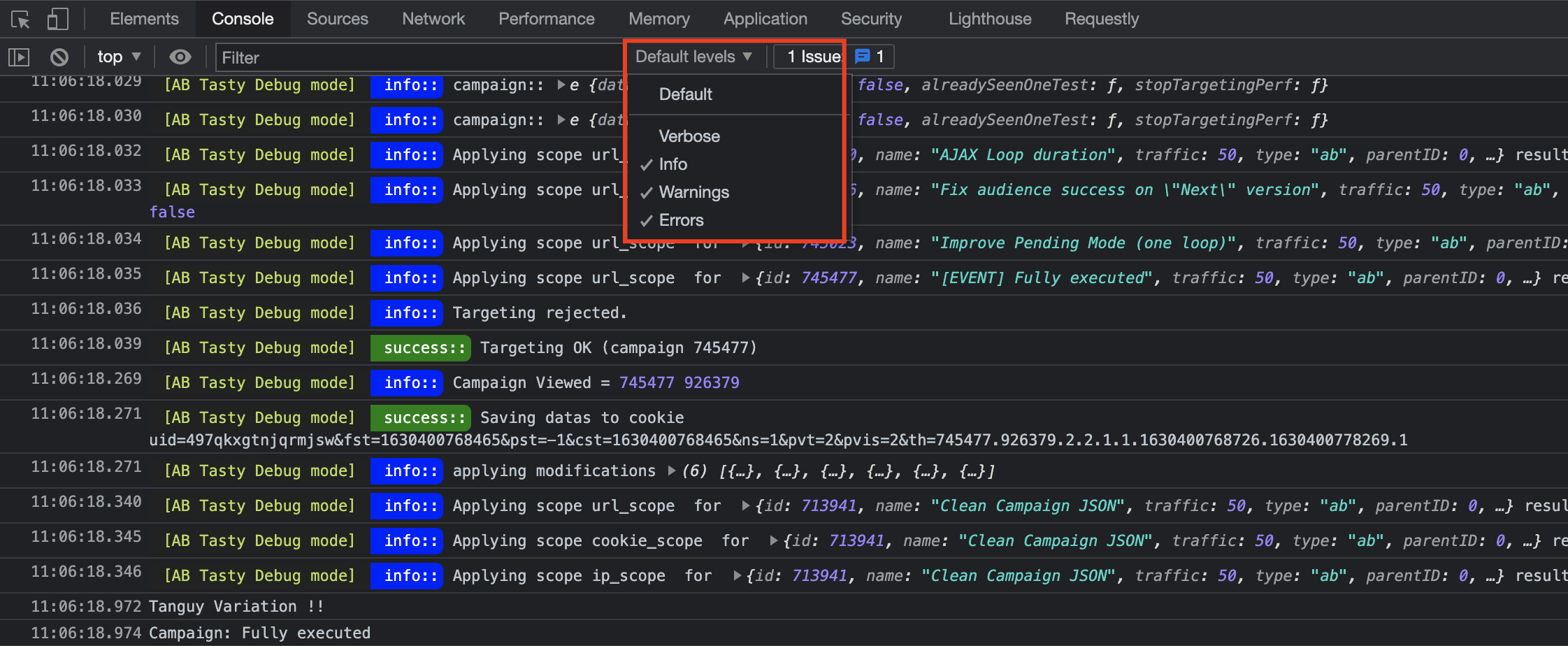
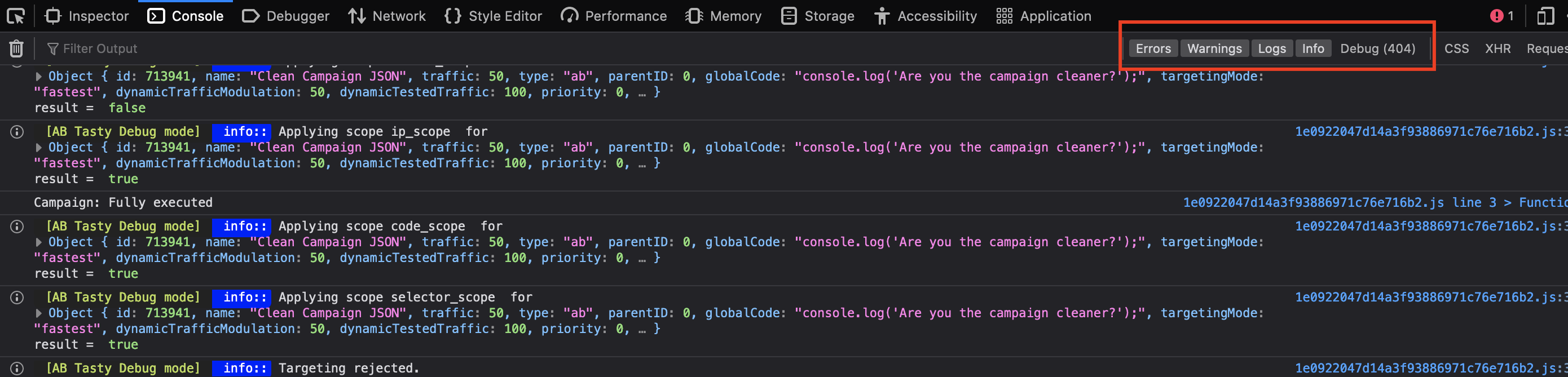
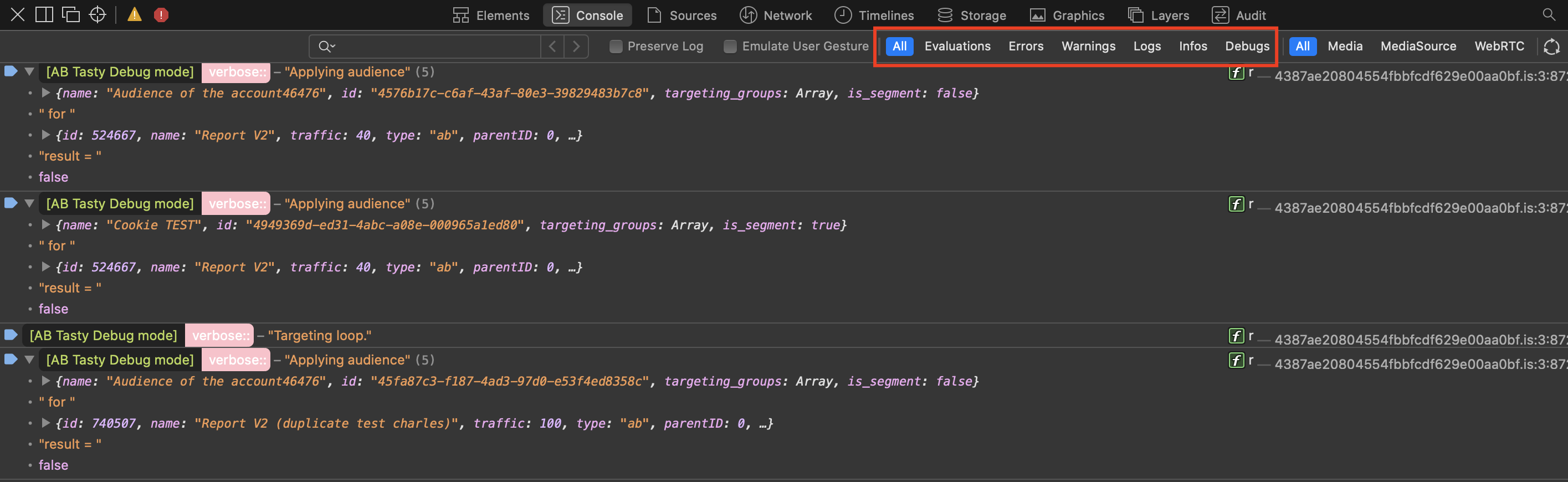
There are 4 log levels: `error`, `warn`, `info` and `verbose`/`debug`
The verbose log level is logging more information into the console. However, keep in mind that minor importance verbose information might mess the console window up.
Here how to chose the correct log level in the different browsers:
Chrome:
Firefox:
Safari:
#### Pause the debug module
Once the debug module is activated, it is going to log everything. But what about the case you only want to log the initialization of the tag? We are providing a method to pause the debug module so it stops the logs while keeping the tag running.
You can use the following method:
1. using a global variable named `abTastyStopLog` with a value equal to `true`. This method allows you to stop the logs from the debug module on the current page until a refresh or a page change.
*Creating the variable:*
```javascript
window.abTastyStopLog = true;
```
*Removing the variable:*
```javascript
delete window.abTastyStopLog;
```
---
# Agent Instructions
This documentation is published with GitBook. GitBook is the documentation platform designed so that both humans and AI agents can read, navigate, and reason over technical content effectively. Learn more at gitbook.com.
## Querying This Documentation
If you need additional information that is not directly available in this page, you can query the documentation by asking a question.
Perform an HTTP GET request on the following URL with the `ask` and `goal` query parameters:
```
GET https://docs.abtasty.com/client-side/tag/tag-debug-module.md?ask=&goal=
```
`ask` is the immediate question: it should be specific, self-contained, and written in natural language.
`goal` is what the user is ultimately trying to achieve, the reason they need the answer. Sharing it helps GitBook give you a better, more relevant answer. A goal is most helpful when it describes the outcome the user wants rather than restating the question. For example, with `ask=how do I create an API token`, a goal like `automate deployments from our CI pipeline` lets GitBook tailor the answer to that use case.
The response will contain a direct answer to the question and relevant excerpts and sources from the documentation.
Use this mechanism when the answer is not explicitly present in the current page, you need clarification or additional context, or you want to retrieve related documentation sections.