> For the complete documentation index, see [llms.txt](https://docs.abtasty.com/llms.txt). Markdown versions of documentation pages are available by appending `.md` to page URLs; this page is available as [Markdown](https://docs.abtasty.com/dashboard/global-experience-dashboard-discovery.md).
# Global Experience Dashboard discovery
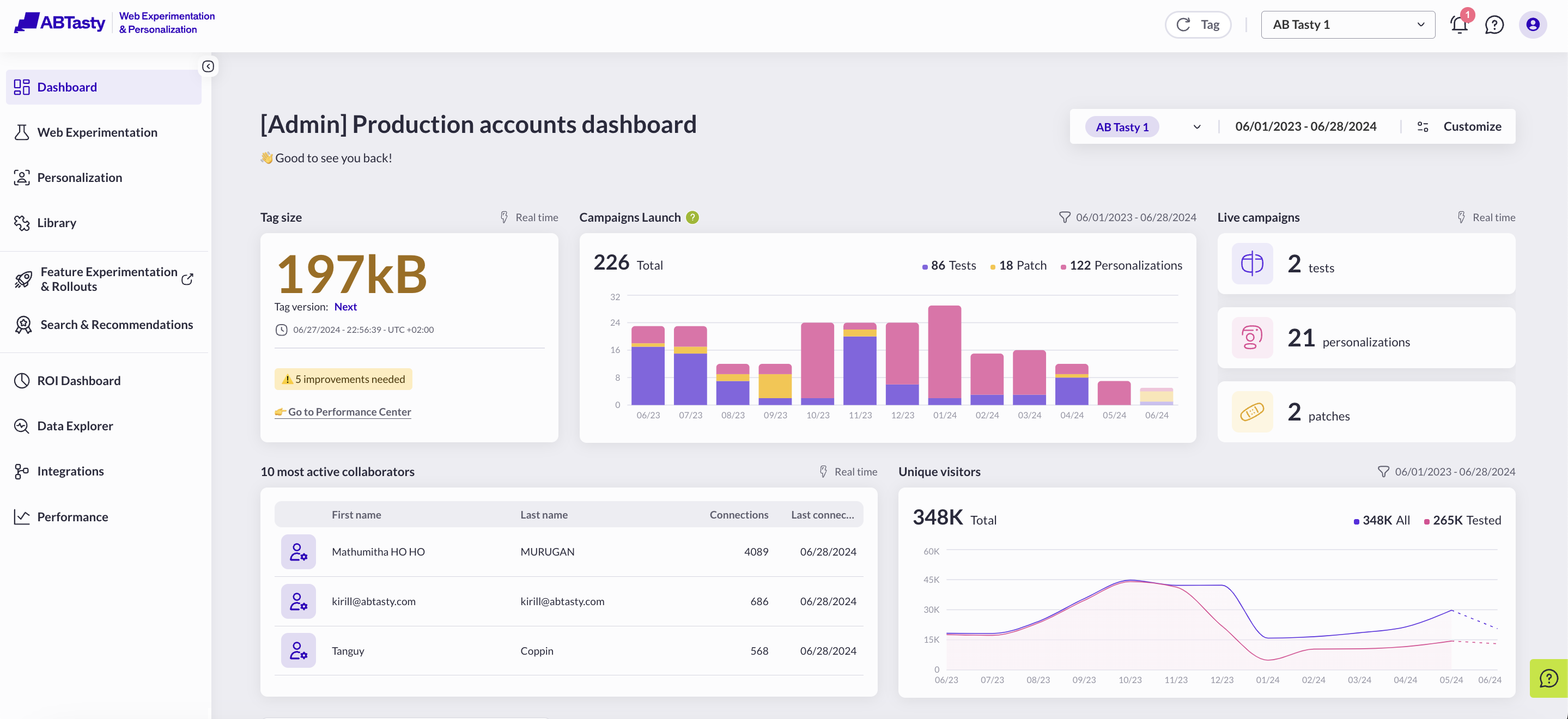
The global dashboard is the first page displayed when you access your AB Tasty account and allows you to keep track of your C.R.O campaign's performance.
The dashboard keeps track of 10 main indicators:
* [Live campaigns](#h_01hrybr1fvm4jbr3626sa91ctt)
* [Campaign status overview](#h_01hrybr1fvbfqeb6m4kk4fz56y)
* [Campaign launch](#h_01hrybr1fv8fds26epmm475a0f)
* [Upcoming scheduled campaign](#id-01jkgbkwg5z6npbh9698j7p8ww)
* [10 most active collaborators](#h_01hrybr1fvwp7k4k668t6tjcdj)
* [Unique visitors](#h_01hrybr1fvzazewjnbavzbw1fa)
* [Tag size](#h_01hrybr1fvstwtfqkt5y5cfaqh)
* [Integrations](#h_01jp23gvrmt5bj3yen0a8sz6kq)
* [Experiment Health Check](#h_01hrybr1fv6tdpn5bc17k612e0)
* [EmotionsAI Key Insights](#h_01hrybr1fvm4jbr3626sa91ctt-1)
## Customizable dashboard
You can [customize your dashboard](/dashboard/how-to-customize-your-global-experience-dashboard.md) by choosing which card you want to display and its exact place.\\
### Date filters
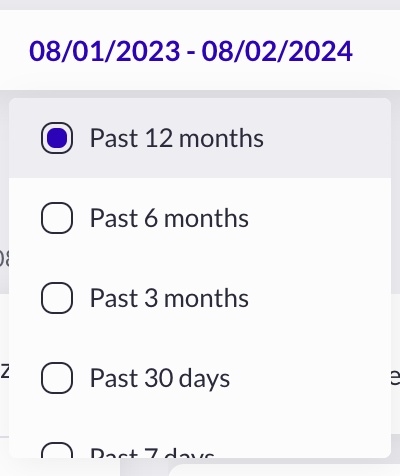
You can change the timeline by choosing between several options, from the past 12 months to the past 7 days.
Please refer to [this article about using filters in the Dashboard.](/dashboard/how-to-filter-the-global-experience-dashboard.md)
### Single account vs Multiple account view
#### Single-account view
The single-account view mode is the default mode and displays data for a single account.
#### Multi-account view
The multi-account view mode displays aggregated data of all accounts within an [organization](/account/account-management/the-organization-page.md). Multi-account view mode is activated automatically when you select several accounts in your organization.
To select multiple accounts, in the upper right corner of the Dashboard, click on the drop-down menu.
You must be a super admin of your organization to be able to select several accounts.
## Campaigns activity metrics
The dashboard shows real-time and historical tracking of your campaigns' activity.
Campaigns are split by category and type where applicable.
### Live Campaigns
This section shows the total number of campaigns **currently** running on your AB Tasty account or organization. It is the sum of campaigns with *live* or *live in QA* status.\
It'a "real time" card, meaning that the usage of the date filter can't impact it.
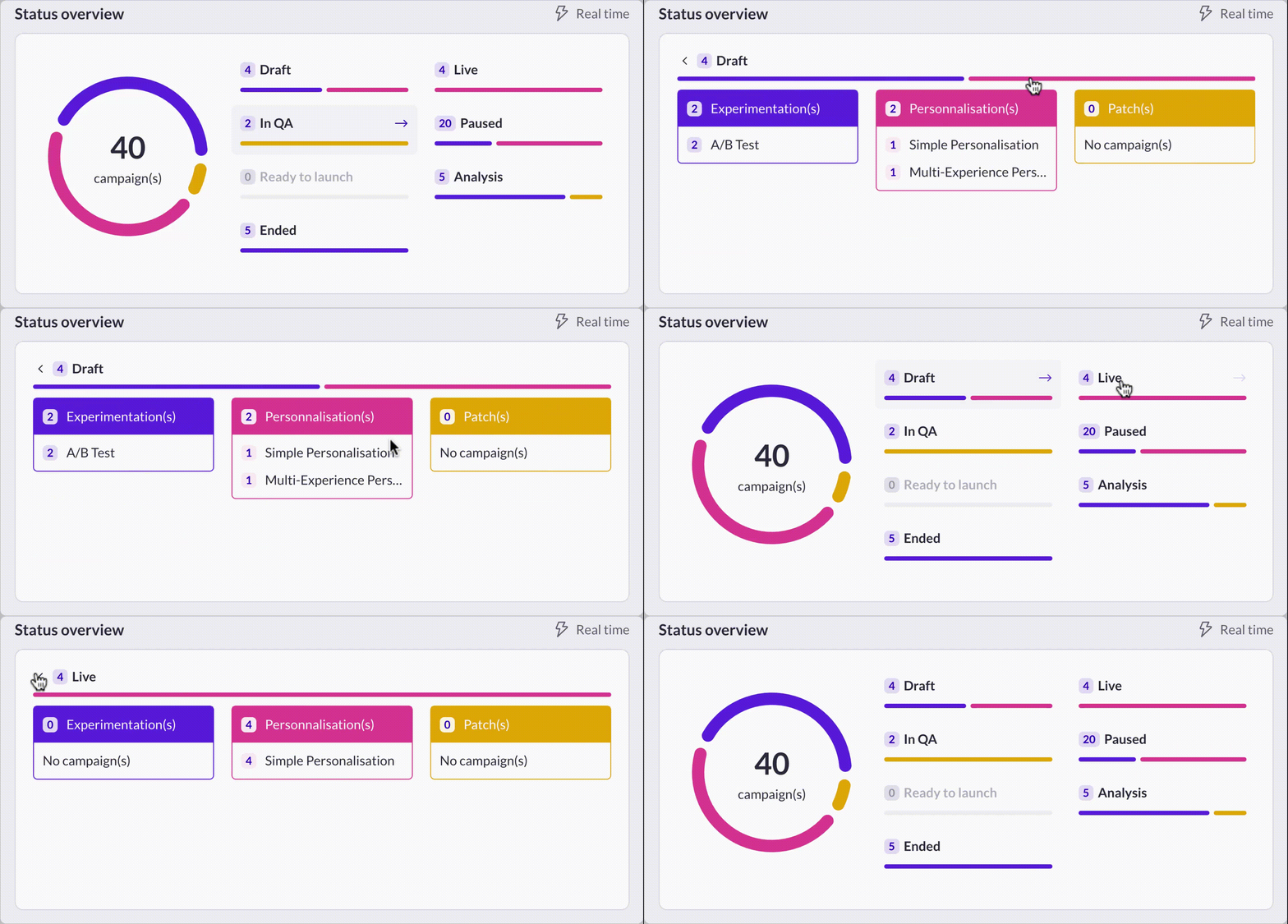
### Status Overview
This section provides a 2 steps overview status. First it gives a brief summary of activity by status. Second, clicking on a status reveals more details about the associated campaign types. Additionally, selecting a specific campaign type will redirect you to a filtered campaign list.
If a campaign type does not appear in the list, it means there are no campaigns of that type in the current status.
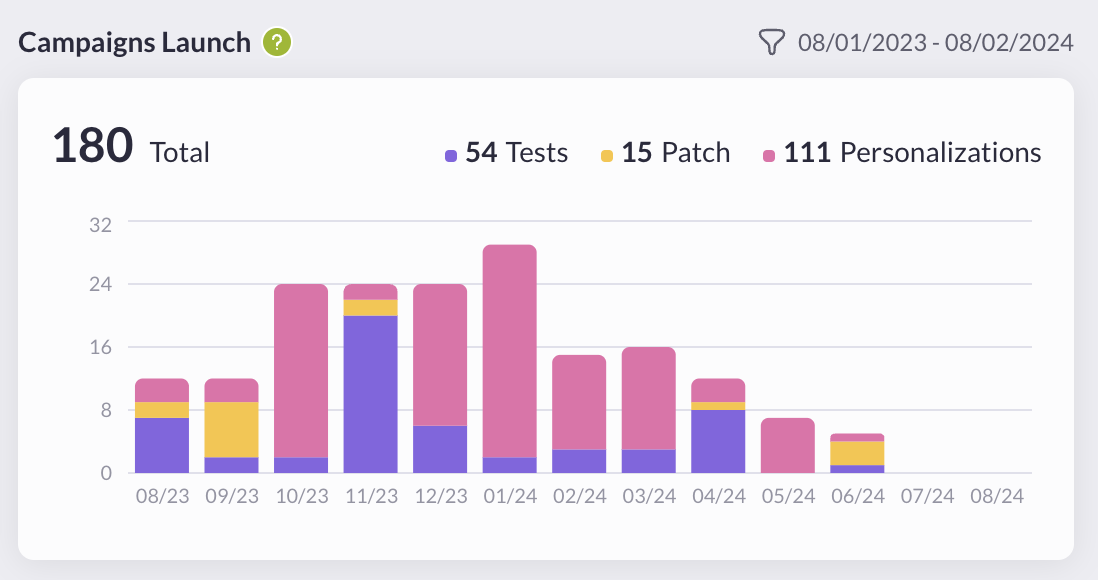
### Campaign launch
This section shows the total number of times campaigns have been launched in the past 12 months. It is calculated by the sum of launches that took place, excluding campaigns in QA mode and counting only 1 launch per day per campaign at maximum.
### Upcoming scheduled campaigns
This section shows real-time updates on your scheduled campaigns of your account or organization.
It includes the list of:
* All paused campaigns ready to be launched on a future date
* All live campaigns planned to be stopped on a future date
* All campaigns with recurring scheduled options that didn’t hit the last occurrence
The dot next to the campaign name informs about the current status:
* in green the campaign is live
* in yellow the campaign is paused
The information area resumes the next action scheduled on the campaign. The color of this area is linked to the type of the action:
* in yellow the campaign has been scheduled to be paused
* in green the campaign has been scheduled to be played and paused
* in blue the campaign has been scheduled with a recurrency
By hovering the information area you'll find the full details about the schedule.\
By clicking on the pictogram on the right of the line, you're redirected to the campaign flow.
### 10 most active collaborators
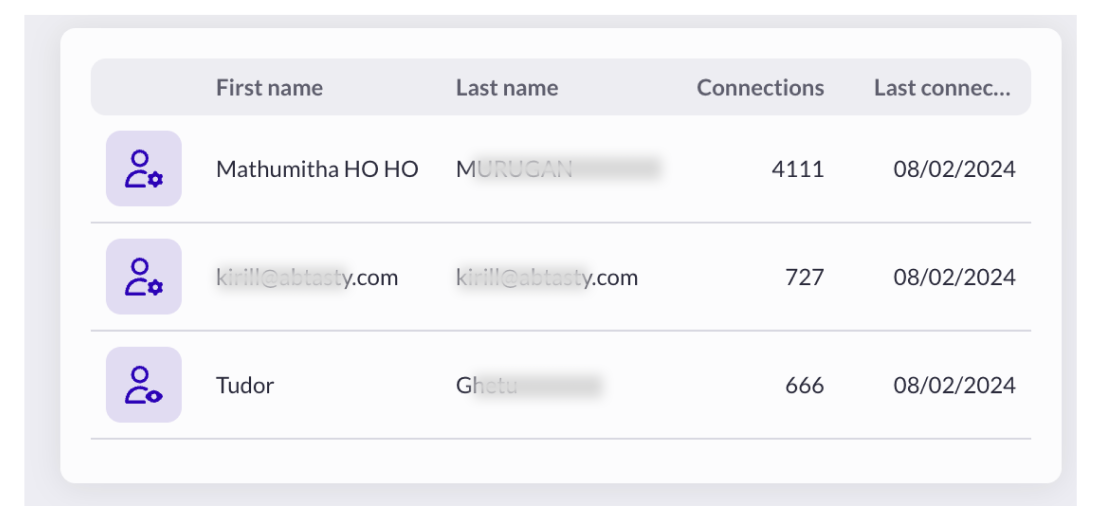
This section shows the list of the 10 most active users on your AB Tasty account or organization with their:
* First name
* Last name
* Number of connexions till the beginning
* The last connexion date
As a user, it is possible to declare you first name and last name in the [profile page of the settings](https://app2.abtasty.com/settings/user-informations). If these fields are not completed, the email address is automatically displayed for both fields.\
\
An active user is a user whose last login time to AB Tasty was in the past 12 months. Users are sorted by number of connections, in descending order.
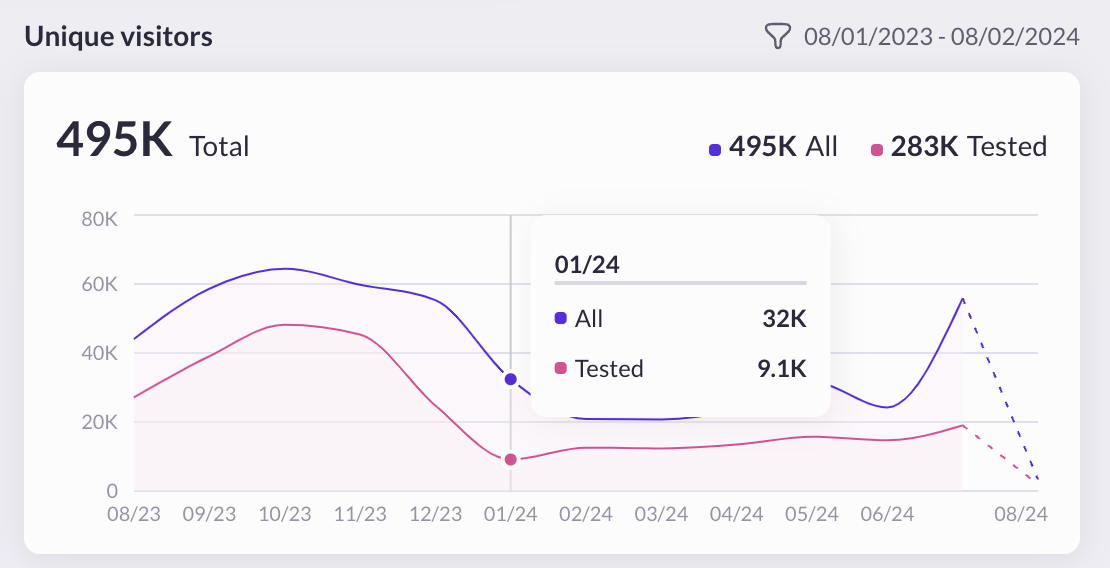
### Unique visitors
This section shows two metrics:
1. **All**: The total number of unique visitors tracked by the AB Tasty tag, regardless of whether they are assigned to a campaign. This should be equivalent to the MAU (Monthly Active Users) count as we count a visitor once it has accepted the cookies.
2. **Tested**: The total number of unique visitors (new) tracked by the AB Tasty tag, **and assigned to a campaign**.
By hovering the graph, you can access to the monthly details.
## Performance metrics
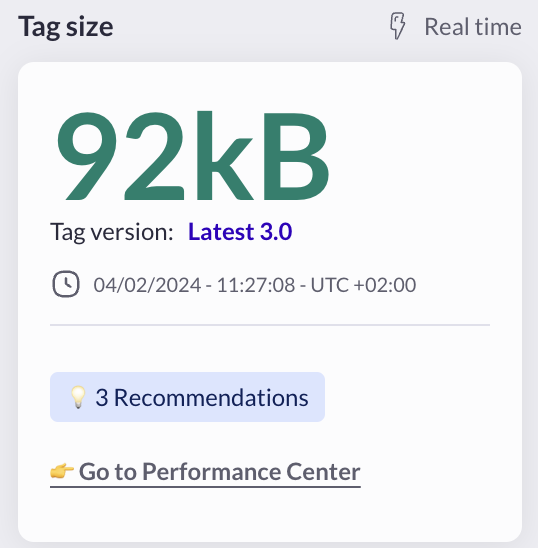
### Tag size
The tag size is the size of AB Tasty HTML tag, in kilobytes. Its size should be under 125 Kilobytes for optimal performance. For more information, go to the [Performance Center](/reporting-and-performances/performance-center.md) article.
## Integrations metrics
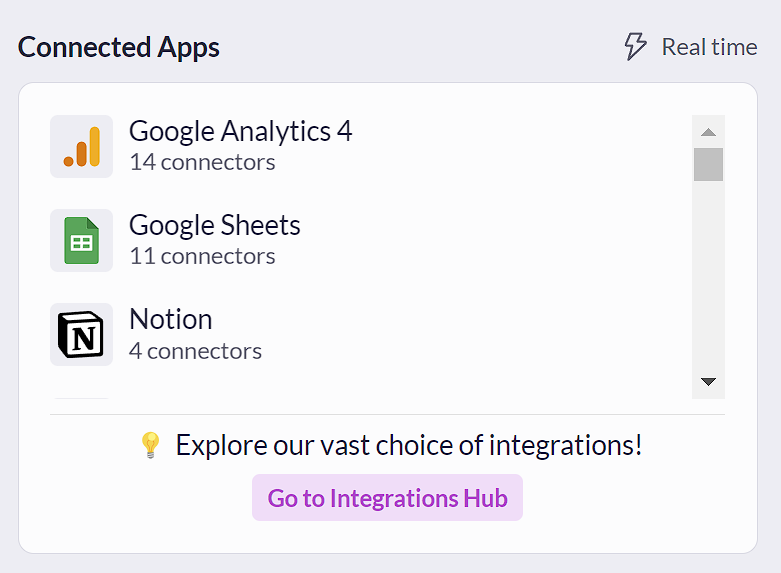
Your [integrations](/integrations/integrations-general-information.md) are listed in the **Global dashboard** as **Connected Apps**:
You can access the [Integrations Hub](https://app2.abtasty.com/settings/integration/integration-hub) from this section.
## Experiment Health Check
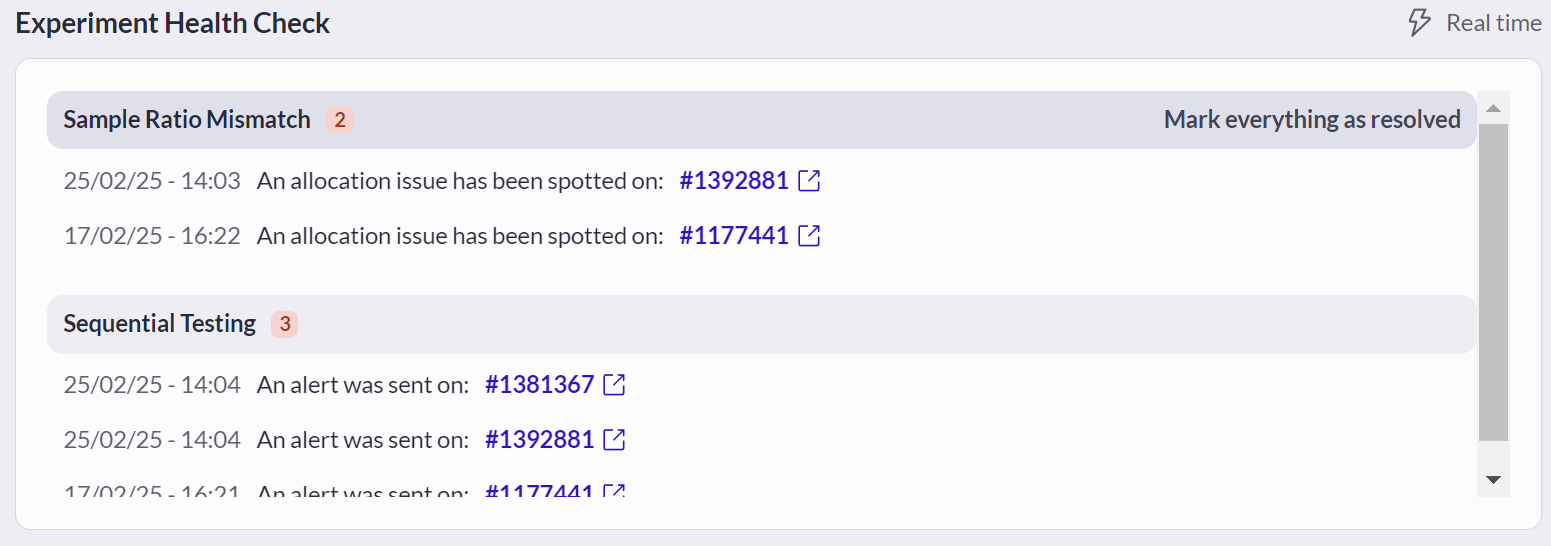
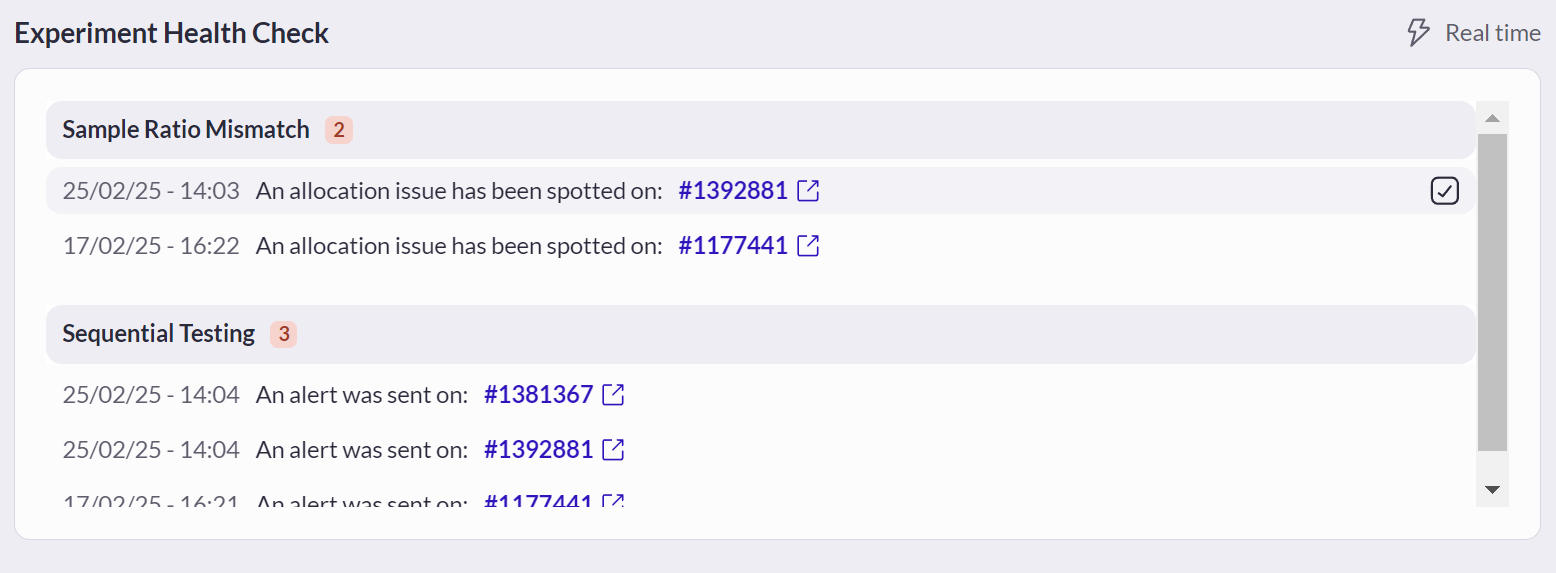
**Experiment Health Check** enhances the reliability and efficiency of experimentation programs. Experiment Health Check automatically monitors your experiments, providing alerts and insights to help you maintain the integrity of your data.
### Types of Alerts
* [**Sample Ratio Mismatch (SRM)**](/reporting-and-performances/reporting/sample-ratio-mismatch.md)**:** This alert indicates a discrepancy between expected and observed traffic allocations. It’s crucial to address SRM to maintain the validity of your test results.
* [**Sequential Testing Issues**](/web-experimentation-and-personalization/campaign-flow-advanced-options/sequential-testing-alerts.md)**:** Alerts you to potential statistical anomalies that may arise from improper sequential testing practices.
You can mark all alerts as resolved or check them individually by hovering on the elements or headers.
### EmotionsAI Key Insights
This card allows you to have a glance at the main information of a Journey Analysis request you have made on the [dedicated page](https://app2.abtasty.com/emotionsai-mapping-analysis).
{% hint style="warning" %}
In order to have some Insights, you must have activated the EmotionsAI Insights on your accounts and requested at least one Journey Analysis.
{% endhint %}
The card displays the information of the saved Journey Analysis for which the end date is the closest to today.
{% hint style="info" %}
If you are managing multiple accounts, you have the possibility to switch from one account to another using a dropdown in the Title of the card.
{% endhint %}
You will find there a lot of condensed information to assess the emotional performance of your website :
* Estimated Losses on the period
* The Top 3 EmotionsAI audiences composing your traffic.
* The Top 3 Dissatisfactions by EmotionsAI audiences to manage.
* The Top 3 pages where most emotional improvements have to be addressed.
Depending on the Journey Analysis available, you will be able to filter the Journey Mapping and its goals you want to monitor.
## Real time vs. Historical metrics
The Global Experience dashboard tracks 3 types of data: Real-time, Historical and Specific.
### **Real-time metrics**
Real-time data metrics are identified by a “Real time” icon and label placed on top of the section. Real-time metrics cannot be filtered by date.
### **Historical metrics**
Historical data are identified by a “Filter” icon followed by a date range. Those data are updated every day and can be filtered up to the past 12 months.
### **Specific**
The card fetch data on a period specific to the card.
---
# Agent Instructions
This documentation is published with GitBook. GitBook is the documentation platform designed so that both humans and AI agents can read, navigate, and reason over technical content effectively. Learn more at gitbook.com.
## Querying This Documentation
If you need additional information that is not directly available in this page, you can query the documentation dynamically by asking a question.
Perform an HTTP GET request on the current page URL with the `ask` query parameter, and the optional `goal` query parameter:
```
GET https://docs.abtasty.com/dashboard/global-experience-dashboard-discovery.md?ask=&goal=
```
`ask` is the immediate question: it should be specific, self-contained, and written in natural language.
`goal` is optional and describes the broader end goal you are ultimately trying to accomplish on behalf of the user. GitBook uses it to tailor the answer towards what is most useful for that goal.
The response will contain a direct answer to the question and relevant excerpts and sources from the documentation.
Use this mechanism when the answer is not explicitly present in the current page, you need clarification or additional context, or you want to retrieve related documentation sections.
 You can [customize your dashboard](/dashboard/how-to-customize-your-global-experience-dashboard.md) by choosing which card you want to display and its exact place.\\
### Date filters
You can change the timeline by choosing between several options, from the past 12 months to the past 7 days.
You can [customize your dashboard](/dashboard/how-to-customize-your-global-experience-dashboard.md) by choosing which card you want to display and its exact place.\\
### Date filters
You can change the timeline by choosing between several options, from the past 12 months to the past 7 days.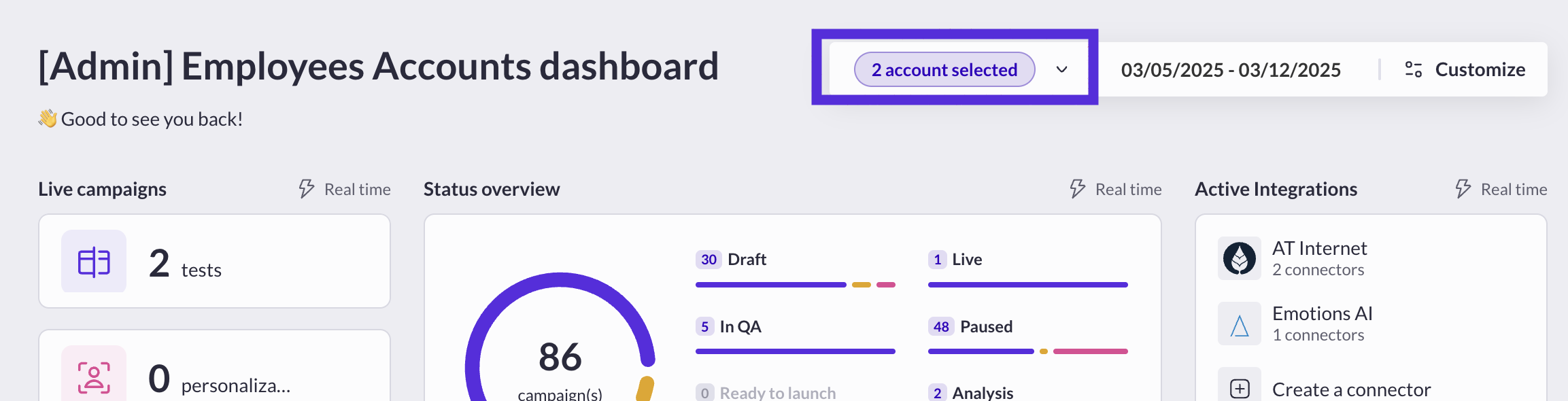 You must be a super admin of your organization to be able to select several accounts.
## Campaigns activity metrics
The dashboard shows real-time and historical tracking of your campaigns' activity.
Campaigns are split by category and type where applicable.
### Live Campaigns
This section shows the total number of campaigns **currently** running on your AB Tasty account or organization. It is the sum of campaigns with *live* or *live in QA* status.\
It'a "real time" card, meaning that the usage of the date filter can't impact it.
You must be a super admin of your organization to be able to select several accounts.
## Campaigns activity metrics
The dashboard shows real-time and historical tracking of your campaigns' activity.
Campaigns are split by category and type where applicable.
### Live Campaigns
This section shows the total number of campaigns **currently** running on your AB Tasty account or organization. It is the sum of campaigns with *live* or *live in QA* status.\
It'a "real time" card, meaning that the usage of the date filter can't impact it.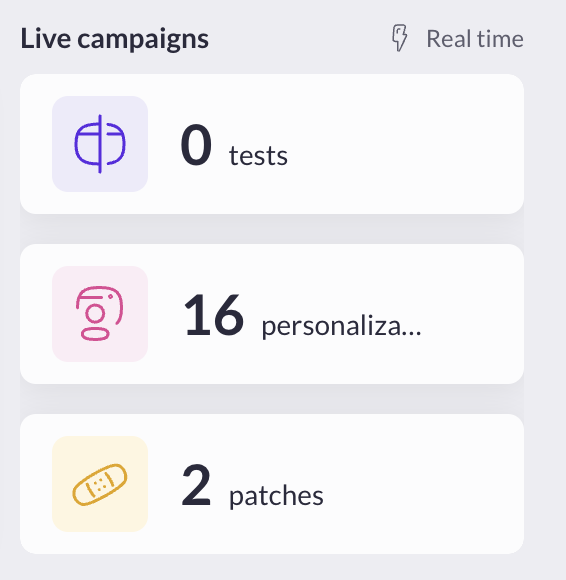
 ### Campaign launch
This section shows the total number of times campaigns have been launched in the past 12 months. It is calculated by the sum of launches that took place, excluding campaigns in QA mode and counting only 1 launch per day per campaign at maximum.
### Campaign launch
This section shows the total number of times campaigns have been launched in the past 12 months. It is calculated by the sum of launches that took place, excluding campaigns in QA mode and counting only 1 launch per day per campaign at maximum.
 ### Upcoming scheduled campaigns
This section shows real-time updates on your scheduled campaigns of your account or organization.
### Upcoming scheduled campaigns
This section shows real-time updates on your scheduled campaigns of your account or organization.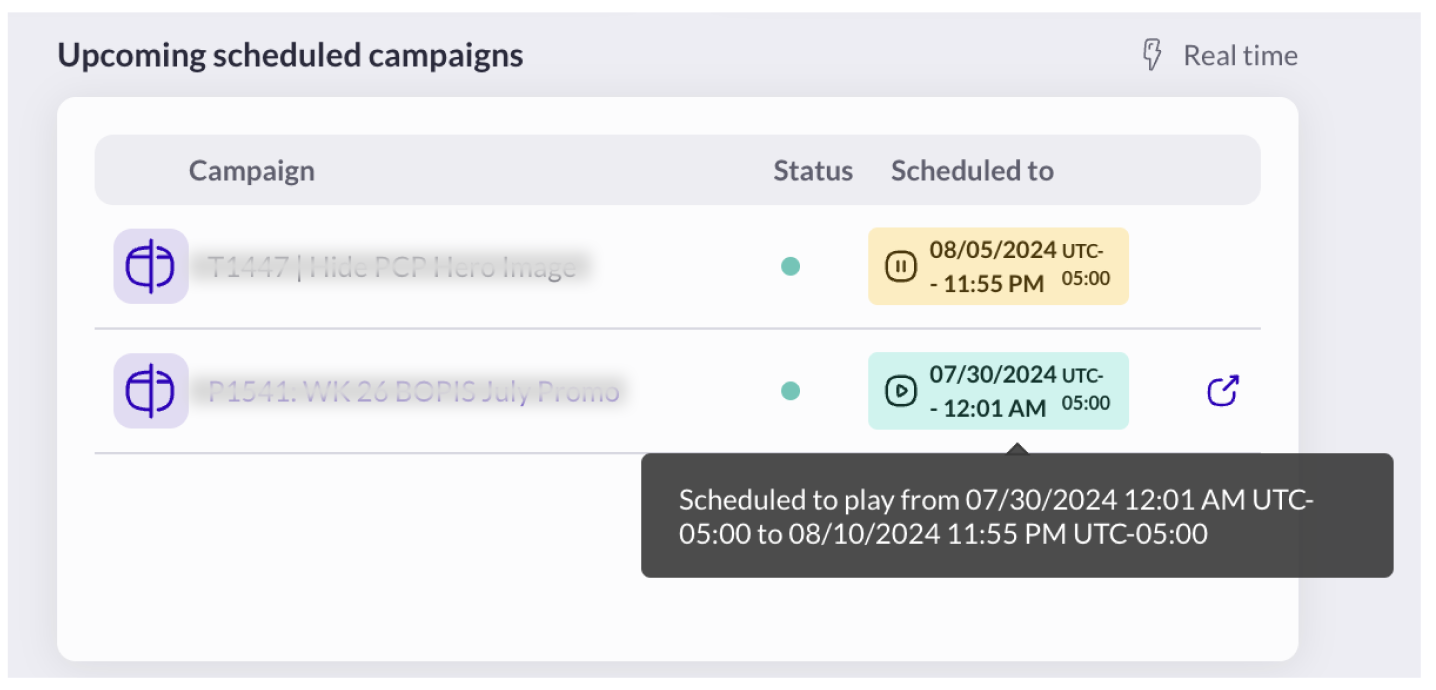
 You can access the [Integrations Hub](https://app2.abtasty.com/settings/integration/integration-hub) from this section.
## Experiment Health Check
**Experiment Health Check** enhances the reliability and efficiency of experimentation programs. Experiment Health Check automatically monitors your experiments, providing alerts and insights to help you maintain the integrity of your data.
### Types of Alerts
* [**Sample Ratio Mismatch (SRM)**](/reporting-and-performances/reporting/sample-ratio-mismatch.md)**:** This alert indicates a discrepancy between expected and observed traffic allocations. It’s crucial to address SRM to maintain the validity of your test results.
* [**Sequential Testing Issues**](/web-experimentation-and-personalization/campaign-flow-advanced-options/sequential-testing-alerts.md)**:** Alerts you to potential statistical anomalies that may arise from improper sequential testing practices.
You can access the [Integrations Hub](https://app2.abtasty.com/settings/integration/integration-hub) from this section.
## Experiment Health Check
**Experiment Health Check** enhances the reliability and efficiency of experimentation programs. Experiment Health Check automatically monitors your experiments, providing alerts and insights to help you maintain the integrity of your data.
### Types of Alerts
* [**Sample Ratio Mismatch (SRM)**](/reporting-and-performances/reporting/sample-ratio-mismatch.md)**:** This alert indicates a discrepancy between expected and observed traffic allocations. It’s crucial to address SRM to maintain the validity of your test results.
* [**Sequential Testing Issues**](/web-experimentation-and-personalization/campaign-flow-advanced-options/sequential-testing-alerts.md)**:** Alerts you to potential statistical anomalies that may arise from improper sequential testing practices.
 You can mark all alerts as resolved or check them individually by hovering on the elements or headers.
### EmotionsAI Key Insights
This card allows you to have a glance at the main information of a Journey Analysis request you have made on the [dedicated page](https://app2.abtasty.com/emotionsai-mapping-analysis).
{% hint style="warning" %}
In order to have some Insights, you must have activated the EmotionsAI Insights on your accounts and requested at least one Journey Analysis.
{% endhint %}
You can mark all alerts as resolved or check them individually by hovering on the elements or headers.
### EmotionsAI Key Insights
This card allows you to have a glance at the main information of a Journey Analysis request you have made on the [dedicated page](https://app2.abtasty.com/emotionsai-mapping-analysis).
{% hint style="warning" %}
In order to have some Insights, you must have activated the EmotionsAI Insights on your accounts and requested at least one Journey Analysis.
{% endhint %}
