> For the complete documentation index, see [llms.txt](https://docs.abtasty.com/llms.txt). Markdown versions of documentation pages are available by appending `.md` to page URLs; this page is available as [Markdown](https://docs.abtasty.com/flagship-deprecated/integrations/fe-and-r-heap-analytics/heap-analytics-integration-pull.md).
# \[FE\&R] Import Heap Audience
Heap is a Product Analytics company that provides analytics infrastructure and helps their clients to focus on discovering insights and taking action, not writing tracking code.
The Heap Analytics integration allows you to import your Heap segments in Flagship so you can target them with Flagship use cases.
{% hint style="warning" %}
Heap Analytics Segments
A segment in Heap is any subset of users based on a particular criterion defined by you.\
For further information on how to use segments please refer to the [Heap Analytics documentation](https://help.heap.io/define-analyze/data-management/segments-overview/).
To make this integration work, Heap must receive the AB Tasty FE\&R visitor ID.
What you must do:\
\
• Identify the AB Tasty FE\&R visitor ID you already use (details [here)](https://docs.abtasty.com/server-side/concepts/universal-collect-1)\
• Collect this same value in Heap, as it’s the key used for user matching\
• In Heap, the property name can vary depending on your implementation\
• You can declare it as a user property in your Heap tracking code, for example:\
`heap.addUserProperties({ FlagshipVisitorId: 'xxxx' });`
{% endhint %}
Once the integration is active on Flagship you need to export the segment from Heap.
This article will walk you through the different steps to setup the integration on Mixpanel side and to export your cohorts.
## Enable the integration on Flagship
### 
To enable the integration on Flagship, follow the steps below:
1. Access **Settings > Integrations > Pull**
2. In the **dropdown**, select **Heap Analytics**.
3. Click the link in the description **Click Here** (in the red square in the screenshot above).
4. You will be redirected to the Heap Analytics interface in which you will be able to allow the Flagship integration to access your Heap environment (this is necessary to enable integration between the two tools). Click Allow.
5. After clicking Allow you will be redirected to Flagship's integration setting page. The integration is set up and you will see it in the validated list. The TokenID field is automatically filled.
The Heap Analytics integration is set up. You now need to export the Heap segment to Flagship. This is done on the Heap Analytics interface, and it is explained in the next part of this article.
Export the the Segments From Heap Analytics to Flagship\
---------------------------------------------------------------------------------------------------------------------------------------
To be able to target your Heap segments with Flagship usecases, you now need to export the desired segments to Flagship.
To export the segments to Flagship, follow the steps below:
1. Access **Definitions > Segments** to see the list of defined segments.
2. Select the segment you want to export to Flagship. 
3. In the segment panel, under **Integrations**, turn on the **Flagship** switch.
4. In the export config, choose FlagshipVisitorId as the Heap User ID.
{% hint style="warning" %}
In order to make the integration work you must be collecting the Flagship visitor ID into Heap.
In Heap Analytics the AB Tasty FE\&R visitor ID can have another name depending on how you collect it. You can declare it as a user property in your Heap tracking code:
```
heap.addUserProperties({ FlagshipVisitorId: 'xxxx'});
```
{% endhint %}
1. Click **Confirm**.
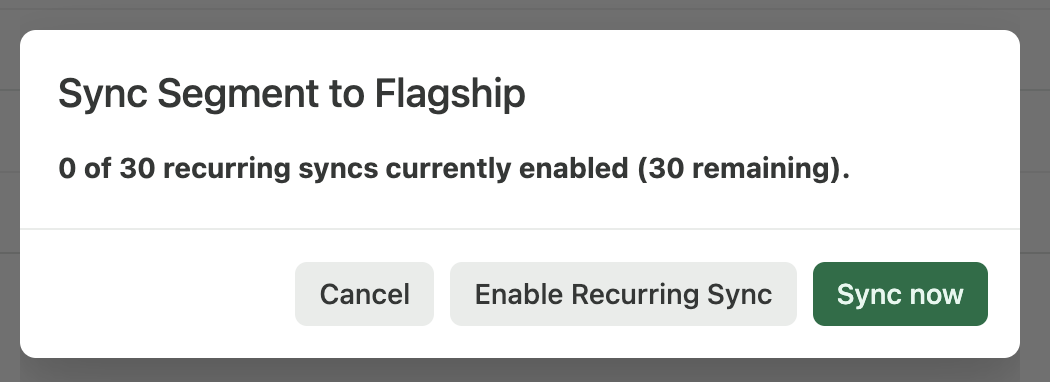
You will be able to choose **Enable Recurring Sync**. We recommend using this option to keep your segment updated in AB Tasty. Confirm by clicking **Enable Recurring Sync** or **Sync now**.
For global information on retrieving audiences, please refer to [this page](https://docs.abtasty.com/flagship-deprecated/integrations/retrieving-your-third-party-tools-audiences-in-ab-tasty-feature-experimentation-rollouts).
**Need additional information?** Submit your request at Always happy to help!
---
# Agent Instructions
This documentation is published with GitBook. GitBook is the documentation platform designed so that both humans and AI agents can read, navigate, and reason over technical content effectively. Learn more at gitbook.com.
## Querying This Documentation
If you need additional information that is not directly available in this page, you can query the documentation dynamically by asking a question.
Perform an HTTP GET request on the current page URL with the `ask` query parameter, and the optional `goal` query parameter:
```
GET https://docs.abtasty.com/flagship-deprecated/integrations/fe-and-r-heap-analytics/heap-analytics-integration-pull.md?ask=&goal=
```
`ask` is the immediate question: it should be specific, self-contained, and written in natural language.
`goal` is optional and describes the broader end goal you are ultimately trying to accomplish on behalf of the user. GitBook uses it to tailor the answer towards what is most useful for that goal.
The response will contain a direct answer to the question and relevant excerpts and sources from the documentation.
Use this mechanism when the answer is not explicitly present in the current page, you need clarification or additional context, or you want to retrieve related documentation sections.