> For the complete documentation index, see [llms.txt](https://docs.abtasty.com/llms.txt). Markdown versions of documentation pages are available by appending `.md` to page URLs; this page is available as [Markdown](https://docs.abtasty.com/integrations/pull-integrations/air.md).
# Air
Air360 is an analytics solution that gives you the power to turn more users into loyal customers, with actionable insights, whether you feel comfortable with numbers, or not.
The Air360 integration allows you to target the segments created in Air360 with AB Tasty.
**Good to Know 💡- Air360 Segments**
Segment are groups of users defined by a particular set of criteria, like a shared property or sequence of events.
For further information on how to use segments, please refer to the [***Air360 documentation***](https://help.air360.io/how-to-create-a-segment/)***.***
## Integration
### Enabling the Integration on AB Tasty
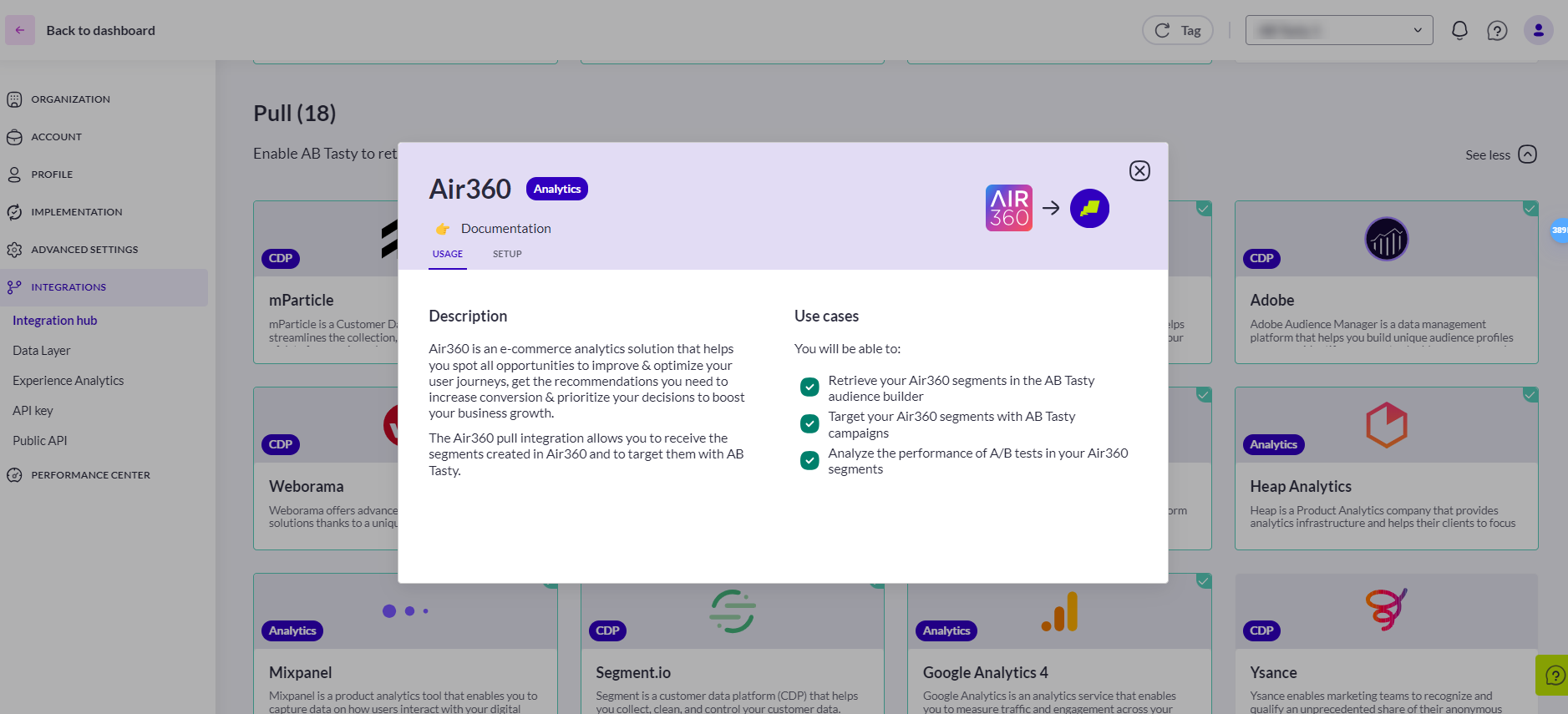
To enable the Integration on AB Tasty, follow the steps below:
1. Access **Integrations > Integration Hub > Pull**.
2. Search for and select **Air360**.
3. Click **Setup connector.**
4. Give a name to your connector so you can easily retrieve it.
5. Click **Save and create connector.**
Air360 is now set up. No other action is required here. This will allow AB Tasty to display the cohorts that will be sent by Air360.
### Enabling the Integration on Air360
Segment export to AB Tasty is only available in the [*new version of Air360*](https://beta.air360.io/).\
\
To enable the integration on Air360, follow the steps below:
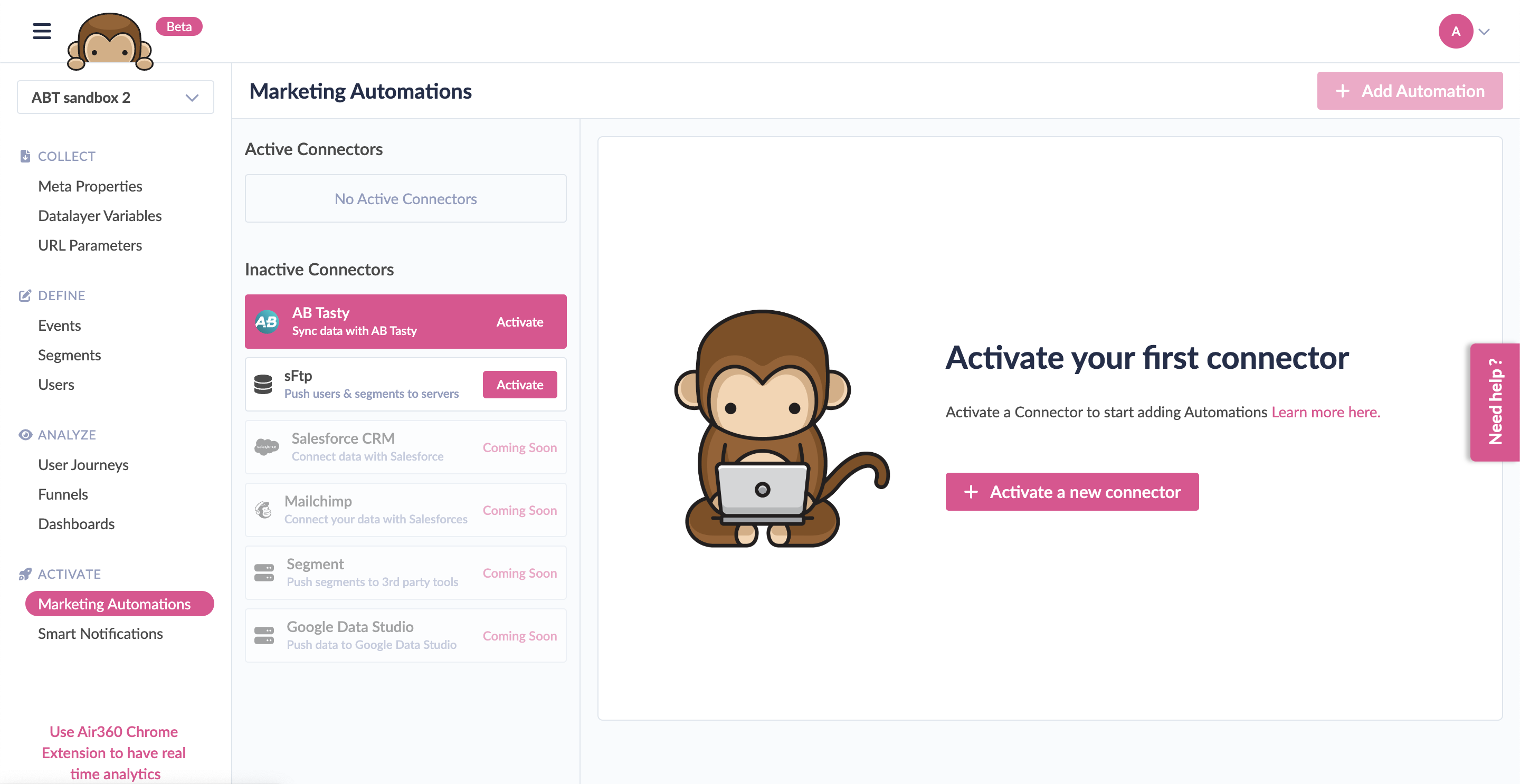
1. Access **Marketing Automations** under the **Activate** in the left menu.
2. In the **Connectors** list, select **AB Tasty**, and click **Activate**.
3. To set up the AB Tasty integration, you need to enter your account’s API Key. Copy and paste the API Key of your AB Tasty account. Click **Activate**.
**Good to Know 💡- API Key**
An integration API key is a unique key that allows a third-party tool to communicate with your specific AB Tasty account, i.e. send data to your account.
To generate an API Key, follow the steps below:
1. Go the AB Tasty interface
2. Access **Settings > Integrations > API Key**.
3. Click **Generate API Key**.
The API Key is ready to use.
The AB Tasty connector will be displayed under **Active Connectors** once the connection is established.
### Exporting the Segments From Air360 to AB Tasty
Now that the connection between the tools is established, we have to export the desired segments to AB Tasty to target them.
\
To export the segments to AB Tasty, follow the steps below:
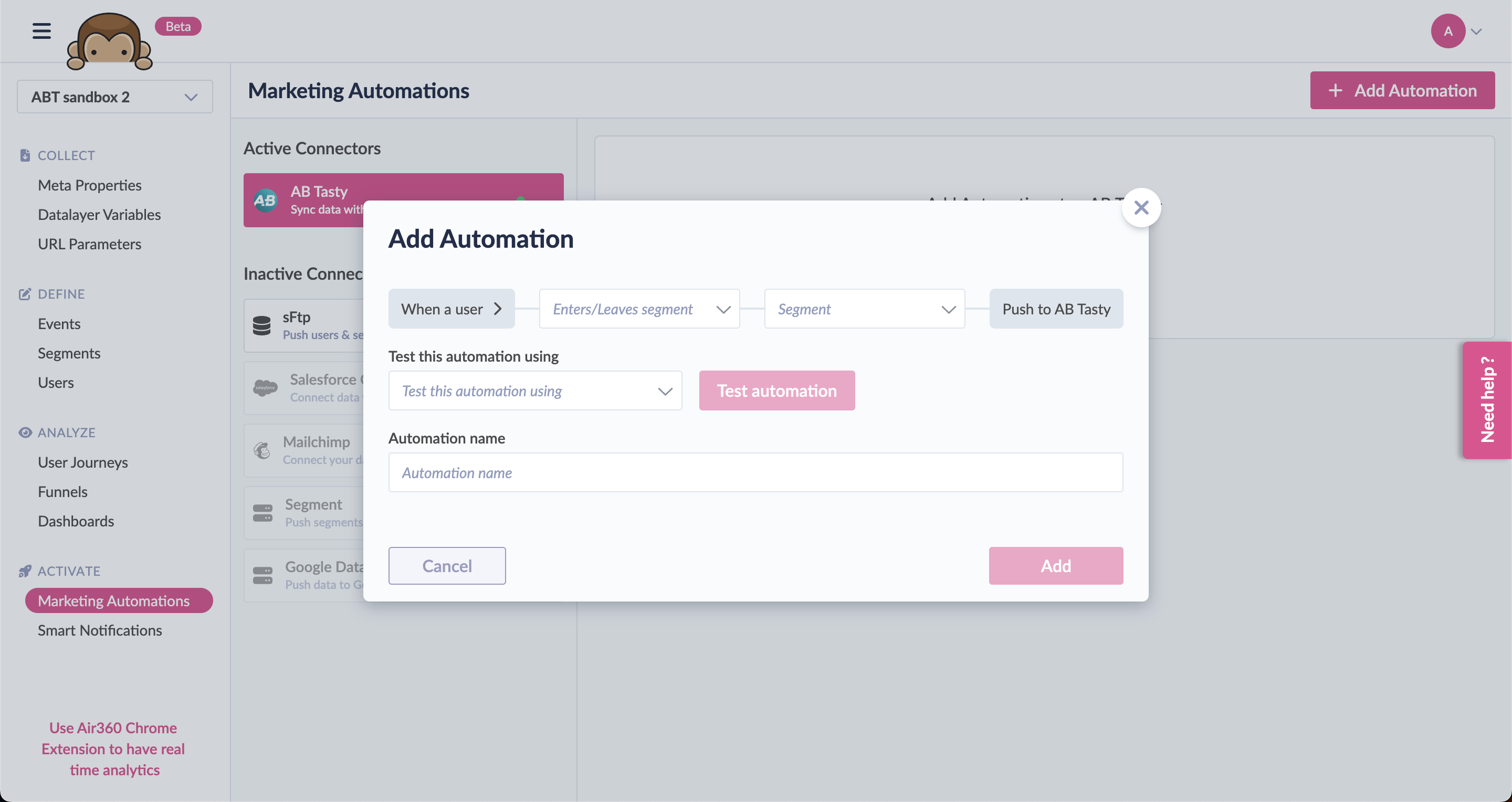
1. Click **Add Automation** in the AB Tasty connector.
2. In the first dropdown, select the trigger (Enter/Leaves segment) for sending the segments.
3. In the second dropdown, select the segment that you want to export.
4. Give a name to your Automation.
5. Click **Add**.
Congratulations, the integration is now set up, and you can target your Air360 segments with AB Tasty!
{% hint style="info" %}
**Good to Know 💡- Technical Specifications**
* For the cohorts to be used in AB Tasty’s segment builder (once exported from Air360), we need to match at least one user i.e. empty cohorts will not be displayed in the segment builder.
* Air360 includes his own user id in the segment export. This id is used to match the user.
{% endhint %}
## Configuration
### Using and Retrieving Your Air360 Segments
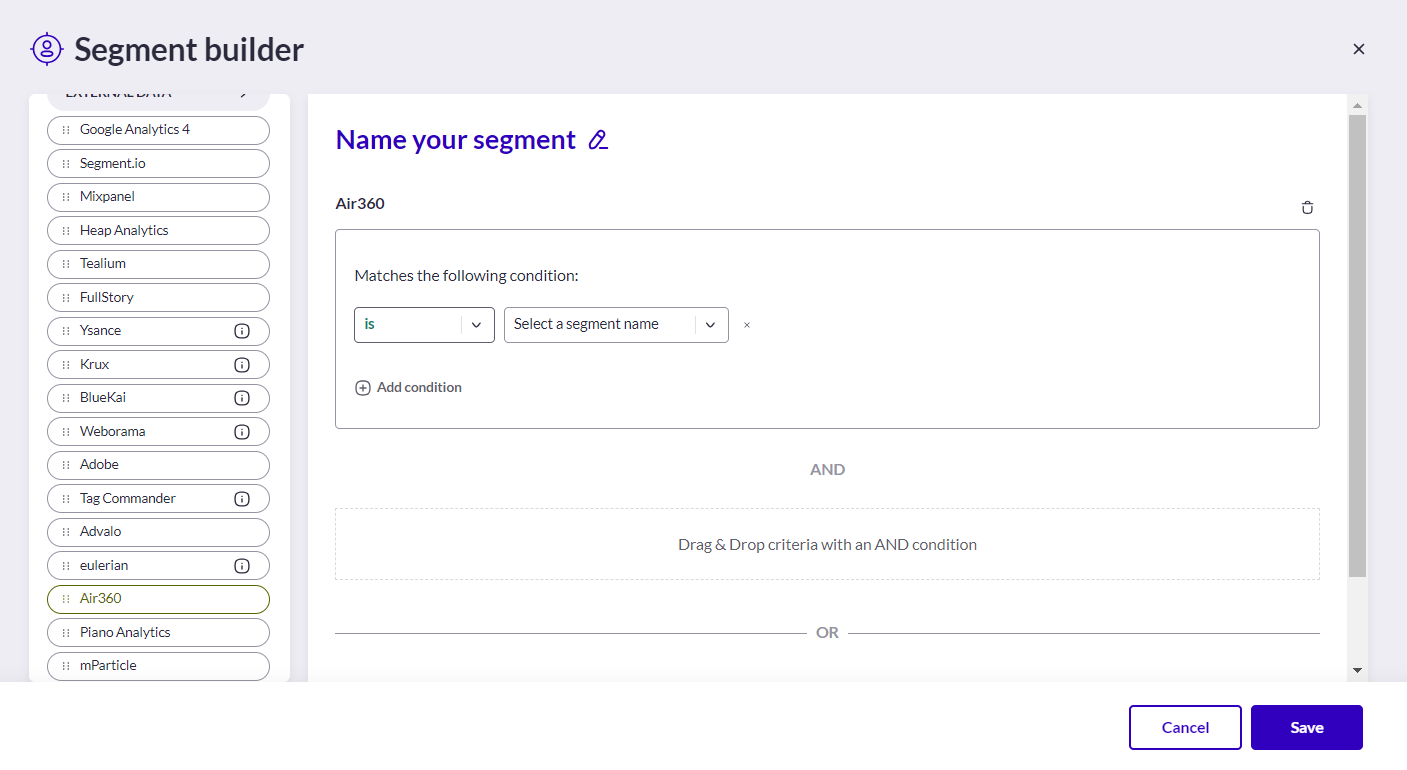
Once you have activated and configured an integration, you can retrieve Air360 Segments in the segment builder (available when you create a new segment).\
\
Audiences generated by your integrations can all be found under the criteria group **DATA INTEGRATION**.
For each integration, you will have a corresponding item that you can drag and drop to use.
For global information on how to build a targeting segment, please refer to [how to create a segment](/web-experimentation-and-personalization/targeting-step/how-to-create-a-segment-who-section.md).
{% hint style="info" %}
**Audience availability in the Segment Builder**\
For an audience to be available in the segment builder, it must not be empty, meaning that we have to identify at least one user belonging to that audience.
{% endhint %}
Once a user is identified, the audience will appear in the segment builder.
---
# Agent Instructions
This documentation is published with GitBook. GitBook is the documentation platform designed so that both humans and AI agents can read, navigate, and reason over technical content effectively. Learn more at gitbook.com.
## Querying This Documentation
If you need additional information that is not directly available in this page, you can query the documentation dynamically by asking a question.
Perform an HTTP GET request on the current page URL with the `ask` query parameter, and the optional `goal` query parameter:
```
GET https://docs.abtasty.com/integrations/pull-integrations/air.md?ask=&goal=
```
`ask` is the immediate question: it should be specific, self-contained, and written in natural language.
`goal` is optional and describes the broader end goal you are ultimately trying to accomplish on behalf of the user. GitBook uses it to tailor the answer towards what is most useful for that goal.
The response will contain a direct answer to the question and relevant excerpts and sources from the documentation.
Use this mechanism when the answer is not explicitly present in the current page, you need clarification or additional context, or you want to retrieve related documentation sections.
 To enable the Integration on AB Tasty, follow the steps below:
1. Access **Integrations > Integration Hub > Pull**.
2. Search for and select **Air360**.
3. Click **Setup connector.**
4. Give a name to your connector so you can easily retrieve it.
5. Click **Save and create connector.**
Air360 is now set up. No other action is required here. This will allow AB Tasty to display the cohorts that will be sent by Air360.
### Enabling the Integration on Air360
Segment export to AB Tasty is only available in the [*new version of Air360*](https://beta.air360.io/).\
\
To enable the integration on Air360, follow the steps below:
To enable the Integration on AB Tasty, follow the steps below:
1. Access **Integrations > Integration Hub > Pull**.
2. Search for and select **Air360**.
3. Click **Setup connector.**
4. Give a name to your connector so you can easily retrieve it.
5. Click **Save and create connector.**
Air360 is now set up. No other action is required here. This will allow AB Tasty to display the cohorts that will be sent by Air360.
### Enabling the Integration on Air360
Segment export to AB Tasty is only available in the [*new version of Air360*](https://beta.air360.io/).\
\
To enable the integration on Air360, follow the steps below: