> For the complete documentation index, see [llms.txt](https://docs.abtasty.com/llms.txt). Markdown versions of documentation pages are available by appending `.md` to page URLs; this page is available as [Markdown](https://docs.abtasty.com/integrations/pull-integrations/salesforce-marketing-cloud-pull.md).
# SalesForce Marketing Cloud (Pull)
## SalesForce Marketing Cloud (Pull)
This guide outlines the steps to integrate AB Tasty with Salesforce Marketing Cloud (SFMC) and pull audience data into AB Tasty from a designated Data Extension (DE) in SFMC.
## Overview
Salesforce Marketing Cloud (SFMC) is a digital marketing platform that supports multichannel campaigns, including email, social media, and advertising. By integrating SFMC with AB Tasty you can leverage SFMC-created segments to personalise your website campaigns.
The SFMC Pull integration enables AB Tasty to retrieve audience data from a dedicated Data Extension in SFMC, allowing for targeted experiences on your website.
### Integration
#### Definition and Process
The SFMC Pull integration establishes a connection between your SFMC Data Extension and AB Tasty, enabling AB Tasty to retrieve audience data for website personalisation.
#### Requirements
**Visitor Identification**
Since SFMC lacks native visitor identification for websites, visitors must be uniquely identified using one of the following methods:\
\
**2 Methods which imply a modification on your side by creating either a cookie or adding a key to your Local Storage**
1. **Local Storage:** Store the visitor ID under the SFMC\_VISITOR\_ID key.
2. **Cookie:** Store the visitor ID under the SFMC\_VISITOR\_ID key.
**A third method can be used and added within the Account JS of your AB Tasty Account**
**AB Tasty Method:** Use a window\.ABTasty.setSFMCVisitorId to assign the ID.
**Data Extension Setup**
**The dedicated Data Extension (DE) should be created and made available to AB Tasty.**\
**AB Tasty will retrieve data from this DE daily.**\
\
\
**Below is the required structure for the DE:**
| **Field Name** | **Type** | **Details** |
| ----------------- | -------- | -------------------------------------------------------------------------------------------------------------- |
| **SubscriberKey** | String | The subscriber key associated with one or more audiences (Primary Key). |
| **Audience** | String | The name of the audience linked to the subscriber key. |
| **Value** | Optional | The audience-specific value (if applicable). |
| **Date** | String | Current date in MM/DD/YYYY format (Primary Key). |
| **is\_include** | Boolean | The default is TRUE. Set to FALSE if a visitor has been removed from an audience after being included earlier. |
**Example Records**
| **ID** | **SubscriberKey** | **Audience** | **Value** | **Date** | **is\_include** |
| ------ | ----------------- | ------------ | --------- | ---------- | --------------- |
| 1 | idVisitorId1 | audience 1 | value 1 | 12/25/2024 | TRUE |
| 2 | idVisitorId2 | audience 1 | value 2 | 12/25/2024 | TRUE |
| 3 | idVisitorId2 | audience 2 | | 12/26/2024 | TRUE |
| 4 | idVisitorId3 | audience 3 | | 12/26/2024 | FALSE |
| 5 | idVisitorId2 | audience 2 | | 12/26/2024 | FALSE |
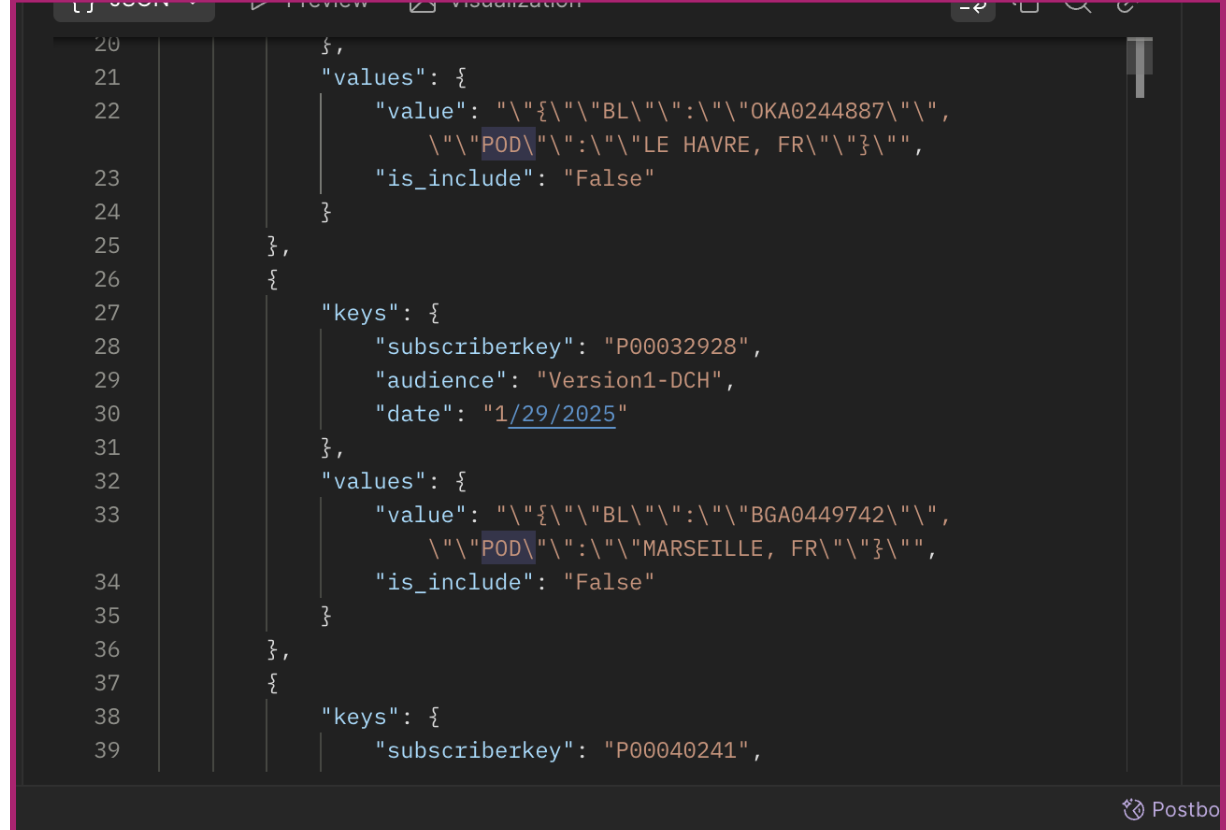
**The records must be structured as follows:**
* ***SubscriberKey*****, *****Audience***** and *****date***** must be inserted inside the keys field (of the data extension**
* ***Value***** and *****is\_include***** must be included inside the values field (of the data extension)**
**Here is an example of the correct structure of a dedicated Data Extension for AB tasty**\
#### **How to Set Up the Integration**
**Step 1: Configure the Connector in AB Tasty**
1. Log in to your AB Tasty account.
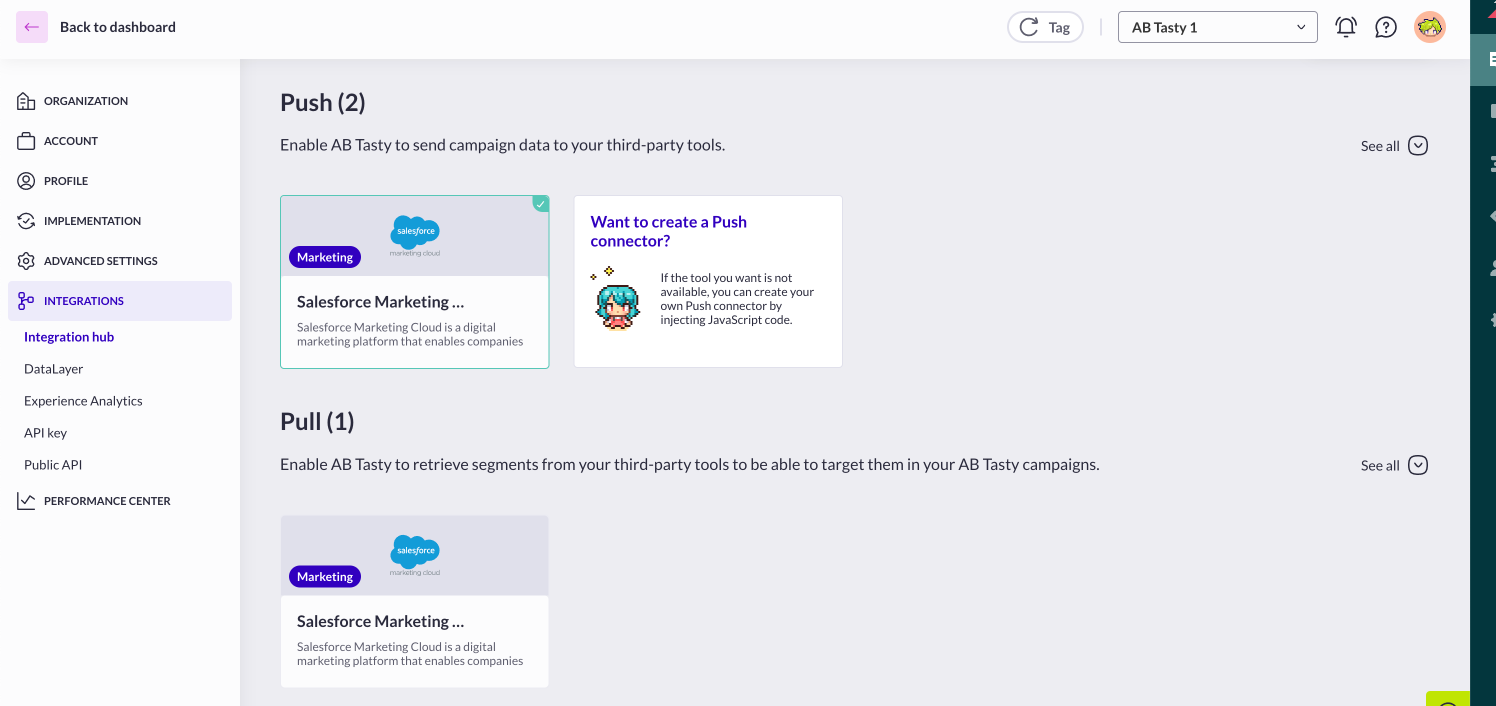
2. Go to **Integrations** > **Integration Hub**.
3. Search for and select **Salesforce Marketing Cloud (Pull section)**.
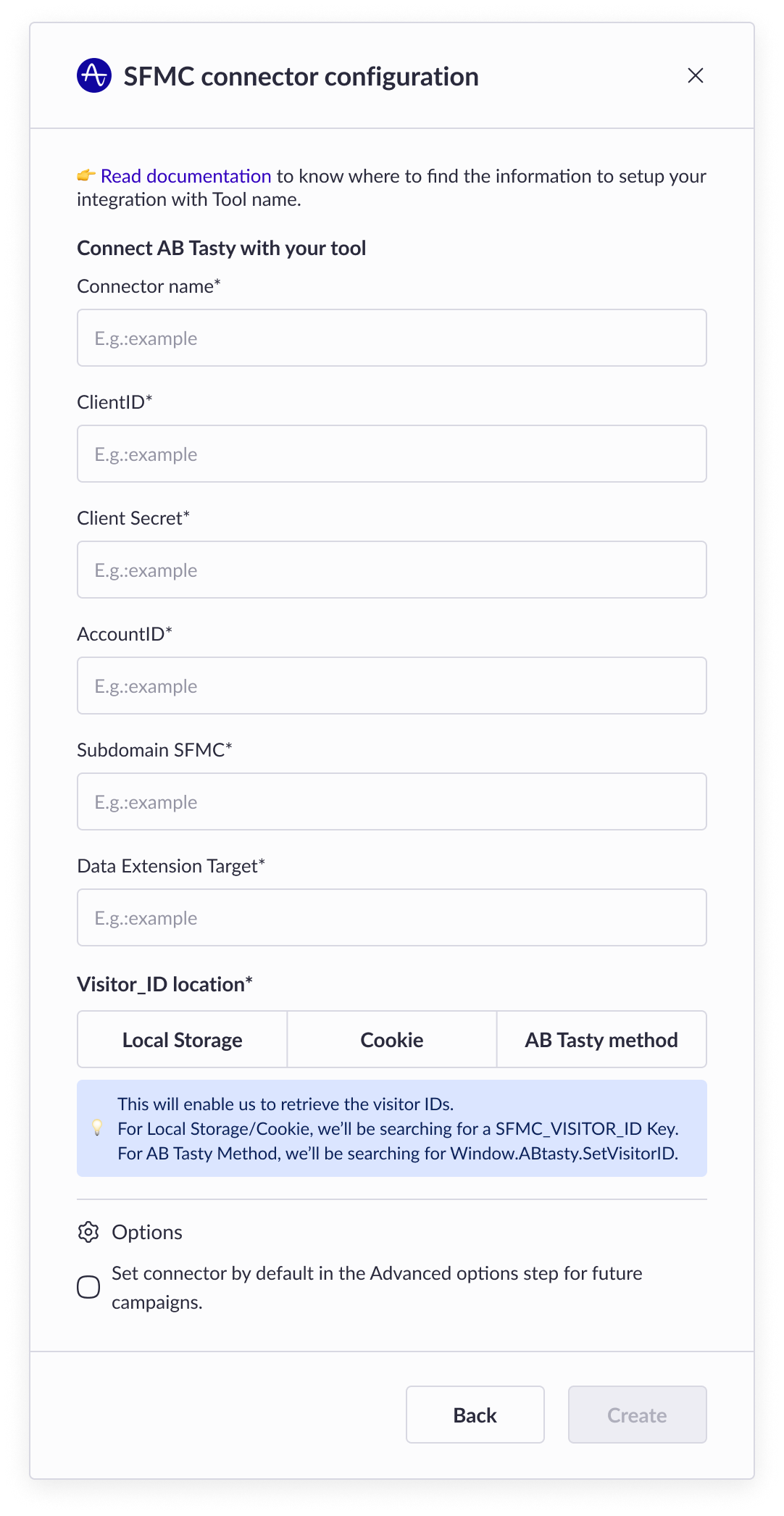
4. Click **Setup Connector** and provide the following details:\
\
**Connector Name:** A unique name to identify the connector.\
**Client ID:** Your SFMC clientId.\
**Client Secret:** Your SFMC clientSecret.\
**Account ID:** Your SFMC account ID (sometimes called Merchant ID).\
**Subdomain:** Your SFMC subdomain.\
**Data Extension ID:** The ID of the Data Extension created in Step 1\
**Visitor ID Location:** The method used to store the SFMC\_VISITOR\_ID (e.g., Local Storage, Cookie, or AB Tasty Method).
5. **Create** the connector
**Step 2: Verify the Integration (usually at J+1)**
1. Ensure that your website includes the AB Tasty tag.
2. Test the visitor identification process (e.g., through login or form submission).
3. Based on your choice preference / Cookie - Local Storage - AB tasty method\
\
Verify that AB Tasty is retrieving audience data from the specified DE.\
\
Go to your website and enable debug mode by running the following command in the browser console:
document.cookie="abTastyDebug=true;path=/;";
Refresh your browser and act to become a registered visitor (like login or form submission).\
If you fall in the right Audience criterion\
you'll see a matching VisitorID
And a success linked to SFMC ( if the table appears empty, it's simply because our bridge retrieve audience one time per day)
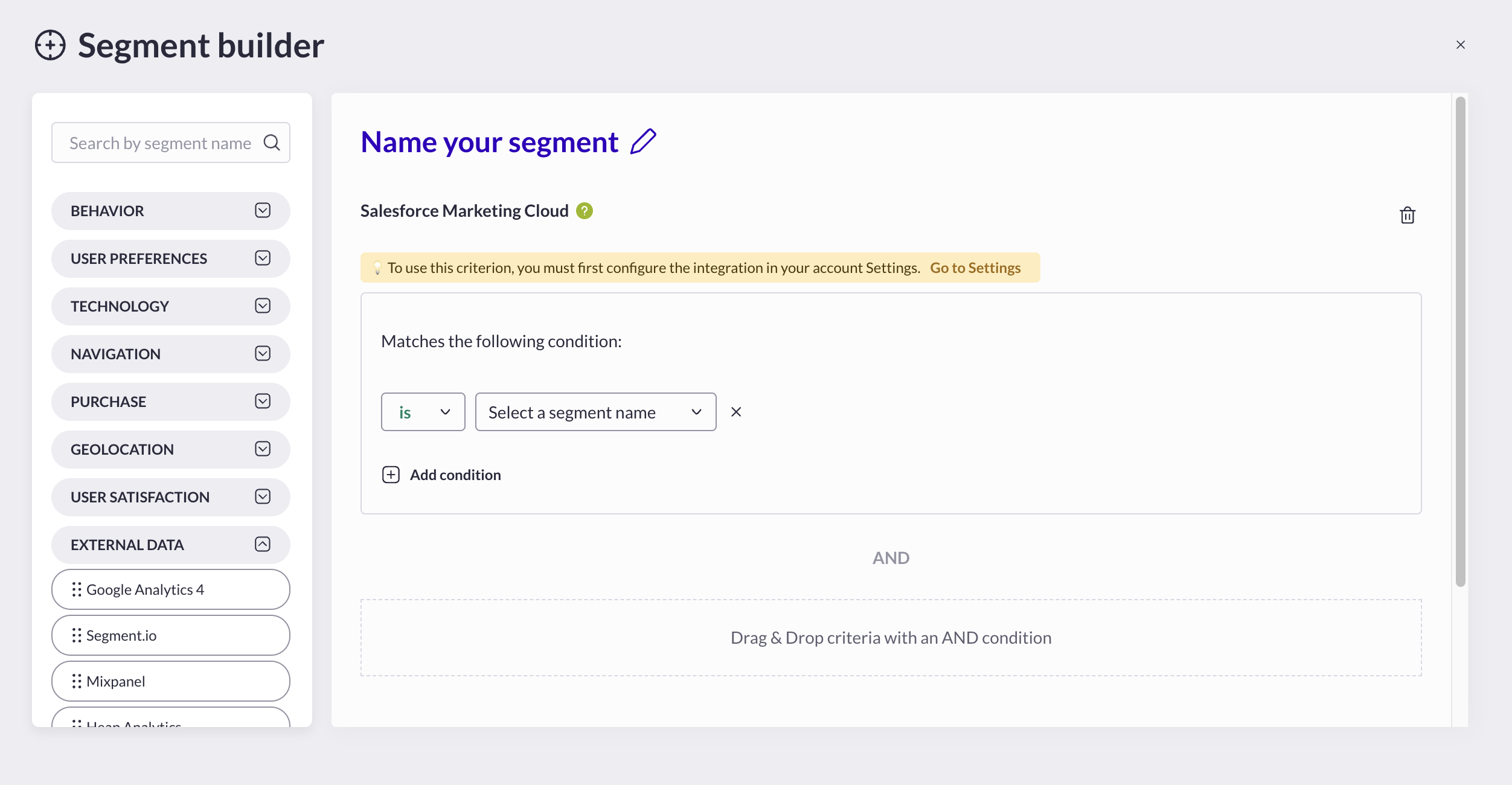
4\. Then the Audience should be available from AB Tasty Segment builder\
under **External Data>SFMC**
{% hint style="info" %}
#### **Good to Know**
* **Mandatory Fields**: All fields are **required**.\
The clientId, clientSecret, accountId, subDomain, and DataExtension ID fields are required to authenticate the integration and enable data push. SFMC\_VISITOR\_ID will allow AB Tasty to identify your visitors during a campaign
* **Data Accuracy**: Ensure your Data Extension includes up-to-date information for reliable audience targeting.
* **Known Visitors Only**: The integration only applies to "known" visitors with a subscriber key
{% endhint %}
{% hint style="warning" %}
#### **Heads Up ⚡**
* **Primary Keys**: Do not modify the SubscriberKey or Date fields in the Data Extension, as they are critical for syncing data.
* **Customisations**: You can filter or arrange the Data Extension data to suit your marketing needs, as long as the required structure is maintained.
* The **SubscriberKeys** in the Data Extension **must** be identical to those you provide via the AB Tasty method (or Local Storage or Cookies) for proper matching. Otherwise, the integration **will fail**.
{% endhint %}
Following these steps, you’ll successfully integrate AB Tasty with SFMC, enabling personalised audience targeting on your website! 🎉
---
# Agent Instructions
This documentation is published with GitBook. GitBook is the documentation platform designed so that both humans and AI agents can read, navigate, and reason over technical content effectively. Learn more at gitbook.com.
## Querying This Documentation
If you need additional information that is not directly available in this page, you can query the documentation by asking a question.
Perform an HTTP GET request on the following URL with the `ask` and `goal` query parameters:
```
GET https://docs.abtasty.com/integrations/pull-integrations/salesforce-marketing-cloud-pull.md?ask=&goal=
```
`ask` is the immediate question: it should be specific, self-contained, and written in natural language.
`goal` is what the user is ultimately trying to achieve, the reason they need the answer. Sharing it helps GitBook give you a better, more relevant answer. A goal is most helpful when it describes the outcome the user wants rather than restating the question. For example, with `ask=how do I create an API token`, a goal like `automate deployments from our CI pipeline` lets GitBook tailor the answer to that use case.
The response will contain a direct answer to the question and relevant excerpts and sources from the documentation.
Use this mechanism when the answer is not explicitly present in the current page, you need clarification or additional context, or you want to retrieve related documentation sections.


 4\. Then the Audience should be available from AB Tasty Segment builder\
under **External Data>SFMC**
4\. Then the Audience should be available from AB Tasty Segment builder\
under **External Data>SFMC**