> For the complete documentation index, see [llms.txt](https://docs.abtasty.com/llms.txt). Markdown versions of documentation pages are available by appending `.md` to page URLs; this page is available as [Markdown](https://docs.abtasty.com/integrations/pull-integrations/tealium--import-audiences.md).
# Tealium : Import Audiences
## Tealium & AB tasty
**Tealium AudienceStream** is a Customer Data Platform (CDP) that enables you to qualify the users who visit a website to create audience segments.
A **segment** can be made up of several attributes and other triggers, such as the duration of a session on the website.
Once Tealium is integrated into the platform, AB Tasty collects the segments created in Tealium to offer advanced campaign targeting (personalization preferences).
You may then configure your segments to create custom segments in AB Tasty.
The AB Tasty tag detects and reads the **localstorage** of the visitor’s browser to determine whether they match the segmentation target. To do this, the tag reads the key according to the following template: **tealium\_va\_accountname\_profile**.
## Integration
To use Tealium AudienceStream, you need to connect the CDP to AB Tasty for our platform to be able to recover its data.
To do this, follow the steps below:
1. Access **Integrations > Integration Hub > Pull**.
2. Search for and select **Tealium**
3. Click **Setup connector.**
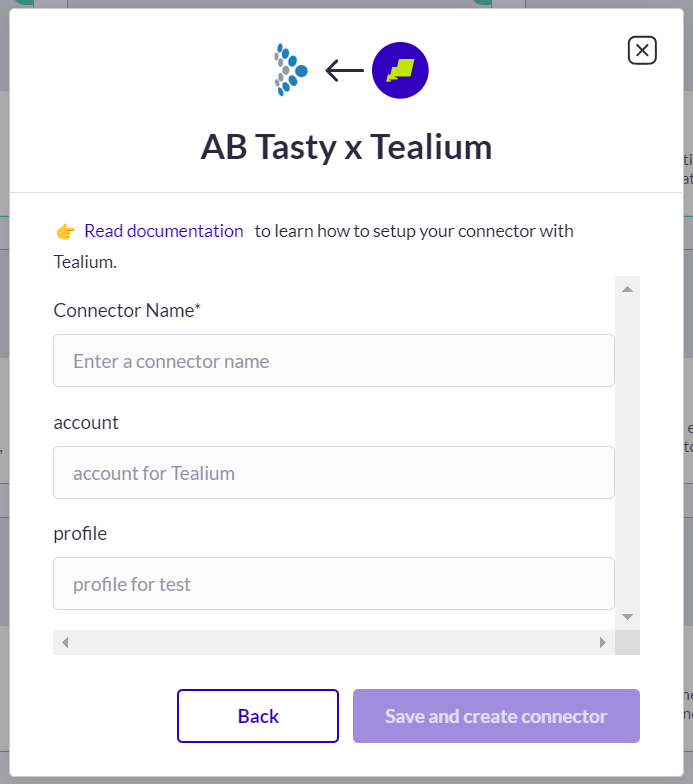
4. Give a name to your connector so you can easily retrieve it.
5. In the **Account name** field, enter your Tealium Audience stream account.
6. In the **Profile** field, enter the profile you want to connect with.
7. Click **Save and create connector**
Enter the account name and profile you want to use to connect to your Tealium AudienceStream account.
## Configuration
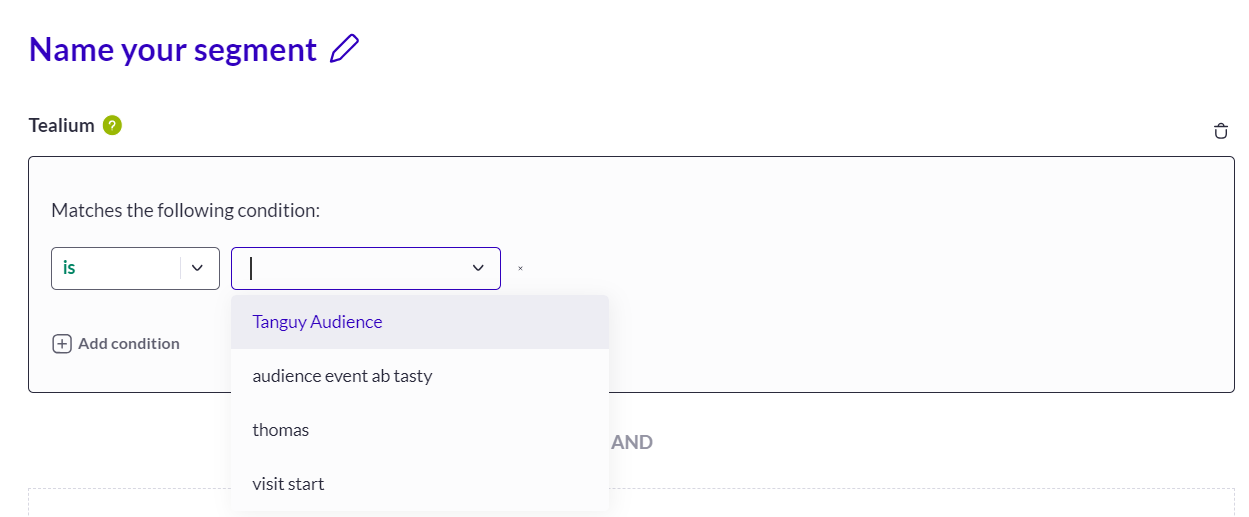
Once you have activated and configured an integration, you can retrieve Segment traits in the segment builder (available when you create a new segment).
Audiences or traits generated by your integrations are all to be found under the criteria group **EXTERNAL DATA**.\
For each integration, you will have a corresponding item that you can drag and drop to use.\
For global information on how to build a targeting segment, please refer to [how to create a segment](/web-experimentation-and-personalization/targeting-step/how-to-create-a-segment-who-section.md).
For an audience to be available in the segment builder it must not be empty, meaning that we have to identify at least one user belonging to that audience. Once a user is identified, the audience will appear in the segment builder.
---
# Agent Instructions
This documentation is published with GitBook. GitBook is the documentation platform designed so that both humans and AI agents can read, navigate, and reason over technical content effectively. Learn more at gitbook.com.
## Querying This Documentation
If you need additional information that is not directly available in this page, you can query the documentation dynamically by asking a question.
Perform an HTTP GET request on the current page URL with the `ask` query parameter, and the optional `goal` query parameter:
```
GET https://docs.abtasty.com/integrations/pull-integrations/tealium--import-audiences.md?ask=&goal=
```
`ask` is the immediate question: it should be specific, self-contained, and written in natural language.
`goal` is optional and describes the broader end goal you are ultimately trying to accomplish on behalf of the user. GitBook uses it to tailor the answer towards what is most useful for that goal.
The response will contain a direct answer to the question and relevant excerpts and sources from the documentation.
Use this mechanism when the answer is not explicitly present in the current page, you need clarification or additional context, or you want to retrieve related documentation sections.
 Enter the account name and profile you want to use to connect to your Tealium AudienceStream account.
## Configuration
Once you have activated and configured an integration, you can retrieve Segment traits in the segment builder (available when you create a new segment).
Enter the account name and profile you want to use to connect to your Tealium AudienceStream account.
## Configuration
Once you have activated and configured an integration, you can retrieve Segment traits in the segment builder (available when you create a new segment).