> For the complete documentation index, see [llms.txt](https://docs.abtasty.com/llms.txt). Markdown versions of documentation pages are available by appending `.md` to page URLs; this page is available as [Markdown](https://docs.abtasty.com/recommendations-and-merchandising_deprecated/merchandising/how-to-deploy-a-merchandised-product-list-through-algolia.md).
# How to deploy a merchandised product list through Algolia
**ABTasty Recos & Merch** lets you push **product scores** to **Algolia**, enabling you to use these scores in Algolia rules to organise your product lists accordingly.
## How It Works
### Synchronising Merchandising
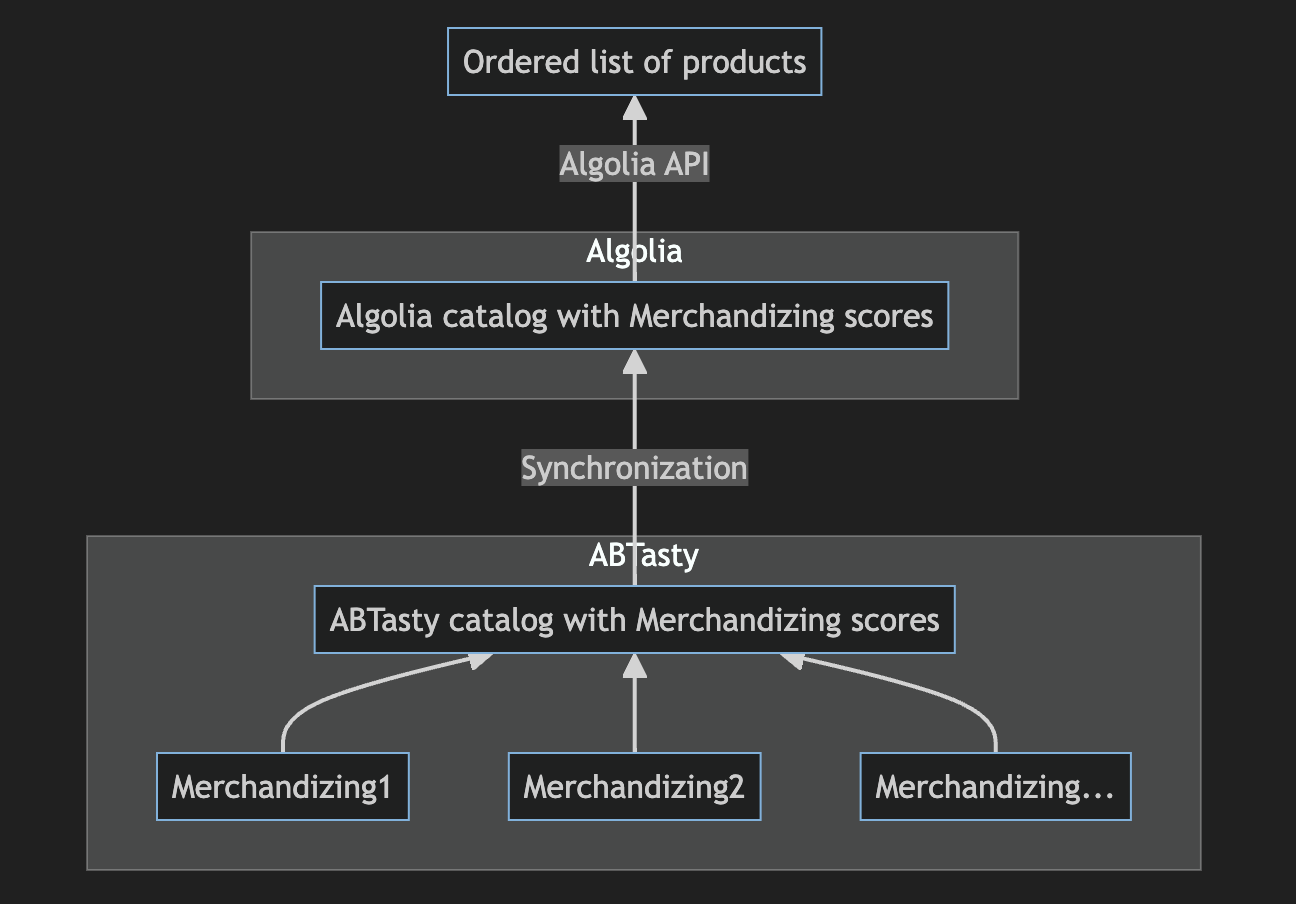
1. After creating a new **merchandising** in **ABTasty Recos & Merch**:
* ABTasty generates a **catalog (.csv file)** accessible upon request.
* This file contains all products and includes columns for each configured merchandising, with their **MERCH\_ID** as the column headers.
2. **File Transfer**:
* You can request this file regularly and send it to **Algolia** to synchronise the merchandising.
3. **Coming Soon**:
* ABTasty will automate product score updates in Algolia, eliminating the need to manually request and send a CSV file.
## Merchandising and Algolia Scores
* **Merchandising Scores Equivalence**:
* Merchandising scores in **ABTasty Recos & Merch** are directly equivalent to scores in Algolia.
* If you rank products in ABTasty by descending merchandising scores, the same ranking will be reflected in Algolia.
## Applying an ABTasty Merchandising Through Algolia
When displaying a product list on your website, your website code will call the **Algolia API** with one of two options:
1. **Without a MERCH\_ID**:
* In this case, the product order is managed directly within the Algolia interface, potentially using merchandising scores like **trending\_score** or **recency\_score**.
2. **With a MERCH\_ID**:
* If the API call includes a **MERCH\_ID**, Algolia will apply the corresponding merchandising score for ordering.
* You primarily manage and organise product lists in the **ABTasty Recos & Merch** interface.
## Example: Merchandising by Audience
You can create multiple merchandising configurations based on audience profiles:
* **Impulsive Visitors**: Show **top trends** first, followed by **bestsellers**.
* **Promotion Lovers**: Prioritise **promotional products**.
For each audience, you’ll create a unique merchandising in **ABTasty Recos & Merch**.
When calling the Algolia API, pass the corresponding **MERCH\_ID** for each audience. Algolia will order products according to the score associated with that **MERCH\_ID**.
## Coupling with ABTasty Audience Capabilities
By leveraging ABTasty's **audience segmentation**, you can easily map ABTasty audiences to specific **MERCH\_IDs** for a seamless experience.
---
# Agent Instructions
This documentation is published with GitBook. GitBook is the documentation platform designed so that both humans and AI agents can read, navigate, and reason over technical content effectively. Learn more at gitbook.com.
## Querying This Documentation
If you need additional information that is not directly available in this page, you can query the documentation dynamically by asking a question.
Perform an HTTP GET request on the current page URL with the `ask` query parameter, and the optional `goal` query parameter:
```
GET https://docs.abtasty.com/recommendations-and-merchandising_deprecated/merchandising/how-to-deploy-a-merchandised-product-list-through-algolia.md?ask=&goal=
```
`ask` is the immediate question: it should be specific, self-contained, and written in natural language.
`goal` is optional and describes the broader end goal you are ultimately trying to accomplish on behalf of the user. GitBook uses it to tailor the answer towards what is most useful for that goal.
The response will contain a direct answer to the question and relevant excerpts and sources from the documentation.
Use this mechanism when the answer is not explicitly present in the current page, you need clarification or additional context, or you want to retrieve related documentation sections.