> For the complete documentation index, see [llms.txt](https://docs.abtasty.com/llms.txt). Markdown versions of documentation pages are available by appending `.md` to page URLs; this page is available as [Markdown](https://docs.abtasty.com/recommendations-and-merchandising_deprecated/recommendations/recommendation-banner/how-to-push-recommendations-with-adobe-campaign.md).
# How to push recommendations with Adobe Campaign
## Goal
Enable you to create email campaigns that include recommendation banners showcasing products tailored to each of your users.
## How It Works
Deploying a recommendation banner in an email involves three key steps:
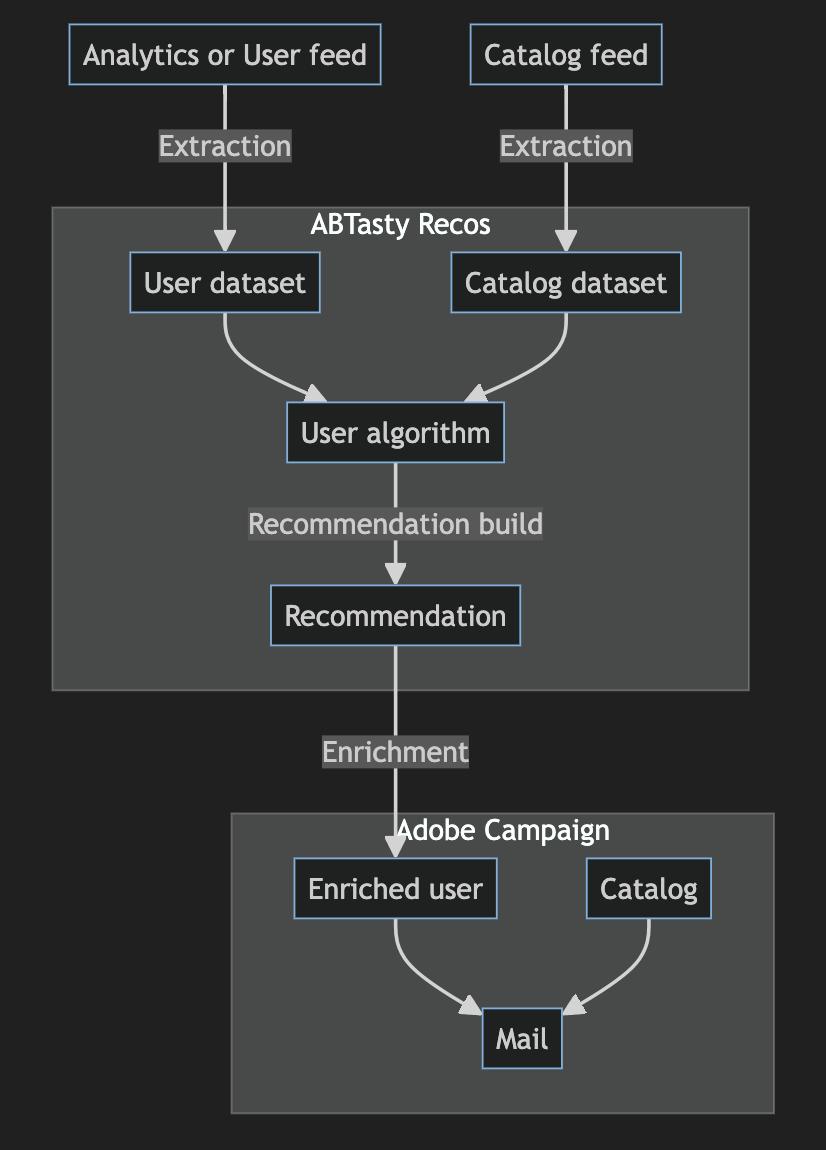
### 1. ABTasty Recos Extracts Data to Train User-Based Algorithms
#### Adobe Campaign Integration:
* Emails are sent to users identified by a USER\_ID in the Adobe Campaign database.
* ABTasty retrieves events (e.g., product page views, add-to-cart actions, purchases) containing a USER\_ID through your analytics integration or a custom feed.
#### Algorithm Training:
* ABTasty matches these events with your product catalogue to train algorithms that return relevant product recommendations based on:
* Similar to last viewed products.
* Complementary to purchased products.
* Bestsellers, top views, or newest releases from related categories or subcategories.
### 2. Build Recommendations Using Algorithms
* Use the Algorithm Builder to create recommendations tailored to your needs.
#### Algorithms:
* Input-based algorithms: For example, “Similar to last viewed products” or “Complementary to purchased products.”
* Non-input-based algorithms: For example, “Category bestsellers” or “Top new releases.”
#### Coming Soon:
* ABTasty will compile lists of products to create custom fields at the user level (e.g., preferred\_category) that can be used in the Recommendation Builder for more personalised outputs (e.g., “Preferred category top trends”).
### 3. ABTasty Recos Enriches the Adobe Campaign Database
#### Data Enrichment Protocol:
* Typically, a flat file exchange is used before launching a campaign:
* Deposit a file containing the RECOMMENDATION\_ID and the list of USER\_IDs.
* ABTasty processes the file and returns it enriched with recommended products.
#### Coming Soon:
* ABTasty will allow direct integration by requesting an access token for Adobe Campaign.
* This will enable seamless deployment of recommendations without requiring IT involvement.
#### Prerequisites
To use ABTasty recommendation & merchandising with Adobe Campaign, ensure the following are in place:
#### Navigation Events:
* Ensure navigation events (e.g., product views, purchases) are sent with the Adobe Campaign USER\_ID so ABTasty can retrieve them (via analytics or a custom table).
**Data Enrichment Protocol:**
Set up a protocol for file exchanges or configure direct access to Adobe Campaign when available.
#### Optional:
* Have your catalogue available in Adobe Campaign for seamless integration.
* If not, ABTasty will include all necessary fields in the recommendations to ensure proper display.
## Setting Up a New Mail Recommendation
### Create a Recommendation:
1. Build a recommendation that uses a USER\_ID or no input parameters.\
Deploy the Recommendation:
2. The recommendation will now be available for integration into your email campaigns.
## Final Notes
* This process allows for highly personalised email campaigns that drive user engagement and conversions.
* If you encounter any issues or need additional assistance, consult the platform documentation or contact your Customer Success Manager (CSM).
---
# Agent Instructions
This documentation is published with GitBook. GitBook is the documentation platform designed so that both humans and AI agents can read, navigate, and reason over technical content effectively. Learn more at gitbook.com.
## Querying This Documentation
If you need additional information that is not directly available in this page, you can query the documentation dynamically by asking a question.
Perform an HTTP GET request on the current page URL with the `ask` query parameter, and the optional `goal` query parameter:
```
GET https://docs.abtasty.com/recommendations-and-merchandising_deprecated/recommendations/recommendation-banner/how-to-push-recommendations-with-adobe-campaign.md?ask=&goal=
```
`ask` is the immediate question: it should be specific, self-contained, and written in natural language.
`goal` is optional and describes the broader end goal you are ultimately trying to accomplish on behalf of the user. GitBook uses it to tailor the answer towards what is most useful for that goal.
The response will contain a direct answer to the question and relevant excerpts and sources from the documentation.
Use this mechanism when the answer is not explicitly present in the current page, you need clarification or additional context, or you want to retrieve related documentation sections.