> For the complete documentation index, see [llms.txt](https://docs.abtasty.com/llms.txt). Markdown versions of documentation pages are available by appending `.md` to page URLs; this page is available as [Markdown](https://docs.abtasty.com/reporting-and-performances/reporting/metrics/metrics-based-on-tracking-widgets.md).
# Metrics based on tracking widgets
Some widgets enables to add trackers in your campaigns:
* [**Scroll Rate Tracking widget:**](/web-experimentation-and-personalization/editors-and-widget/list-of-widgets/ab-tasty-prebuilt-widgets/scroll-rate-tracking-widget.md) Track if your visitors have reached a pre-defined scroll percentage on a page.
* [**Dwell Time Tracking widget:** ](/web-experimentation-and-personalization/editors-and-widget/list-of-widgets/ab-tasty-prebuilt-widgets/dwell-time-tracking-widget.md)Track the time your visitors spend on a page by creating a duration goal.
* [**Element Visible Tracking widget:** ](/web-experimentation-and-personalization/editors-and-widget/list-of-widgets/ab-tasty-prebuilt-widgets/element-visible-tracking-widget.md)Track your visitor’s scroll progression on a page based on elements made visible on the visitor's screen (viewport).
* [**Iframe Click Tracking widget:** ](/web-experimentation-and-personalization/editors-and-widget/list-of-widgets/ab-tasty-prebuilt-widgets/iframe-click-tracking-widget.md)Track clicks in an iframe. Track clicks on Facebook like buttons, Google Adsense ads, YouTube videos, or any other iframe. Clicks must not be consecutive in order to be counted. This means that in order to count a second click, the user must click elsewhere before clicking on the iframe. This preserves reporting results to be distorted with repetitive clicks and spam.
In this article, we provide more details on the trackers built using these widgets.
## Scroll Tracking
### **The event “scroll” or “percentage of scroll”**
This event is sent if you have added the widget [scroll rate tracking](/web-experimentation-and-personalization/editors-and-widget/list-of-widgets/ab-tasty-prebuilt-widgets/scroll-rate-tracking-widget.md) to your campaign and a visitor reaches the defined percentage of scrolling during their navigation on the targeted page(s).
This event is sent via our tag from every page where the campaign containing the widget is triggered (see [Targeting article)](/web-experimentation-and-personalization/targeting-step.md).
**AB Tasty considers this type of event as** [**action tracker**](/assets-library/trackers-page/action-trackers.md) (label in the report/same type of hit stored in the database).
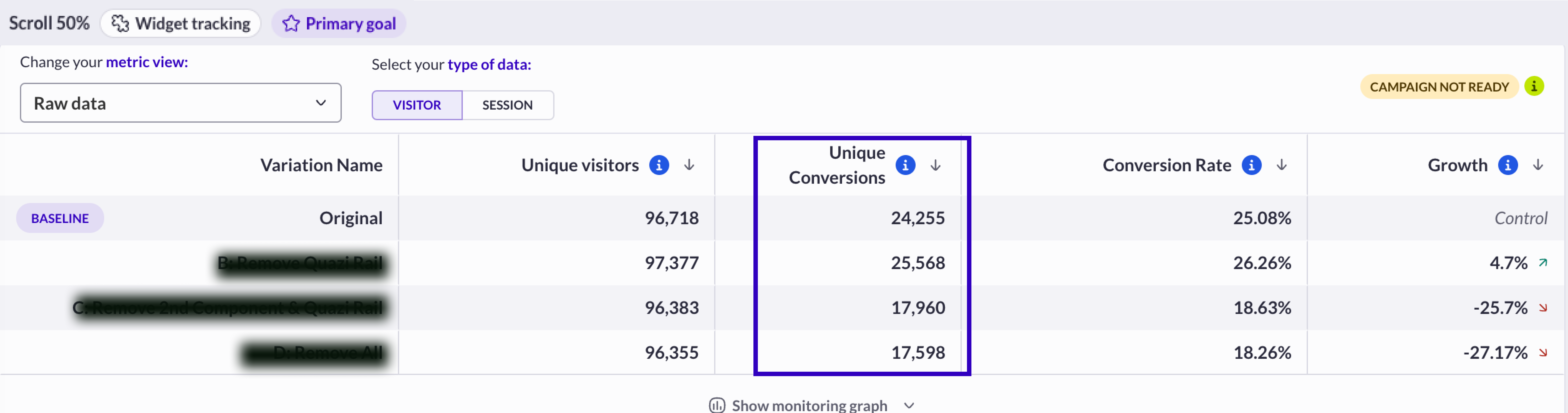
* It’s displayed as “**unique**” in the column “unique conversions” when the *type of data* is “visitor”. It represents the number of unique visitors that have reached the percentage of scroll on the targeted page(s) at least once thought its session(s).
\
In this case, it represents the number of visitors who have reached the defined percentage of scroll during their sessions at least one time, on the targeted page(s) of the campaign (if a unique visitor has reached the scroll level three times, the total will still be one).
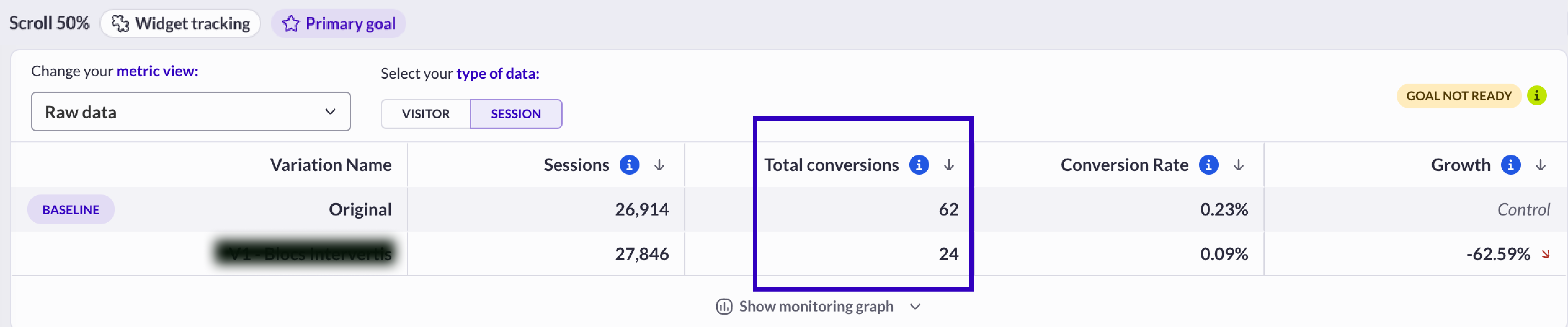
* It’s displayed as “**total**” in the column "Total conversions" when the *type of data* is “session”. It represents the total number of events “percentage of scroll reached” on the targeted page(s) on all session(s).
In this case, it represents the total number of events when the percentage of scroll has been reached, on the targeted pages(s) of the campaign (if a unique visitor has reached the scroll level three times, the total will be three).
### **Scroll rate**
#### Visitor scope
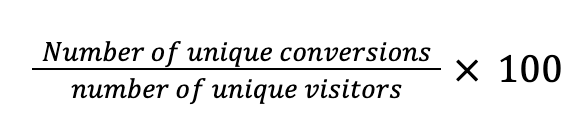
In this case, the scroll conversion rate represents the percentage of scrollers (unique visitors who performed the level of scroll) on the targeted page(s) versus the total traffic on the variation.
*Calculation*
*Example*
88 unique visitors have scrolled
Total traffic is 880
Percentage of scroll rate = 88 / 880 \* 100 = 10%
#### Session scope
In this case, the scroll conversion rate represents the percentage of sessions where the percentage scroll has been reached on the targeted page(s) versus the total number of sessions on the variation.
*Calculation*
*Example*
The scroll percentage has been reached 120 times
Total number of sessions is 1,000
Percentage of scroll rate = 120 / 1,000 \* 100 = 12%
In a testing campaign, this metric compares two percentages of scroll conversion rates (at a visitor level or a session-level) and helps to identify the best performer between two variations (the variation is compared to the baseline, which is the original version).
### **Scroll rate growth**
The growth metrics are always displayed on all variations except on the one which is used as the ***baseline***. See the [Campaign reporting ](/reporting-and-performances/reporting/campaign-reporting.md)article to learn how to change the baseline in a report.
## Dwell time tracking
### **The event “dwell time” or “time on page”**
This event is sent if you have added the widget “dwell time tracking” to your campaign and a visitor reaches the defined number of seconds on a targeted page during their navigation.
This event is sent via our tag from every page where the campaign containing the widget is triggered (see Targeting: Where section). AB Tasty considers this type of event action tracker (label in the report or the same type of hit stored in the database).
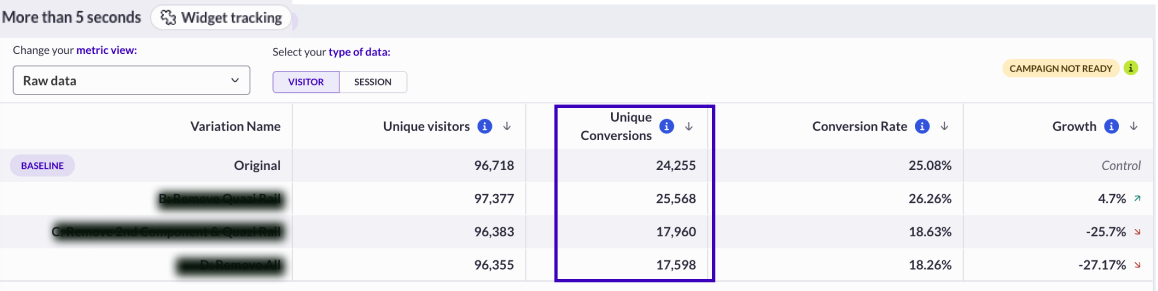
* It’s displayed as “**unique**” in the column “unique conversions” when the *type of data* is “visitor”. It represents the number of unique visitors that have reached the minimum time defined on the targeted page(s) at least once thought its session(s).
In this case, it represents the number of visitors who have reached the defined time on the page during their sessions at least one time, on the targeted page(s) of the campaign (if a unique visitor reaches the time on the page three times, it will only count as one time).
* It’s displayed as “**total**” in the column "Total conversions" when the *type of data* is “session”. It represents the total number of events “minimum time reached” on the targeted page(s) on all session(s).
In this case, it represents the total number of events when the defined time on the page has been reached on the targeted page(s) of the campaign (if a unique visitor reaches the defined time on the page three times, it counts as three times).\\
### **Dwell time rate**
#### Visitor scope
In this case, the time-on-page conversion rate represents the percentage of visitors (unique visitors who performed the time-on-page objective) on the targeted page(s) versus the total traffic on the variation.
*Calculation*
*Example*
88 unique visitors have reached the time on page objective
Total traffic is 880
Percentage of scroll rate = 88 / 880 \* 100 = 10%
#### Session scope
In this case, the time on page rate represents the percentage of sessions where the time on page has been reached on the targeted page(s) versus the total number of sessions on the variation.
*Calculation*
*Example*
The time on page has been reached 120 times
Total number of sessions is 1,000
Percentage of time on page = 120 / 1,000 \* 100 = 12%
In a testing campaign, this metric compares two “time on page reached” conversion rates (at a visitor level or a session level) and helps to identify the best performer between two variations (the variation is compared to the baseline, which is the original version).
### **Dwell time growth**
**The growth metrics are always displayed on all variations except on the one which is used as the *****baseline*****. See the** [**campaign reporting article**](/reporting-and-performances/reporting/campaign-reporting.md) **to learn how to change the baseline in a report.**
## Element visible tracking
### **The event “element visible”**
This event is sent if you have added the widget “visible element tracking” to your campaign and a visitor has seen (in the visible part of their screen) the defined element during their navigation.
This event is sent via our tag from every page where the campaign containing the widget is triggered (see [Targeting](/web-experimentation-and-personalization/targeting-step.md) article).
**AB Tasty considers this type of event as** [**action tracker**](/assets-library/trackers-page/action-trackers.md) (label in the report/same type of hit stored in the database).
* It’s displayed as “**unique**” in the column “unique conversions” when the *type of data* is “visitor”. It represents the number of unique visitors that have seen the defined element on the targeted page at least once thought its session(s).
In this case, it represents the number of visitors who have seen the defined element on the page during their sessions at least 1 time, on the targeted page(s) of the campaign (if a unique visitor has viewed the element on the page three times, it will only count as one view).
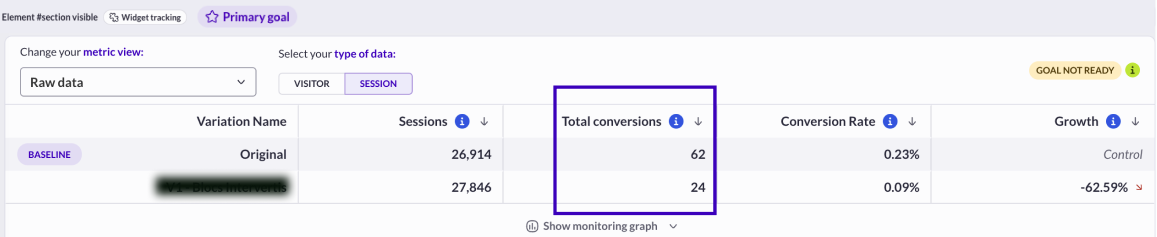
* It’s displayed as “**total**” in the column "Total conversions" when the *type of data* is “session”. In this case, it represents the total number of events when the defined element on the page has been seen, on the targeted page(s) of the campaign (if a unique visitor has viewed the defined element on the page three times, it will count as three views).
### **Element visible rate**
#### Visitor scope
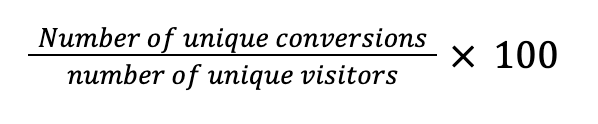
In this case, the visible element conversion rate represents the percentage of viewers (unique visitors who have seen the element on the screen) on the targeted page(s) versus the total traffic on the variation.
*Calculation*
*Example*
88 unique visitors have seen the element
Total traffic is 880
Visible Element conversion rate = 88 / 880 \* 100 = 10%
#### Session scope
In this case, the visible element conversion rate represents the percentage of sessions where the element has been seen on the targeted page(s) versus the total number of sessions on the variation.
*Calculation*
*Example*
The element has been seen 120 times
Total number of sessions is 1,000
Visible element conversion rate = 120 / 1,000 \* 100 = 12%
In a testing campaign, this metric compares two percentages of element visible conversion rates (at a visitor level or a session-level) and helps to identify the best performer between 2 variations (the variation is compared to the baseline aka original version).
### **Element visible growth**
The growth metrics are always displayed on all variations except on the one which is used as the ***baseline***. See this [***article***](/reporting-and-performances/reporting/campaign-reporting.md) to learn how to change the baseline in a report.
## Iframe Tracking
### **The event “Iframe tracking”**
The Iframe Click Tracking widget enables you to record clicks in an iframe (an HTML element that lets you display content from another web page - the same website or another one).
For example, YouTube videos are displayed in an iframe when you embed them in your website. It is pretty much the same thing for any web app that lets you embed a part of or the full content of a page. Generally speaking, except for websites that forbid it, any web page can be embedded in an iframe.
This event is sent via our tag from every page where the campaign containing the widget is triggered (see [Targeting step article](/web-experimentation-and-personalization/targeting-step.md)).
**AB Tasty considers this type of event as** [**action tracker**](/assets-library/trackers-page/action-trackers.md) (label in the report/same type of hit stored in the database).
* It’s displayed as “**unique**” in the column “unique conversions” when the *type of data* is “visitor”. It represents the number of unique visitors that have performed a click on the iframe **at least once** thought its session(s) (if a unique visitor clicks several time, it will only count as one).
* It’s displayed as “**total**” in the reports, in the column “total conversions” when the *type of data* is “session”. In this case, it represents the total number of clicks in the iframe (if a unique visitor clicks 3 times, it will increment 3).\\
### **Iframe tracking rate**
#### Visitor scope
In this case, the Iframe tracking rate represents the percentage of unique visitors who performed at least one event Iframe tracking on the targeted page(s) versus the total traffic on the variation.
*Calculation*
*Example*
88 unique visitors have clicked in the Iframe
Total traffic is 880
Percentage of scroll rate = 88 / 880 \* 100 = 10%
#### Session scope
In this case, the Iframe tracking rate represents the ratio between the number of events on the Iframe versus the total number of sessions on the variation.
*Calculation*
*Total number of events clicks on Iframe / Total number of sessions X 100*
*Example*
We have recorded 120 clicks on Iframes though sessions
Total number of sessions is 1,000
Percentage = 120 / 1,000 \* 100 = 12%
In a testing campaign, this metric compares two “Iframe tracking” conversion rates (at a visitor level or a session level) and helps to identify the best performer between two variations (the variation is compared to the baseline, which is the original version).
### **Iframe tracking growth**
**The growth metrics are always displayed on all variations except on the one which is used as the *****baseline*****. See the** [**Campaign reporting**](/reporting-and-performances/reporting/campaign-reporting.md) **article to learn how to change the baseline in a report.**
---
# Agent Instructions
This documentation is published with GitBook. GitBook is the documentation platform designed so that both humans and AI agents can read, navigate, and reason over technical content effectively. Learn more at gitbook.com.
## Querying This Documentation
If you need additional information that is not directly available in this page, you can query the documentation dynamically by asking a question.
Perform an HTTP GET request on the current page URL with the `ask` query parameter, and the optional `goal` query parameter:
```
GET https://docs.abtasty.com/reporting-and-performances/reporting/metrics/metrics-based-on-tracking-widgets.md?ask=&goal=
```
`ask` is the immediate question: it should be specific, self-contained, and written in natural language.
`goal` is optional and describes the broader end goal you are ultimately trying to accomplish on behalf of the user. GitBook uses it to tailor the answer towards what is most useful for that goal.
The response will contain a direct answer to the question and relevant excerpts and sources from the documentation.
Use this mechanism when the answer is not explicitly present in the current page, you need clarification or additional context, or you want to retrieve related documentation sections.
 In this case, it represents the total number of events when the percentage of scroll has been reached, on the targeted pages(s) of the campaign (if a unique visitor has reached the scroll level three times, the total will be three).
### **Scroll rate**
#### Visitor scope
In this case, the scroll conversion rate represents the percentage of scrollers (unique visitors who performed the level of scroll) on the targeted page(s) versus the total traffic on the variation.
*Calculation*
In this case, it represents the total number of events when the percentage of scroll has been reached, on the targeted pages(s) of the campaign (if a unique visitor has reached the scroll level three times, the total will be three).
### **Scroll rate**
#### Visitor scope
In this case, the scroll conversion rate represents the percentage of scrollers (unique visitors who performed the level of scroll) on the targeted page(s) versus the total traffic on the variation.
*Calculation*
 *Example*
88 unique visitors have scrolled
Total traffic is 880
Percentage of scroll rate = 88 / 880 \* 100 = 10%
#### Session scope
In this case, the scroll conversion rate represents the percentage of sessions where the percentage scroll has been reached on the targeted page(s) versus the total number of sessions on the variation.
*Calculation*
*Example*
88 unique visitors have scrolled
Total traffic is 880
Percentage of scroll rate = 88 / 880 \* 100 = 10%
#### Session scope
In this case, the scroll conversion rate represents the percentage of sessions where the percentage scroll has been reached on the targeted page(s) versus the total number of sessions on the variation.
*Calculation*
 *Example*
The scroll percentage has been reached 120 times
Total number of sessions is 1,000
Percentage of scroll rate = 120 / 1,000 \* 100 = 12%
In a testing campaign, this metric compares two percentages of scroll conversion rates (at a visitor level or a session-level) and helps to identify the best performer between two variations (the variation is compared to the baseline, which is the original version).
### **Scroll rate growth**
The growth metrics are always displayed on all variations except on the one which is used as the ***baseline***. See the [Campaign reporting ](/reporting-and-performances/reporting/campaign-reporting.md)article to learn how to change the baseline in a report.
## Dwell time tracking
### **The event “dwell time” or “time on page”**
This event is sent if you have added the widget “dwell time tracking” to your campaign and a visitor reaches the defined number of seconds on a targeted page during their navigation.
This event is sent via our tag from every page where the campaign containing the widget is triggered (see Targeting: Where section). AB Tasty considers this type of event action tracker (label in the report or the same type of hit stored in the database).
* It’s displayed as “**unique**” in the column “unique conversions” when the *type of data* is “visitor”. It represents the number of unique visitors that have reached the minimum time defined on the targeted page(s) at least once thought its session(s).
In this case, it represents the number of visitors who have reached the defined time on the page during their sessions at least one time, on the targeted page(s) of the campaign (if a unique visitor reaches the time on the page three times, it will only count as one time).
*Example*
The scroll percentage has been reached 120 times
Total number of sessions is 1,000
Percentage of scroll rate = 120 / 1,000 \* 100 = 12%
In a testing campaign, this metric compares two percentages of scroll conversion rates (at a visitor level or a session-level) and helps to identify the best performer between two variations (the variation is compared to the baseline, which is the original version).
### **Scroll rate growth**
The growth metrics are always displayed on all variations except on the one which is used as the ***baseline***. See the [Campaign reporting ](/reporting-and-performances/reporting/campaign-reporting.md)article to learn how to change the baseline in a report.
## Dwell time tracking
### **The event “dwell time” or “time on page”**
This event is sent if you have added the widget “dwell time tracking” to your campaign and a visitor reaches the defined number of seconds on a targeted page during their navigation.
This event is sent via our tag from every page where the campaign containing the widget is triggered (see Targeting: Where section). AB Tasty considers this type of event action tracker (label in the report or the same type of hit stored in the database).
* It’s displayed as “**unique**” in the column “unique conversions” when the *type of data* is “visitor”. It represents the number of unique visitors that have reached the minimum time defined on the targeted page(s) at least once thought its session(s).
In this case, it represents the number of visitors who have reached the defined time on the page during their sessions at least one time, on the targeted page(s) of the campaign (if a unique visitor reaches the time on the page three times, it will only count as one time).
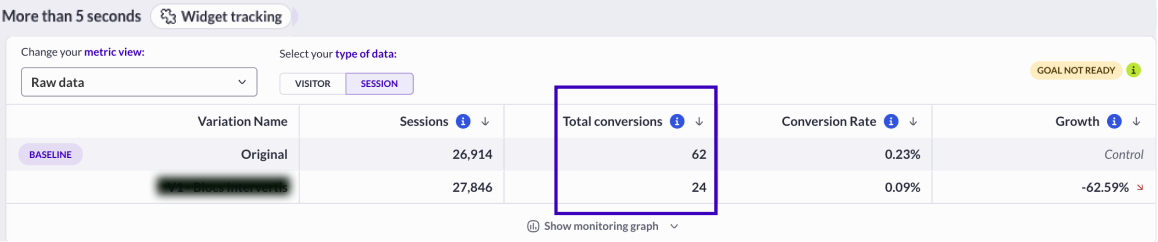 In this case, it represents the total number of events when the defined time on the page has been reached on the targeted page(s) of the campaign (if a unique visitor reaches the defined time on the page three times, it counts as three times).\\
### **Dwell time rate**
#### Visitor scope
In this case, the time-on-page conversion rate represents the percentage of visitors (unique visitors who performed the time-on-page objective) on the targeted page(s) versus the total traffic on the variation.
*Calculation*
In this case, it represents the total number of events when the defined time on the page has been reached on the targeted page(s) of the campaign (if a unique visitor reaches the defined time on the page three times, it counts as three times).\\
### **Dwell time rate**
#### Visitor scope
In this case, the time-on-page conversion rate represents the percentage of visitors (unique visitors who performed the time-on-page objective) on the targeted page(s) versus the total traffic on the variation.
*Calculation*
 *Example*
88 unique visitors have reached the time on page objective
Total traffic is 880
Percentage of scroll rate = 88 / 880 \* 100 = 10%
#### Session scope
In this case, the time on page rate represents the percentage of sessions where the time on page has been reached on the targeted page(s) versus the total number of sessions on the variation.
*Calculation*
*Example*
88 unique visitors have reached the time on page objective
Total traffic is 880
Percentage of scroll rate = 88 / 880 \* 100 = 10%
#### Session scope
In this case, the time on page rate represents the percentage of sessions where the time on page has been reached on the targeted page(s) versus the total number of sessions on the variation.
*Calculation*
 *Example*
The time on page has been reached 120 times
Total number of sessions is 1,000
Percentage of time on page = 120 / 1,000 \* 100 = 12%
In a testing campaign, this metric compares two “time on page reached” conversion rates (at a visitor level or a session level) and helps to identify the best performer between two variations (the variation is compared to the baseline, which is the original version).
### **Dwell time growth**
**The growth metrics are always displayed on all variations except on the one which is used as the *****baseline*****. See the** [**campaign reporting article**](/reporting-and-performances/reporting/campaign-reporting.md) **to learn how to change the baseline in a report.**
## Element visible tracking
### **The event “element visible”**
This event is sent if you have added the widget “visible element tracking” to your campaign and a visitor has seen (in the visible part of their screen) the defined element during their navigation.
This event is sent via our tag from every page where the campaign containing the widget is triggered (see [Targeting](/web-experimentation-and-personalization/targeting-step.md) article).
**AB Tasty considers this type of event as** [**action tracker**](/assets-library/trackers-page/action-trackers.md) (label in the report/same type of hit stored in the database).
* It’s displayed as “**unique**” in the column “unique conversions” when the *type of data* is “visitor”. It represents the number of unique visitors that have seen the defined element on the targeted page at least once thought its session(s).
*Example*
The time on page has been reached 120 times
Total number of sessions is 1,000
Percentage of time on page = 120 / 1,000 \* 100 = 12%
In a testing campaign, this metric compares two “time on page reached” conversion rates (at a visitor level or a session level) and helps to identify the best performer between two variations (the variation is compared to the baseline, which is the original version).
### **Dwell time growth**
**The growth metrics are always displayed on all variations except on the one which is used as the *****baseline*****. See the** [**campaign reporting article**](/reporting-and-performances/reporting/campaign-reporting.md) **to learn how to change the baseline in a report.**
## Element visible tracking
### **The event “element visible”**
This event is sent if you have added the widget “visible element tracking” to your campaign and a visitor has seen (in the visible part of their screen) the defined element during their navigation.
This event is sent via our tag from every page where the campaign containing the widget is triggered (see [Targeting](/web-experimentation-and-personalization/targeting-step.md) article).
**AB Tasty considers this type of event as** [**action tracker**](/assets-library/trackers-page/action-trackers.md) (label in the report/same type of hit stored in the database).
* It’s displayed as “**unique**” in the column “unique conversions” when the *type of data* is “visitor”. It represents the number of unique visitors that have seen the defined element on the targeted page at least once thought its session(s).
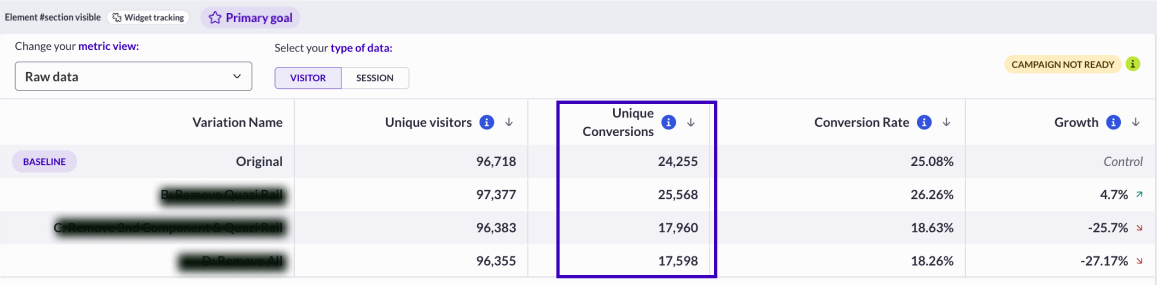 In this case, it represents the number of visitors who have seen the defined element on the page during their sessions at least 1 time, on the targeted page(s) of the campaign (if a unique visitor has viewed the element on the page three times, it will only count as one view).
* It’s displayed as “**total**” in the column "Total conversions" when the *type of data* is “session”. In this case, it represents the total number of events when the defined element on the page has been seen, on the targeted page(s) of the campaign (if a unique visitor has viewed the defined element on the page three times, it will count as three views).
In this case, it represents the number of visitors who have seen the defined element on the page during their sessions at least 1 time, on the targeted page(s) of the campaign (if a unique visitor has viewed the element on the page three times, it will only count as one view).
* It’s displayed as “**total**” in the column "Total conversions" when the *type of data* is “session”. In this case, it represents the total number of events when the defined element on the page has been seen, on the targeted page(s) of the campaign (if a unique visitor has viewed the defined element on the page three times, it will count as three views).
 ### **Element visible rate**
#### Visitor scope
In this case, the visible element conversion rate represents the percentage of viewers (unique visitors who have seen the element on the screen) on the targeted page(s) versus the total traffic on the variation.
*Calculation*
### **Element visible rate**
#### Visitor scope
In this case, the visible element conversion rate represents the percentage of viewers (unique visitors who have seen the element on the screen) on the targeted page(s) versus the total traffic on the variation.
*Calculation*
 *Example*
88 unique visitors have seen the element
Total traffic is 880
Visible Element conversion rate = 88 / 880 \* 100 = 10%
#### Session scope
In this case, the visible element conversion rate represents the percentage of sessions where the element has been seen on the targeted page(s) versus the total number of sessions on the variation.
*Calculation*
*Example*
88 unique visitors have seen the element
Total traffic is 880
Visible Element conversion rate = 88 / 880 \* 100 = 10%
#### Session scope
In this case, the visible element conversion rate represents the percentage of sessions where the element has been seen on the targeted page(s) versus the total number of sessions on the variation.
*Calculation*
 *Example*
The element has been seen 120 times
Total number of sessions is 1,000
Visible element conversion rate = 120 / 1,000 \* 100 = 12%
In a testing campaign, this metric compares two percentages of element visible conversion rates (at a visitor level or a session-level) and helps to identify the best performer between 2 variations (the variation is compared to the baseline aka original version).
### **Element visible growth**
The growth metrics are always displayed on all variations except on the one which is used as the ***baseline***. See this [***article***](/reporting-and-performances/reporting/campaign-reporting.md) to learn how to change the baseline in a report.
## Iframe Tracking
### **The event “Iframe tracking”**
The Iframe Click Tracking widget enables you to record clicks in an iframe (an HTML element that lets you display content from another web page - the same website or another one).
For example, YouTube videos are displayed in an iframe when you embed them in your website. It is pretty much the same thing for any web app that lets you embed a part of or the full content of a page. Generally speaking, except for websites that forbid it, any web page can be embedded in an iframe.
This event is sent via our tag from every page where the campaign containing the widget is triggered (see [Targeting step article](/web-experimentation-and-personalization/targeting-step.md)).
**AB Tasty considers this type of event as** [**action tracker**](/assets-library/trackers-page/action-trackers.md) (label in the report/same type of hit stored in the database).
* It’s displayed as “**unique**” in the column “unique conversions” when the *type of data* is “visitor”. It represents the number of unique visitors that have performed a click on the iframe **at least once** thought its session(s) (if a unique visitor clicks several time, it will only count as one).
* It’s displayed as “**total**” in the reports, in the column “total conversions” when the *type of data* is “session”. In this case, it represents the total number of clicks in the iframe (if a unique visitor clicks 3 times, it will increment 3).\\
### **Iframe tracking rate**
#### Visitor scope
In this case, the Iframe tracking rate represents the percentage of unique visitors who performed at least one event Iframe tracking on the targeted page(s) versus the total traffic on the variation.
*Calculation*
*Example*
The element has been seen 120 times
Total number of sessions is 1,000
Visible element conversion rate = 120 / 1,000 \* 100 = 12%
In a testing campaign, this metric compares two percentages of element visible conversion rates (at a visitor level or a session-level) and helps to identify the best performer between 2 variations (the variation is compared to the baseline aka original version).
### **Element visible growth**
The growth metrics are always displayed on all variations except on the one which is used as the ***baseline***. See this [***article***](/reporting-and-performances/reporting/campaign-reporting.md) to learn how to change the baseline in a report.
## Iframe Tracking
### **The event “Iframe tracking”**
The Iframe Click Tracking widget enables you to record clicks in an iframe (an HTML element that lets you display content from another web page - the same website or another one).
For example, YouTube videos are displayed in an iframe when you embed them in your website. It is pretty much the same thing for any web app that lets you embed a part of or the full content of a page. Generally speaking, except for websites that forbid it, any web page can be embedded in an iframe.
This event is sent via our tag from every page where the campaign containing the widget is triggered (see [Targeting step article](/web-experimentation-and-personalization/targeting-step.md)).
**AB Tasty considers this type of event as** [**action tracker**](/assets-library/trackers-page/action-trackers.md) (label in the report/same type of hit stored in the database).
* It’s displayed as “**unique**” in the column “unique conversions” when the *type of data* is “visitor”. It represents the number of unique visitors that have performed a click on the iframe **at least once** thought its session(s) (if a unique visitor clicks several time, it will only count as one).
* It’s displayed as “**total**” in the reports, in the column “total conversions” when the *type of data* is “session”. In this case, it represents the total number of clicks in the iframe (if a unique visitor clicks 3 times, it will increment 3).\\
### **Iframe tracking rate**
#### Visitor scope
In this case, the Iframe tracking rate represents the percentage of unique visitors who performed at least one event Iframe tracking on the targeted page(s) versus the total traffic on the variation.
*Calculation*