> For the complete documentation index, see [llms.txt](https://docs.abtasty.com/llms.txt). Markdown versions of documentation pages are available by appending `.md` to page URLs; this page is available as [Markdown](https://docs.abtasty.com/reporting-and-performances/reporting/metrics/metrics-based-on-transactions.md).
# Metrics based on transactions
A metric is based on an event and helps to **analyze the number of collected events** (or their mean/average) and compare it to a baseline, generally the total number of unique visitors or the total number of sessions. For more information about definitions, please refer to the following [article](/reporting-and-performances/reporting/data--reports-generalities-and-definitions.md).
In this article, you'll find detailed information about all AB Tasty transactional metrics:
* [Transaction rate](#id-01gtvwn6nsjk6dtxqp7n21hdac)
* [Average order value](#id-01jb9rz8afaxydaw68j7zrn38a)
* [Average product quantity](#id-01jb9rcb3758cjxnrg3kg7mecj)
* [Revenue](#h_01jb9rj3z9615yjwj9bvvgax6d)
* [Revenue uplift](#id-01jb9rpqa2es19p15aef95k3e9)
* [Revenue uplift (potential)](#id-01jb9rs29ka2z898dd5n72yqas)
## Metrics based on “transaction”
You need to set up the **transaction tag** on your website, it collects transactions from your checkout page. For more information, please refer to this [***article.***](broken://pages/Vcf2nmWwkzOAg642d5hu)
### The event "transaction"
It’s triggered each time a visitor performs a transaction on the website and is normally sent from your checkout/validation page.
AB Tasty receives the event transaction but also all the information added in the transaction tag:
* transactionRevenue
* affiliations
* paymentMethods
* currencies
* shippingMethods
* customVariableNames
* productCategories
All this information is useful to calculate metrics and also to filter your report on specific purchases.
### Total vs unique
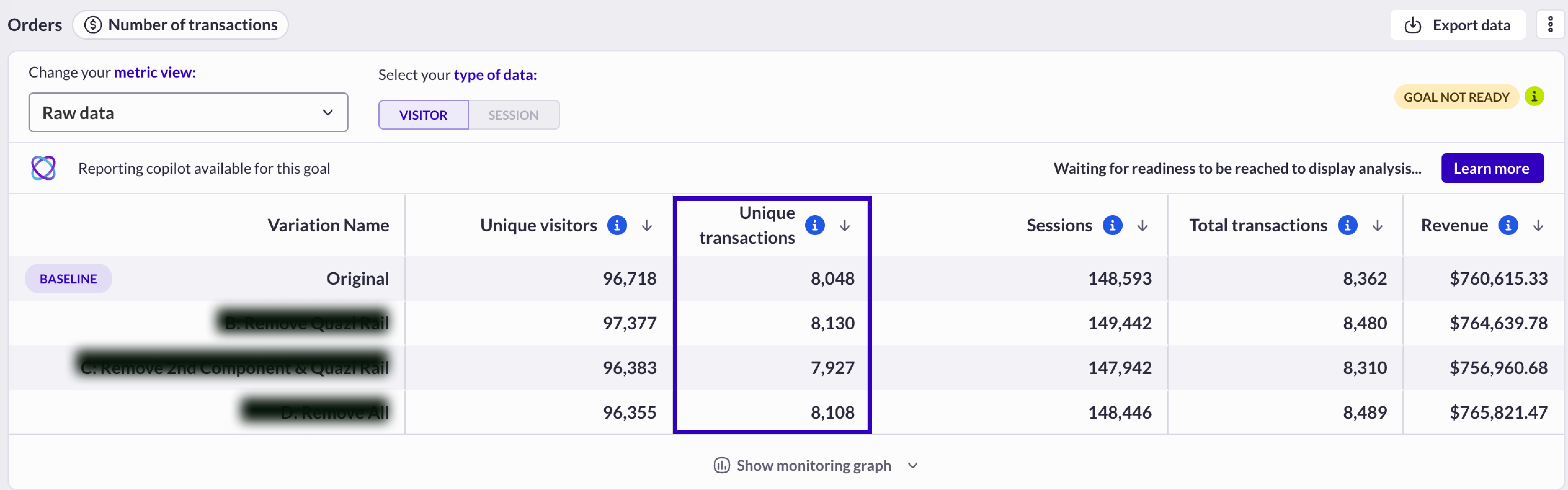
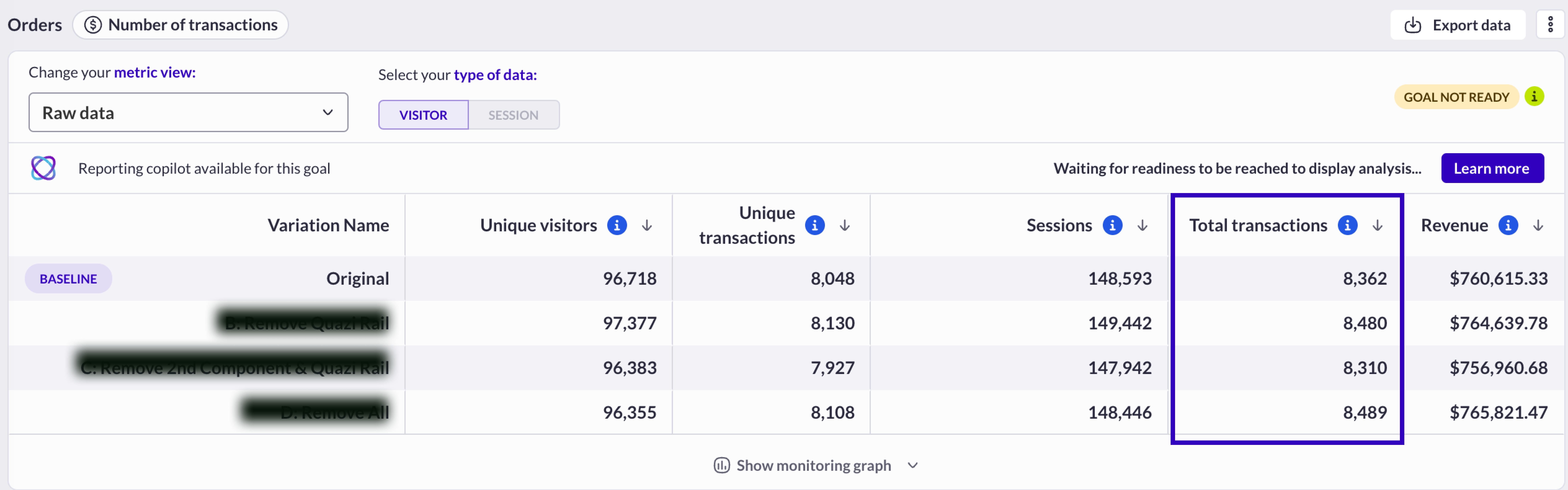
This data is displayed two times and with a different definition and calculation in the reports:
* **Total transactions**: total number of transactions/single purchases performed during the campaign for each variation
* **Unique transactions**: total number of different buyers (unique visitors who have performed one transaction at least)\
In this example, as the unique transaction and the total transactions column are not equal, we conclude that some unique visitors have purchased more than one time during the campaign duration, in both original and variation groups.\
In the [reporting](https://support.abtasty.com/hc/en-us/articles/6397701089180), select *metric view: Raw data*
\
*AB Tasty variable :* transactions
## Transaction rate
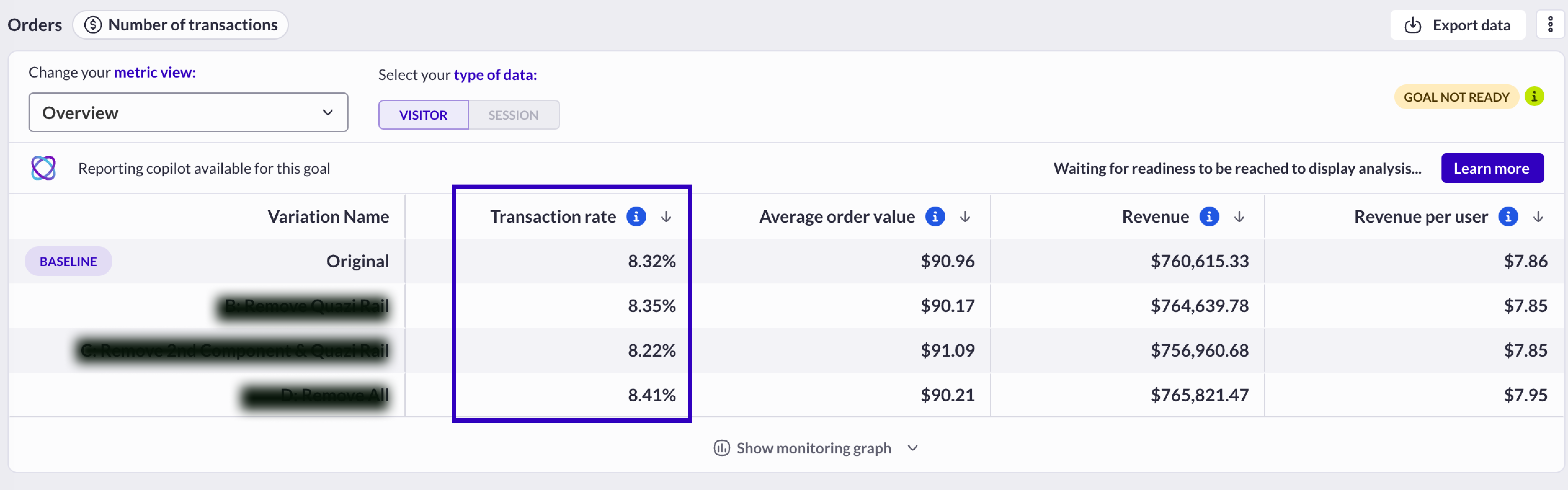
In the [reporting](/reporting-and-performances/reporting/campaign-reporting.md), select:
* *metric view: Overview*\
\&#xNAN;*or*
* *metric view: Transaction detailed data*
The transaction rate is always automatically calculated **at the visitor level**:
### **Calculation**
*AB Tasty variable***:** transactionUserConversionRate
### **Example**
### **Growth between two transaction rates**
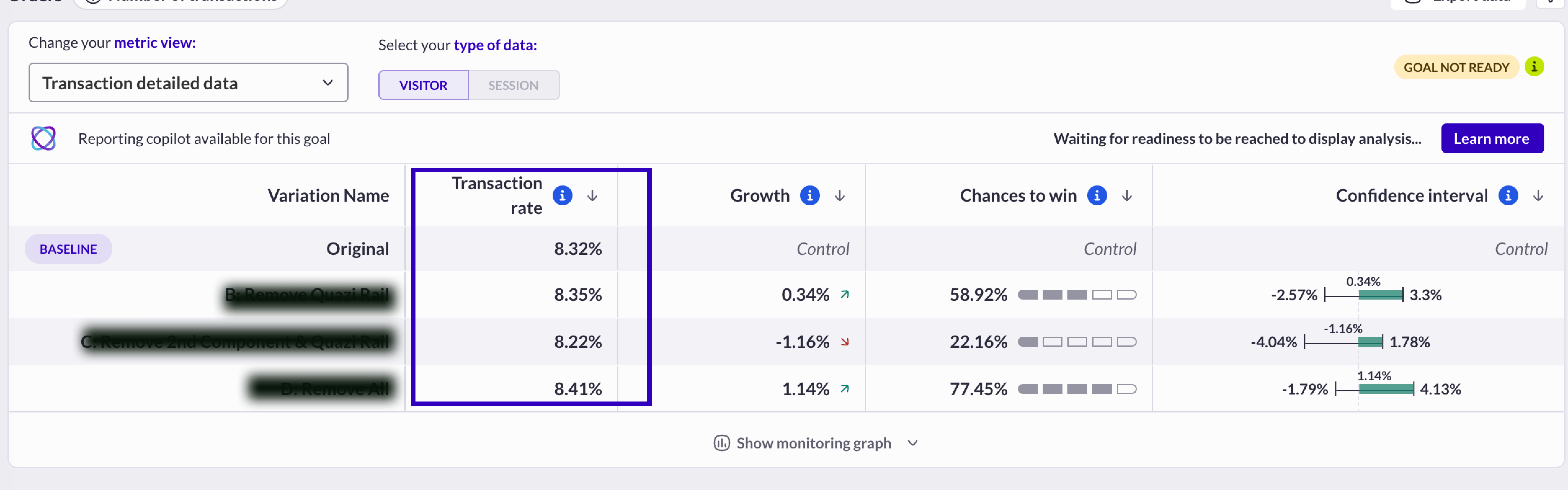
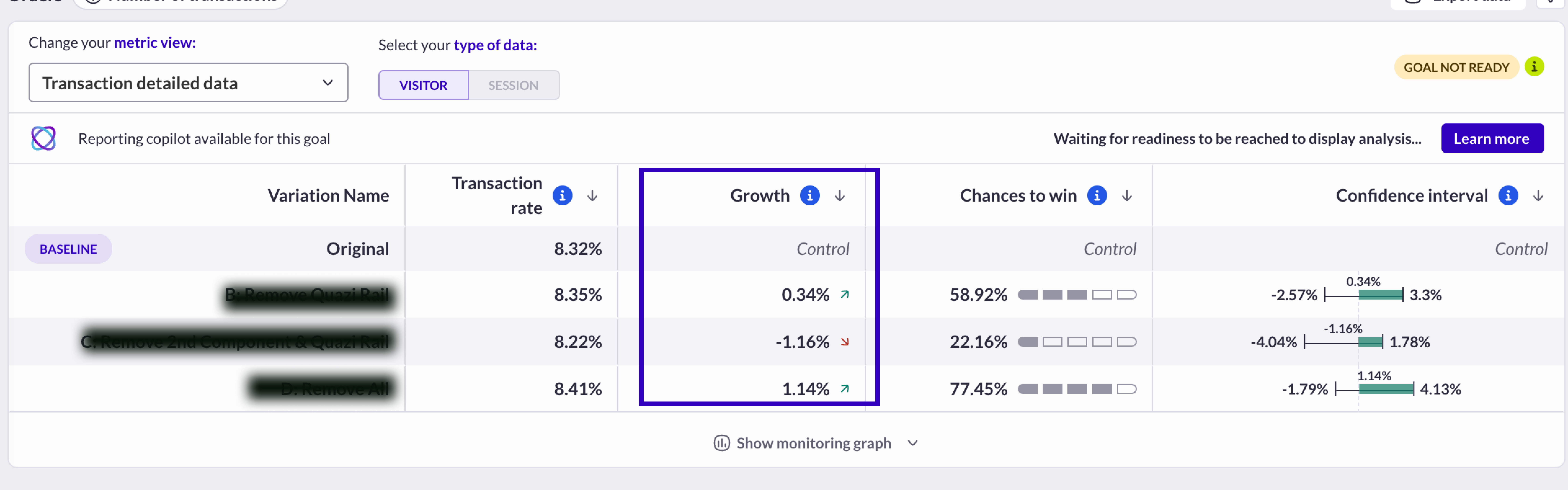
In the [reporting](/reporting-and-performances/reporting/campaign-reporting.md), select: *metric view: Transaction detailed data*
In a test campaign, this metric compares two transaction rates (at a visitor level or a session level) and helps to identify the best performer between two variations (the variation is compared to the baseline, which is the original version).
The growth metrics are always displayed on all variations except on the one which is used as the ***baseline***. See this [***article*** ](/reporting-and-performances/reporting/campaign-reporting.md)to learn how to change the baseline in a report.
#### Calculation
#### Example
## Average order value
In the [reporting](/reporting-and-performances/reporting/campaign-reporting.md), select: *metric view: Overview*
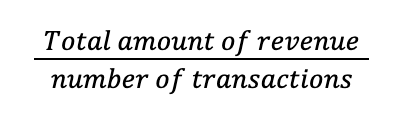
The average order value calculated **on all the recorded purchases** in the variation.
### **Calculation**
### **Example**
20 different transactions recorded, for a total amount of $10,000.
Average order value = $10,000/ 20 = $500
### **Growth between two average order value**
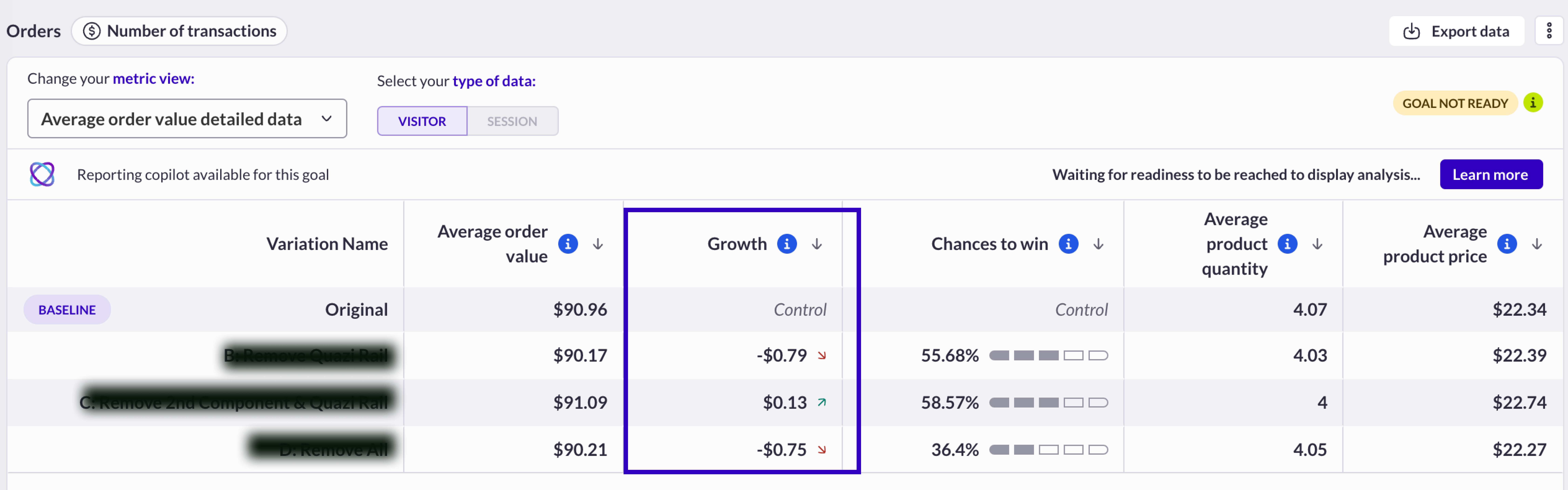
In a testing campaign, this metric compares two average order values and helps to identify the best performer between two variations (the variation is compared to the baseline, which is the original version).
In the [reporting](/reporting-and-performances/reporting/campaign-reporting.md), select: *Average order value detailed data*
#### Calculation
Average order value variation - average order value baseline
#### Example
Average order value original = $154.20
Average order value variation = $153.90
Average order value growth = $154.20 - $153.90 = $+0.30
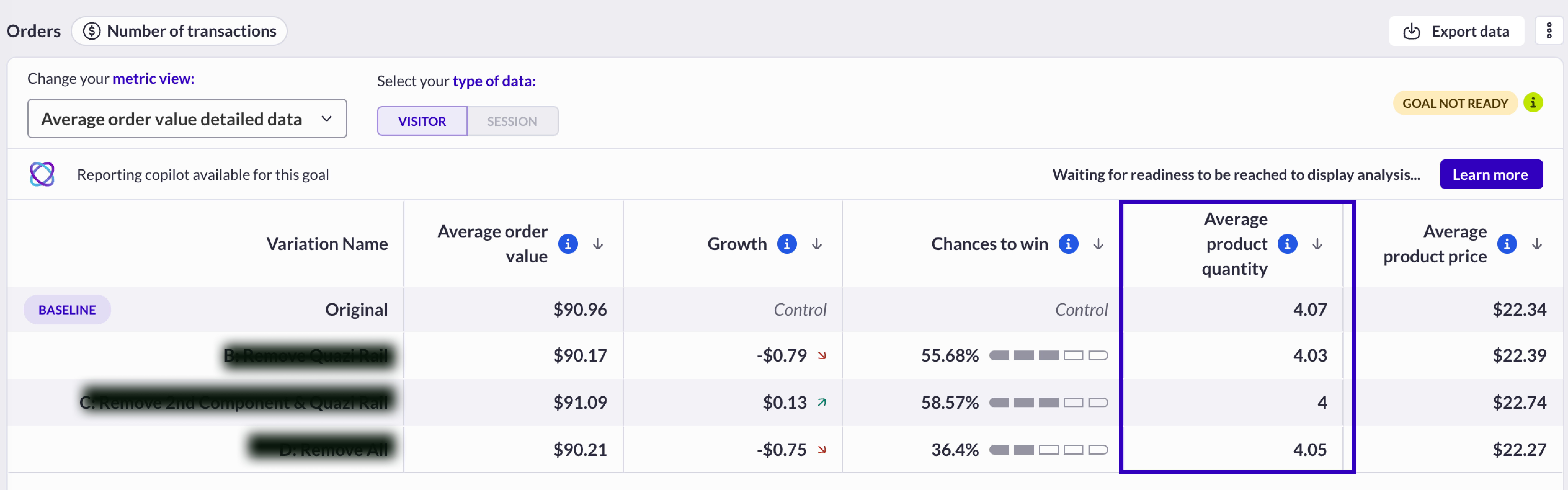
## Average product quantity
In the [reporting](/reporting-and-performances/reporting/campaign-reporting.md), select: *metric view: Average order value detailed data*
Average product quantity is calculated **on all the recorded purchases** in the variation.
### **Calculation**
Total number of items purchased in all transactions / number of transactions
### **Example**
Total number of transactions = 153
Number of purchased items = 298
Average product quantity = 298 / 153 = 1.94
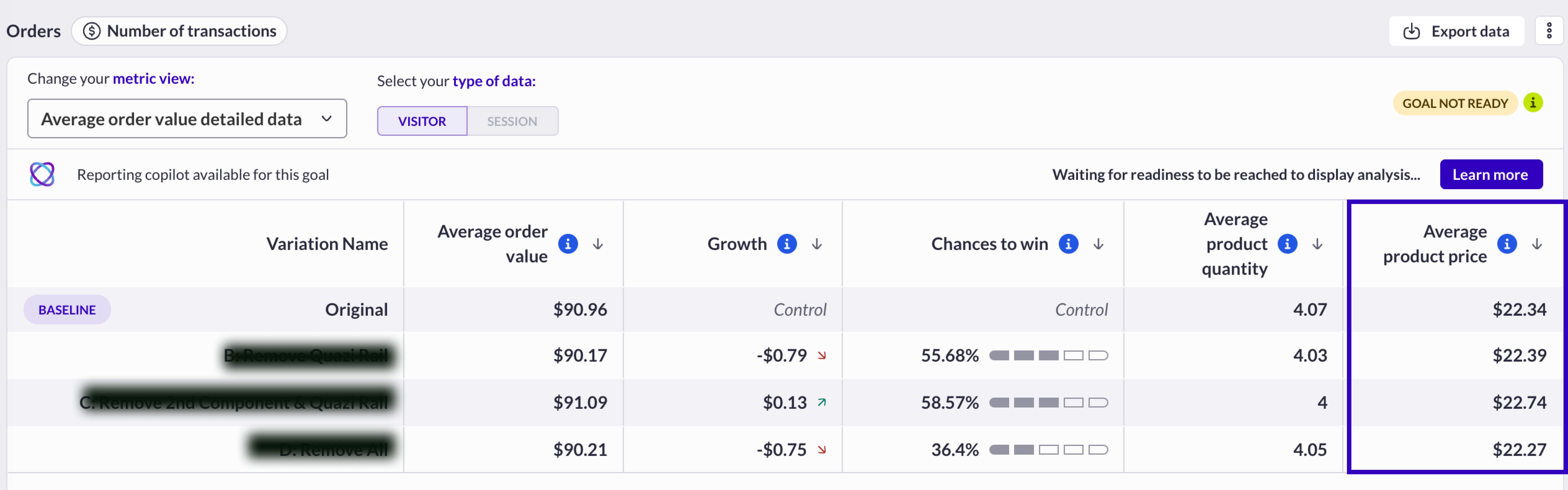
### **Average product price**
In the [reporting](/reporting-and-performances/reporting/campaign-reporting.md), select: *metric view: Average order value detailed data*
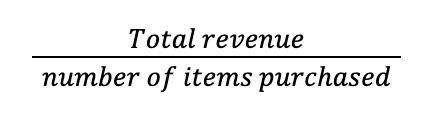
Average price of a purchased item per variation
#### Calculation
#### Example
Total revenue: $10,000
Number of purchased items: 298
Average product price = $10,000 / 298 = $33.55
## Revenue
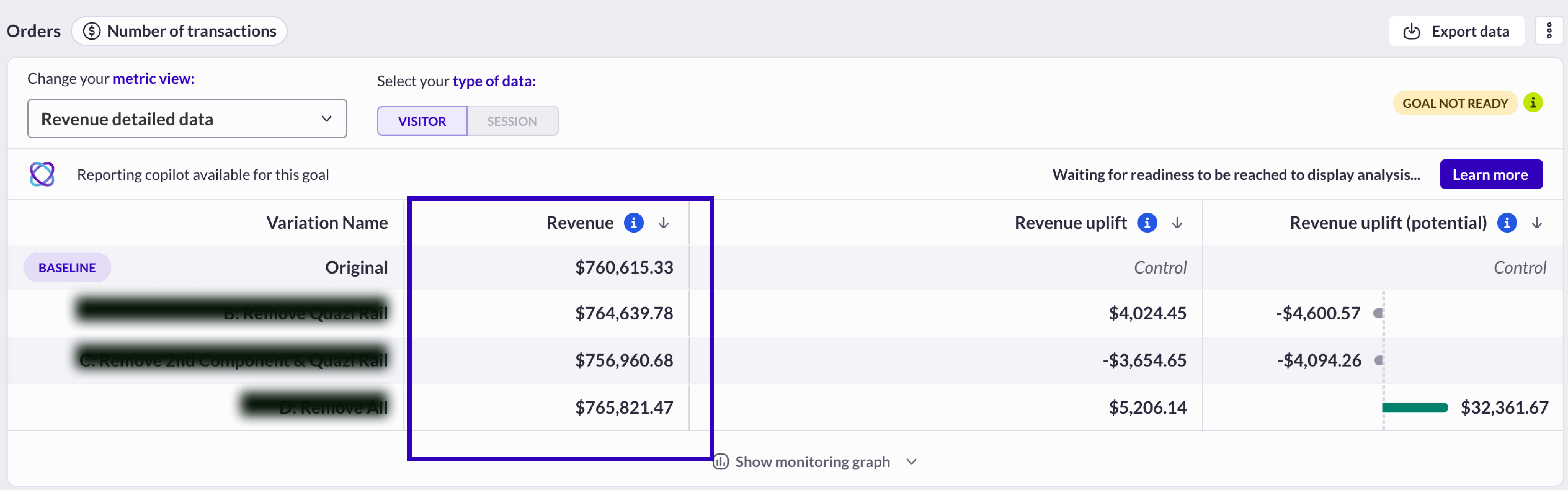
In the [reporting](/reporting-and-performances/reporting/campaign-reporting.md), select: *metric view: Revenue detailed data*
This is the revenue generated by each variation (turnover = sum of all transaction values).
Please consider the variable you use to capture the amount of a purchase when you’ve installed your transaction tag, this amount doesn’t have to contain the delivery fees or taxes.
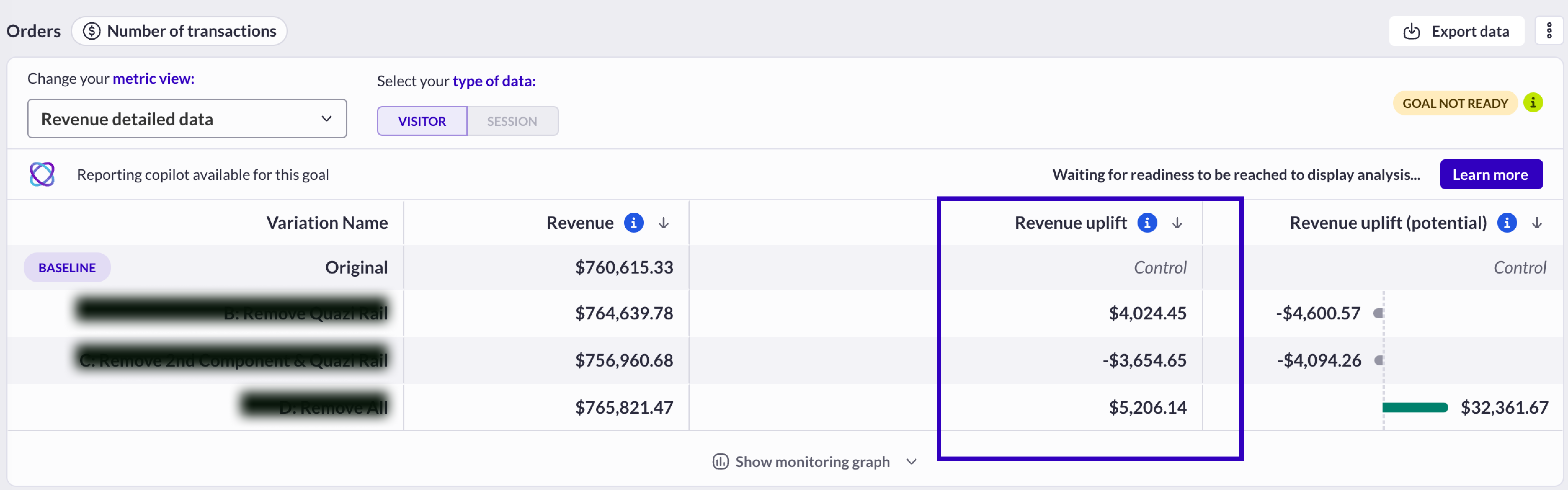
## Revenue uplift
In the [reporting](/reporting-and-performances/reporting/campaign-reporting.md), select: *metric view: Revenue detailed data*
This is the difference between the revenue of a variation compared to the revenue of the baseline (original)
### **Calculation**
Revenue variation - revenue original
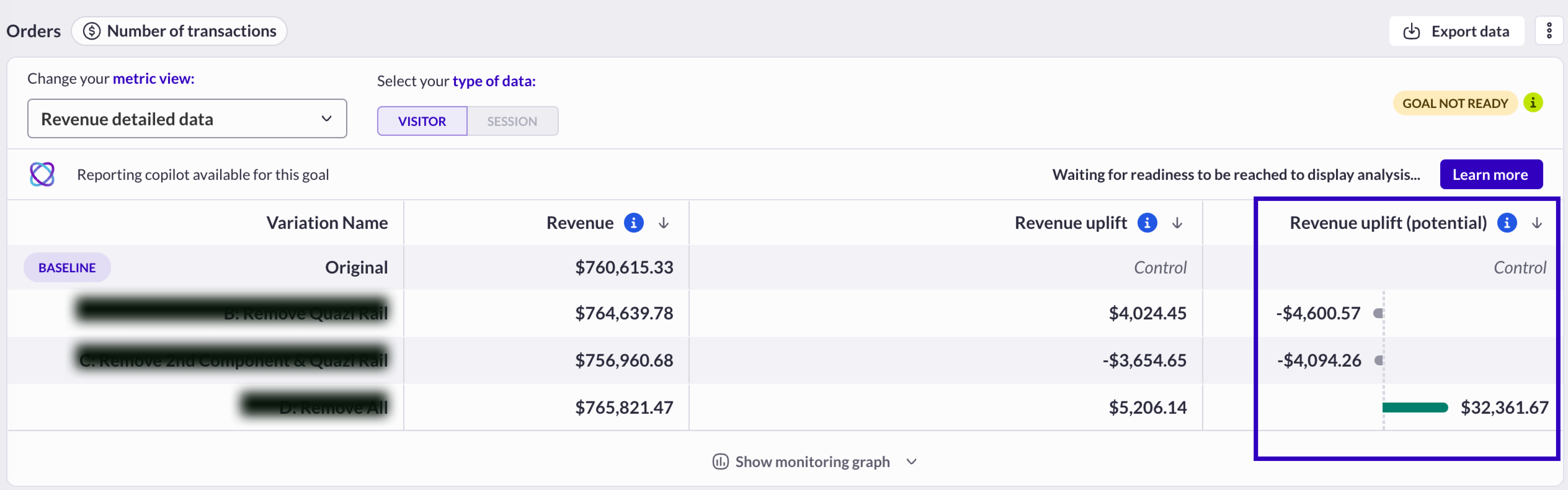
## Revenue uplift (potential)
In the [reporting](/reporting-and-performances/reporting/campaign-reporting.md), select: *metric view: Revenue detailed data*
This is the fictive amount that could have been earned if 100% of the traffic of the campaign had been assigned to the variation (assuming the same behavior in terms of transaction rate and average order value).
### **Calculation**
For an A/B Test with only one variation:
---
# Agent Instructions
This documentation is published with GitBook. GitBook is the documentation platform designed so that both humans and AI agents can read, navigate, and reason over technical content effectively. Learn more at gitbook.com.
## Querying This Documentation
If you need additional information that is not directly available in this page, you can query the documentation dynamically by asking a question.
Perform an HTTP GET request on the current page URL with the `ask` query parameter, and the optional `goal` query parameter:
```
GET https://docs.abtasty.com/reporting-and-performances/reporting/metrics/metrics-based-on-transactions.md?ask=&goal=
```
`ask` is the immediate question: it should be specific, self-contained, and written in natural language.
`goal` is optional and describes the broader end goal you are ultimately trying to accomplish on behalf of the user. GitBook uses it to tailor the answer towards what is most useful for that goal.
The response will contain a direct answer to the question and relevant excerpts and sources from the documentation.
Use this mechanism when the answer is not explicitly present in the current page, you need clarification or additional context, or you want to retrieve related documentation sections.
 ### **Calculation**
 *AB Tasty variable***:** transactionUserConversionRate
### **Example**
*AB Tasty variable***:** transactionUserConversionRate
### **Example**
 ### **Growth between two transaction rates**
 In the [reporting](/reporting-and-performances/reporting/campaign-reporting.md), select: *metric view: Transaction detailed data*
In a test campaign, this metric compares two transaction rates (at a visitor level or a session level) and helps to identify the best performer between two variations (the variation is compared to the baseline, which is the original version).
The growth metrics are always displayed on all variations except on the one which is used as the ***baseline***. See this [***article*** ](/reporting-and-performances/reporting/campaign-reporting.md)to learn how to change the baseline in a report.
#### Calculation
In the [reporting](/reporting-and-performances/reporting/campaign-reporting.md), select: *metric view: Transaction detailed data*
In a test campaign, this metric compares two transaction rates (at a visitor level or a session level) and helps to identify the best performer between two variations (the variation is compared to the baseline, which is the original version).
The growth metrics are always displayed on all variations except on the one which is used as the ***baseline***. See this [***article*** ](/reporting-and-performances/reporting/campaign-reporting.md)to learn how to change the baseline in a report.
#### Calculation
 #### Example
 ## Average order value
In the [reporting](/reporting-and-performances/reporting/campaign-reporting.md), select: *metric view: Overview*
The average order value calculated **on all the recorded purchases** in the variation.
## Average order value
In the [reporting](/reporting-and-performances/reporting/campaign-reporting.md), select: *metric view: Overview*
The average order value calculated **on all the recorded purchases** in the variation.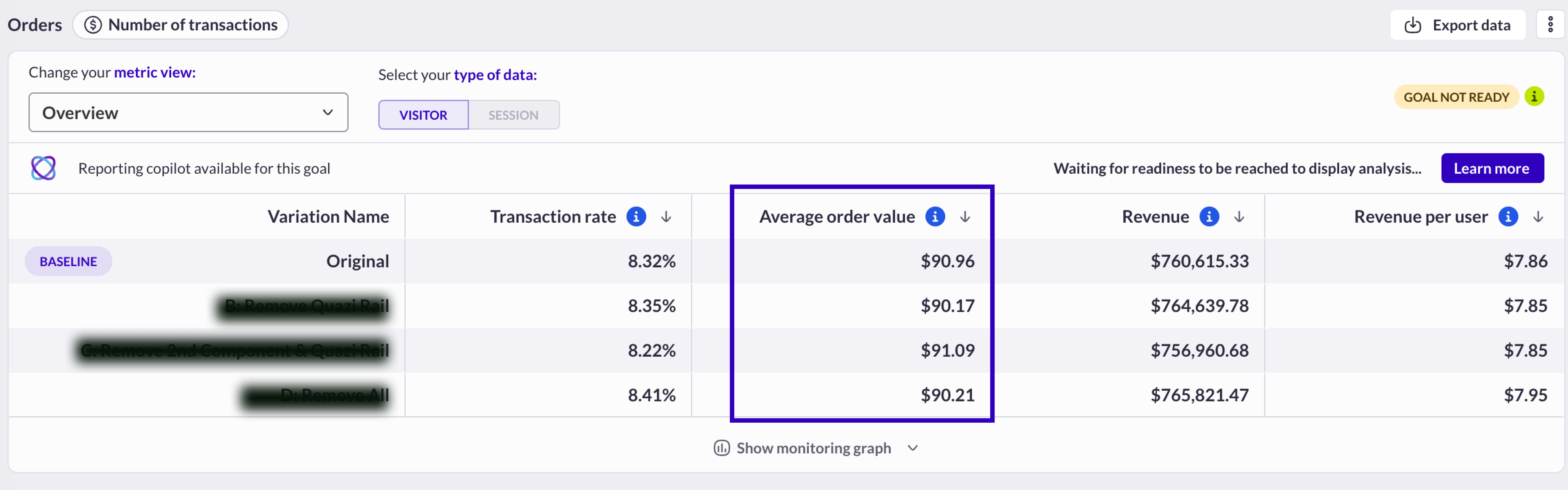
 ### **Example**
20 different transactions recorded, for a total amount of $10,000.
Average order value = $10,000/ 20 = $500
### **Growth between two average order value**
In a testing campaign, this metric compares two average order values and helps to identify the best performer between two variations (the variation is compared to the baseline, which is the original version).
In the [reporting](/reporting-and-performances/reporting/campaign-reporting.md), select: *Average order value detailed data*
### **Example**
20 different transactions recorded, for a total amount of $10,000.
Average order value = $10,000/ 20 = $500
### **Growth between two average order value**
In a testing campaign, this metric compares two average order values and helps to identify the best performer between two variations (the variation is compared to the baseline, which is the original version).
In the [reporting](/reporting-and-performances/reporting/campaign-reporting.md), select: *Average order value detailed data*
 #### Calculation
Average order value variation - average order value baseline
#### Example
Average order value original = $154.20
Average order value variation = $153.90
Average order value growth = $154.20 - $153.90 = $+0.30
## Average product quantity
In the [reporting](/reporting-and-performances/reporting/campaign-reporting.md), select: *metric view: Average order value detailed data*
Average product quantity is calculated **on all the recorded purchases** in the variation.
#### Calculation
Average order value variation - average order value baseline
#### Example
Average order value original = $154.20
Average order value variation = $153.90
Average order value growth = $154.20 - $153.90 = $+0.30
## Average product quantity
In the [reporting](/reporting-and-performances/reporting/campaign-reporting.md), select: *metric view: Average order value detailed data*
Average product quantity is calculated **on all the recorded purchases** in the variation.
 ### **Calculation**
Total number of items purchased in all transactions / number of transactions
### **Example**
Total number of transactions = 153
Number of purchased items = 298
Average product quantity = 298 / 153 = 1.94
### **Average product price**
In the [reporting](/reporting-and-performances/reporting/campaign-reporting.md), select: *metric view: Average order value detailed data*
Average price of a purchased item per variation
### **Calculation**
Total number of items purchased in all transactions / number of transactions
### **Example**
Total number of transactions = 153
Number of purchased items = 298
Average product quantity = 298 / 153 = 1.94
### **Average product price**
In the [reporting](/reporting-and-performances/reporting/campaign-reporting.md), select: *metric view: Average order value detailed data*
Average price of a purchased item per variation
 #### Calculation
 #### Example
Total revenue: $10,000
Number of purchased items: 298
Average product price = $10,000 / 298 = $33.55
## Revenue
In the [reporting](/reporting-and-performances/reporting/campaign-reporting.md), select: *metric view: Revenue detailed data*
This is the revenue generated by each variation (turnover = sum of all transaction values).
#### Example
Total revenue: $10,000
Number of purchased items: 298
Average product price = $10,000 / 298 = $33.55
## Revenue
In the [reporting](/reporting-and-performances/reporting/campaign-reporting.md), select: *metric view: Revenue detailed data*
This is the revenue generated by each variation (turnover = sum of all transaction values).
 Please consider the variable you use to capture the amount of a purchase when you’ve installed your transaction tag, this amount doesn’t have to contain the delivery fees or taxes.
## Revenue uplift
In the [reporting](/reporting-and-performances/reporting/campaign-reporting.md), select: *metric view: Revenue detailed data*
This is the difference between the revenue of a variation compared to the revenue of the baseline (original)
Please consider the variable you use to capture the amount of a purchase when you’ve installed your transaction tag, this amount doesn’t have to contain the delivery fees or taxes.
## Revenue uplift
In the [reporting](/reporting-and-performances/reporting/campaign-reporting.md), select: *metric view: Revenue detailed data*
This is the difference between the revenue of a variation compared to the revenue of the baseline (original)
 ### **Calculation**
Revenue variation - revenue original
## Revenue uplift (potential)
In the [reporting](/reporting-and-performances/reporting/campaign-reporting.md), select: *metric view: Revenue detailed data*
This is the fictive amount that could have been earned if 100% of the traffic of the campaign had been assigned to the variation (assuming the same behavior in terms of transaction rate and average order value).
### **Calculation**
Revenue variation - revenue original
## Revenue uplift (potential)
In the [reporting](/reporting-and-performances/reporting/campaign-reporting.md), select: *metric view: Revenue detailed data*
This is the fictive amount that could have been earned if 100% of the traffic of the campaign had been assigned to the variation (assuming the same behavior in terms of transaction rate and average order value).
 ---
# Agent Instructions
This documentation is published with GitBook. GitBook is the documentation platform designed so that both humans and AI agents can read, navigate, and reason over technical content effectively. Learn more at gitbook.com.
## Querying This Documentation
If you need additional information that is not directly available in this page, you can query the documentation dynamically by asking a question.
Perform an HTTP GET request on the current page URL with the `ask` query parameter, and the optional `goal` query parameter:
```
GET https://docs.abtasty.com/reporting-and-performances/reporting/metrics/metrics-based-on-transactions.md?ask=
---
# Agent Instructions
This documentation is published with GitBook. GitBook is the documentation platform designed so that both humans and AI agents can read, navigate, and reason over technical content effectively. Learn more at gitbook.com.
## Querying This Documentation
If you need additional information that is not directly available in this page, you can query the documentation dynamically by asking a question.
Perform an HTTP GET request on the current page URL with the `ask` query parameter, and the optional `goal` query parameter:
```
GET https://docs.abtasty.com/reporting-and-performances/reporting/metrics/metrics-based-on-transactions.md?ask=