> For the complete documentation index, see [llms.txt](https://docs.abtasty.com/llms.txt). Markdown versions of documentation pages are available by appending `.md` to page URLs; this page is available as [Markdown](https://docs.abtasty.com/reporting-and-performances/reporting/using-the-nps-report/how-does-feedback-analysis-copilot-work.md).
# How does Evi Feedback work
**Evi Feedback** helps you analyze customer feedback from [**NPS®️**](/web-experimentation-and-personalization/editors-and-widget/list-of-widgets/ab-tasty-prebuilt-widgets/nps-net-promoter-score-widget.md) **(Net Promoter Score®️)** or **CSAT (Customer Satisfaction Score) campaigns**. It processes large volumes of comments, identifies key themes, and provides actionable insights. To ensure meaningful analysis, the system requires at least **100 comments**.
## How it works
### 1) Processing the feedback
**Evi Feedback** begins by calculating the **median score** of the campaign. It then divides the comments into two groups:
* **Positive** comments, which have scores above the median
* **Negative** comments, which have scores below or equal to the median.
This separation helps in understanding the overall sentiment of the feedback.
### 2) Identifying themes
Once the comments are categorized, **Evi Feedback** converts them into **vectors**, which are numerical representations that allow for efficient processing of large volumes of text. It then groups similar comments into **clusters** based on sentiment. Positive comments are clustered separately from negative comments, and each cluster represents a **specific theme** that emerges from the feedback.
### 3) Naming & describing themes
To make the themes more understandable, **Evi Feedback** extracts **key terms** from each cluster, such as "price" or "expensive." It then assigns a **theme name** and a **brief description** based on the **10 most representative comments** in each cluster. This ensures that each theme accurately reflects the main concerns or praises expressed by customers.
### 4) Displaying insights
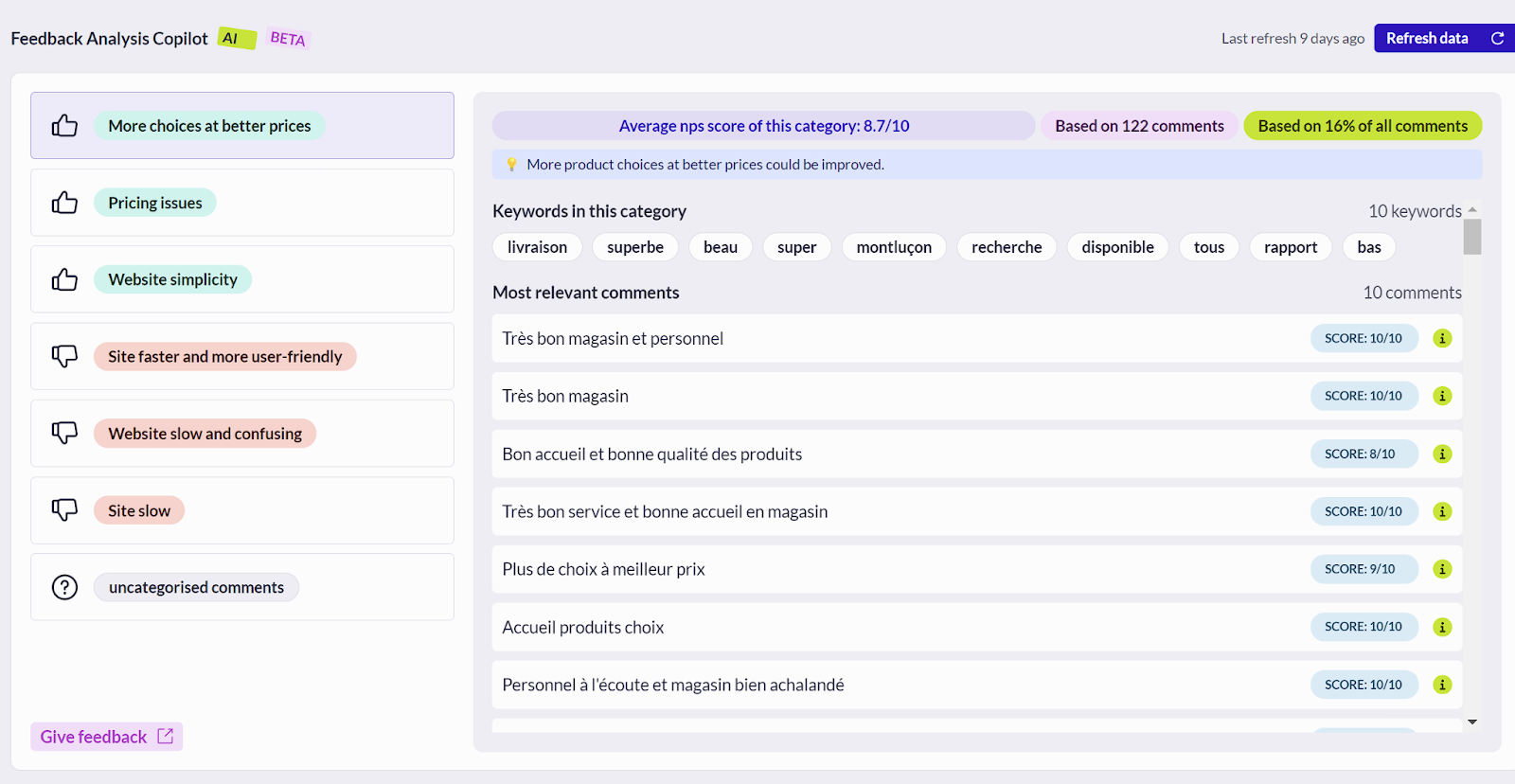
After identifying and naming the themes, the **Evi Feedback** calculates the number of comments linked to each theme. The interface then displays the **top three positive themes** and the **top three negative themes**, providing a clear overview of the most significant feedback trends. Any remaining comments that do not fit into a specific theme are grouped under **"uncategorized comments."**
 ### 5) Loading & Refreshing Data
The initial processing of feedback can take up to two minutes. When you reload the page, the latest results are displayed automatically. If you want to update the analysis with the most recent comments, you can manually refresh the analysis, which will process all campaign comments again.
### 6) Interpreting the Results
Each theme includes a name and a brief description summarizing the feedback. Additionally, the system provides the number of comments associated with each theme, helping you gauge the importance of different topics. The breakdown of positive and negative themes allows you to quickly identify areas of satisfaction and concern.
**Evi Feedback** helps you quickly identify key customer concerns and positive feedback trends, making it easier to take action based on real customer insights.
*Net Promoter®, NPS®, NPS Prism®, and the NPS-related emoticons are registered trademarks of Bain & Company, Inc., NICE Systems, Inc., and Fred Reichheld. Net Promoter ScoreSM and Net Promoter SystemSM are service marks of Bain & Company, Inc., NICE Systems, Inc., and Fred Reichheld.*
---
# Agent Instructions
This documentation is published with GitBook. GitBook is the documentation platform designed so that both humans and AI agents can read, navigate, and reason over technical content effectively. Learn more at gitbook.com.
## Querying This Documentation
If you need additional information that is not directly available in this page, you can query the documentation dynamically by asking a question.
Perform an HTTP GET request on the current page URL with the `ask` query parameter, and the optional `goal` query parameter:
```
GET https://docs.abtasty.com/reporting-and-performances/reporting/using-the-nps-report/how-does-feedback-analysis-copilot-work.md?ask=&goal=
```
`ask` is the immediate question: it should be specific, self-contained, and written in natural language.
`goal` is optional and describes the broader end goal you are ultimately trying to accomplish on behalf of the user. GitBook uses it to tailor the answer towards what is most useful for that goal.
The response will contain a direct answer to the question and relevant excerpts and sources from the documentation.
Use this mechanism when the answer is not explicitly present in the current page, you need clarification or additional context, or you want to retrieve related documentation sections.
### 5) Loading & Refreshing Data
The initial processing of feedback can take up to two minutes. When you reload the page, the latest results are displayed automatically. If you want to update the analysis with the most recent comments, you can manually refresh the analysis, which will process all campaign comments again.
### 6) Interpreting the Results
Each theme includes a name and a brief description summarizing the feedback. Additionally, the system provides the number of comments associated with each theme, helping you gauge the importance of different topics. The breakdown of positive and negative themes allows you to quickly identify areas of satisfaction and concern.
**Evi Feedback** helps you quickly identify key customer concerns and positive feedback trends, making it easier to take action based on real customer insights.
*Net Promoter®, NPS®, NPS Prism®, and the NPS-related emoticons are registered trademarks of Bain & Company, Inc., NICE Systems, Inc., and Fred Reichheld. Net Promoter ScoreSM and Net Promoter SystemSM are service marks of Bain & Company, Inc., NICE Systems, Inc., and Fred Reichheld.*
---
# Agent Instructions
This documentation is published with GitBook. GitBook is the documentation platform designed so that both humans and AI agents can read, navigate, and reason over technical content effectively. Learn more at gitbook.com.
## Querying This Documentation
If you need additional information that is not directly available in this page, you can query the documentation dynamically by asking a question.
Perform an HTTP GET request on the current page URL with the `ask` query parameter, and the optional `goal` query parameter:
```
GET https://docs.abtasty.com/reporting-and-performances/reporting/using-the-nps-report/how-does-feedback-analysis-copilot-work.md?ask=&goal=
```
`ask` is the immediate question: it should be specific, self-contained, and written in natural language.
`goal` is optional and describes the broader end goal you are ultimately trying to accomplish on behalf of the user. GitBook uses it to tailor the answer towards what is most useful for that goal.
The response will contain a direct answer to the question and relevant excerpts and sources from the documentation.
Use this mechanism when the answer is not explicitly present in the current page, you need clarification or additional context, or you want to retrieve related documentation sections.