> For the complete documentation index, see [llms.txt](https://docs.abtasty.com/llms.txt). Markdown versions of documentation pages are available by appending `.md` to page URLs; this page is available as [Markdown](https://docs.abtasty.com/web-experimentation-and-personalization/campaign-creation-and-dashboard/how-to-create-a-campaign/experimentations/how-to-create-an-aa-test.md).
# How to create an A/A Test
An A/A test is a type of campaign that enables you to gather insights about your website by tracking events or specific behaviors using the AB Tasty tag.
This is a type of test for which:
* The traffic allocation is 0% on the original version and 100% on the variation.
* The variation is empty: you don’t create any new content to push, so the campaign is totally transparent for your visitors.
* You have set up goals to follow in the reporting.
 So, what’s the point of an A/A Test?
* **Gathering baseline data:** All market analytics tools track events differently (technologically and also in the way they calculate certain metrics). Thus, it’s normal to observe differences between the metrics displayed by two different analytics tools. With an A/A Test, you can collect your visitors’ main KPIs using AB Tasty and establish a baseline to analyze your future campaigns more accurately.
* **Analyzing before and after revamp:** If you’re planning a large revamp of an important feature on your website and can’t A/B test the two versions, it’s important to have a record of the previous performance of this feature. For example, let’s say you want to change the structure of your navigation bar. If you launch an A/A Test before the release, you’ll get the exact click rates for each tab. After the revamp, another A/A Test will enable you to collect the new click rates on the new tabs and, after several weeks, you’ll be able to measure the impact of your release on the navigation behavior.
* **Adding click zones or segment performance:** You can also use A/A Tests to track the behavior of your visitors with different product categories to compare them or analyze their performance per segment.
To learn more about the differences between each type of test, refer to the [Types of campaigns](/web-experimentation-and-personalization/campaign-creation-and-dashboard/types-of-campaigns.md) article. If you don’t know which type of campaign to choose, [our virtual assistant Ally](/web-experimentation-and-personalization/campaign-creation-and-dashboard/types-of-campaigns/choosing-the-right-type-of-campaign-with-ally-our-assistant.md) can help you.
To create an A/A test, go to Web Experimentation, click the *Create* button and select *A/A Test*.
👉 To learn about the different ways to create a campaign, please refer to [How to create a campaign](/web-experimentation-and-personalization/campaign-creation-and-dashboard/how-to-create-a-campaign.md).
## Configuration
### Step 1: Main information
The Main Information page is the first step toward your new A/A Test campaign.
👉 For more information on how to configure this step, refer to [How to set-up Main Information step](/web-experimentation-and-personalization/campaign-creation-and-dashboard/how-to-set-up-main-information-step.md).
### Step 2: Editor
As the A/A test objective is not to change content of your website but to gather data and insights, you can still use the Visual Editor but only to create trackers.
In the Editor, you can add trackers to your campaign, such as click trackings, custom trackers and widget trackers.
👉 To learn how to use the Visual Editor, discover options, and dive into our widget libraries, please read the [Visual Editor Guide.](/web-experimentation-and-personalization/editors-and-widget/visual-editor---discovery.md)
### Step 3: Goals
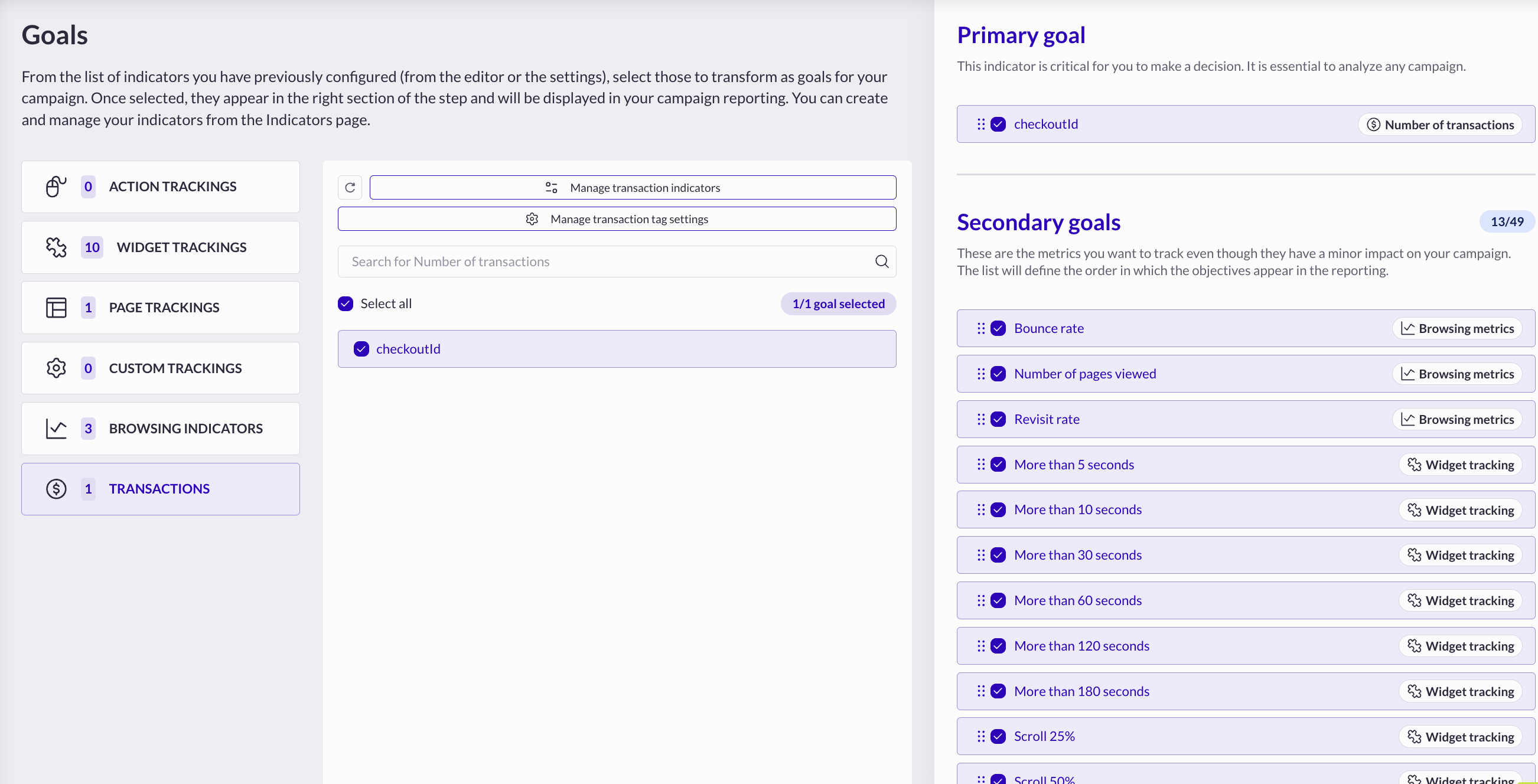
Once you’ve set up your trackers, you can preconfigure your future reporting to easily identify the metrics needed to track your primary goal. The notions of primary and secondary goals are not significant with A/A Tests because the objective here is to recall all the trackers you’ve set-up in the editor.
Once your campaign has started, you can add secondary goals, but action tracker such as clicks or widgets won’t be retroactive in your reporting and will be calculated from the date you added these metrics as goals. All the other goals will be calculated from the date you launched your A/A Test, even if you add them afterward.
By default, A/A Test will embed some goals like:
* Transaction Goal
* Bounce Rate
* Number of pages viewed
* Revisit Rate
* Scroll Rate Tracking
* Dwell-Time Tracking
* Account Action Tracker
The Transaction Goal will be set as the Primary Goal if you have a transaction tag implemented. If not the bounce rate will.
So, what’s the point of an A/A Test?
* **Gathering baseline data:** All market analytics tools track events differently (technologically and also in the way they calculate certain metrics). Thus, it’s normal to observe differences between the metrics displayed by two different analytics tools. With an A/A Test, you can collect your visitors’ main KPIs using AB Tasty and establish a baseline to analyze your future campaigns more accurately.
* **Analyzing before and after revamp:** If you’re planning a large revamp of an important feature on your website and can’t A/B test the two versions, it’s important to have a record of the previous performance of this feature. For example, let’s say you want to change the structure of your navigation bar. If you launch an A/A Test before the release, you’ll get the exact click rates for each tab. After the revamp, another A/A Test will enable you to collect the new click rates on the new tabs and, after several weeks, you’ll be able to measure the impact of your release on the navigation behavior.
* **Adding click zones or segment performance:** You can also use A/A Tests to track the behavior of your visitors with different product categories to compare them or analyze their performance per segment.
To learn more about the differences between each type of test, refer to the [Types of campaigns](/web-experimentation-and-personalization/campaign-creation-and-dashboard/types-of-campaigns.md) article. If you don’t know which type of campaign to choose, [our virtual assistant Ally](/web-experimentation-and-personalization/campaign-creation-and-dashboard/types-of-campaigns/choosing-the-right-type-of-campaign-with-ally-our-assistant.md) can help you.
To create an A/A test, go to Web Experimentation, click the *Create* button and select *A/A Test*.
👉 To learn about the different ways to create a campaign, please refer to [How to create a campaign](/web-experimentation-and-personalization/campaign-creation-and-dashboard/how-to-create-a-campaign.md).
## Configuration
### Step 1: Main information
The Main Information page is the first step toward your new A/A Test campaign.
👉 For more information on how to configure this step, refer to [How to set-up Main Information step](/web-experimentation-and-personalization/campaign-creation-and-dashboard/how-to-set-up-main-information-step.md).
### Step 2: Editor
As the A/A test objective is not to change content of your website but to gather data and insights, you can still use the Visual Editor but only to create trackers.
In the Editor, you can add trackers to your campaign, such as click trackings, custom trackers and widget trackers.
👉 To learn how to use the Visual Editor, discover options, and dive into our widget libraries, please read the [Visual Editor Guide.](/web-experimentation-and-personalization/editors-and-widget/visual-editor---discovery.md)
### Step 3: Goals
Once you’ve set up your trackers, you can preconfigure your future reporting to easily identify the metrics needed to track your primary goal. The notions of primary and secondary goals are not significant with A/A Tests because the objective here is to recall all the trackers you’ve set-up in the editor.
Once your campaign has started, you can add secondary goals, but action tracker such as clicks or widgets won’t be retroactive in your reporting and will be calculated from the date you added these metrics as goals. All the other goals will be calculated from the date you launched your A/A Test, even if you add them afterward.
By default, A/A Test will embed some goals like:
* Transaction Goal
* Bounce Rate
* Number of pages viewed
* Revisit Rate
* Scroll Rate Tracking
* Dwell-Time Tracking
* Account Action Tracker
The Transaction Goal will be set as the Primary Goal if you have a transaction tag implemented. If not the bounce rate will.
 👉 To learn how to configure Goals, please read [Campaign flow: Goals step](/web-experimentation-and-personalization/campaign-flow-goals-step.md).
### Step 4: Targeting
You have to declare **WHERE** your campaign should be visible on your website (e.g. on every page, on specific pages, on only one page, etc.), for **WHOM** (e.g. your whole traffic, mobile users only, etc.), and in **WHICH** conditions (e.g. after a certain number of pages, when it’s cold outside, etc.) it should appear. However, you can't change **WHEN** visitors will see the campaign depending on the recurrence as the A/A test will be instantly trigger.
Be careful when entering the targeted pages (in the *Where* section) of your test to ensure that it will display correctly on the pages you want to target (e.g. Product pages).
👉 To learn how to configure targeting, please read [How to setup a campaign targeting](/web-experimentation-and-personalization/targeting-step/how-to-set-up-a-campaign-targeting.md).
### Step 5: Traffic allocation
By default, traffic allocation it is locked to 100% of your traffic to the variation.
👉 To learn how to configure Traffic allocation, please read [Traffic allocation](/web-experimentation-and-personalization/traffic-allocation.md).
### Step 6: Advanced options
The advanced options are not mandatory.
* Enable the **third party tool(s)** you have connected to AB Tasty to send your test data to your tool.
* Select a **loading method** for your campaign.
👉 To learn how to configure Advanced options, please read [Campaign flow: Advanced Options](/web-experimentation-and-personalization/campaign-flow-advanced-options.md).
### Step 7: QA
The QA of the campaign is one of the most important steps before launching your campaign into production. The QA allows you to verify and test in real condition :
\- the targeting configuration\
\- the tracker you applied\
👉 To learn how to use the QA Assistant, please read [QA Mode & QA Assistant](/web-experimentation-and-personalization/qa-step/qa-mode--qa-assistant.md).
If you want to launch your A/A Test at a specific hour on a specific day, and/or if you want to pause it at a specific hour on a specific day, see our guide on [scheduling.](/web-experimentation-and-personalization/campaign-creation-and-dashboard/campaign-scheduler.md)
---
# Agent Instructions
This documentation is published with GitBook. GitBook is the documentation platform designed so that both humans and AI agents can read, navigate, and reason over technical content effectively. Learn more at gitbook.com.
## Querying This Documentation
If you need additional information that is not directly available in this page, you can query the documentation dynamically by asking a question.
Perform an HTTP GET request on the current page URL with the `ask` query parameter, and the optional `goal` query parameter:
```
GET https://docs.abtasty.com/web-experimentation-and-personalization/campaign-creation-and-dashboard/how-to-create-a-campaign/experimentations/how-to-create-an-aa-test.md?ask=&goal=
```
`ask` is the immediate question: it should be specific, self-contained, and written in natural language.
`goal` is optional and describes the broader end goal you are ultimately trying to accomplish on behalf of the user. GitBook uses it to tailor the answer towards what is most useful for that goal.
The response will contain a direct answer to the question and relevant excerpts and sources from the documentation.
Use this mechanism when the answer is not explicitly present in the current page, you need clarification or additional context, or you want to retrieve related documentation sections.
👉 To learn how to configure Goals, please read [Campaign flow: Goals step](/web-experimentation-and-personalization/campaign-flow-goals-step.md).
### Step 4: Targeting
You have to declare **WHERE** your campaign should be visible on your website (e.g. on every page, on specific pages, on only one page, etc.), for **WHOM** (e.g. your whole traffic, mobile users only, etc.), and in **WHICH** conditions (e.g. after a certain number of pages, when it’s cold outside, etc.) it should appear. However, you can't change **WHEN** visitors will see the campaign depending on the recurrence as the A/A test will be instantly trigger.
Be careful when entering the targeted pages (in the *Where* section) of your test to ensure that it will display correctly on the pages you want to target (e.g. Product pages).
👉 To learn how to configure targeting, please read [How to setup a campaign targeting](/web-experimentation-and-personalization/targeting-step/how-to-set-up-a-campaign-targeting.md).
### Step 5: Traffic allocation
By default, traffic allocation it is locked to 100% of your traffic to the variation.
👉 To learn how to configure Traffic allocation, please read [Traffic allocation](/web-experimentation-and-personalization/traffic-allocation.md).
### Step 6: Advanced options
The advanced options are not mandatory.
* Enable the **third party tool(s)** you have connected to AB Tasty to send your test data to your tool.
* Select a **loading method** for your campaign.
👉 To learn how to configure Advanced options, please read [Campaign flow: Advanced Options](/web-experimentation-and-personalization/campaign-flow-advanced-options.md).
### Step 7: QA
The QA of the campaign is one of the most important steps before launching your campaign into production. The QA allows you to verify and test in real condition :
\- the targeting configuration\
\- the tracker you applied\
👉 To learn how to use the QA Assistant, please read [QA Mode & QA Assistant](/web-experimentation-and-personalization/qa-step/qa-mode--qa-assistant.md).
If you want to launch your A/A Test at a specific hour on a specific day, and/or if you want to pause it at a specific hour on a specific day, see our guide on [scheduling.](/web-experimentation-and-personalization/campaign-creation-and-dashboard/campaign-scheduler.md)
---
# Agent Instructions
This documentation is published with GitBook. GitBook is the documentation platform designed so that both humans and AI agents can read, navigate, and reason over technical content effectively. Learn more at gitbook.com.
## Querying This Documentation
If you need additional information that is not directly available in this page, you can query the documentation dynamically by asking a question.
Perform an HTTP GET request on the current page URL with the `ask` query parameter, and the optional `goal` query parameter:
```
GET https://docs.abtasty.com/web-experimentation-and-personalization/campaign-creation-and-dashboard/how-to-create-a-campaign/experimentations/how-to-create-an-aa-test.md?ask=&goal=
```
`ask` is the immediate question: it should be specific, self-contained, and written in natural language.
`goal` is optional and describes the broader end goal you are ultimately trying to accomplish on behalf of the user. GitBook uses it to tailor the answer towards what is most useful for that goal.
The response will contain a direct answer to the question and relevant excerpts and sources from the documentation.
Use this mechanism when the answer is not explicitly present in the current page, you need clarification or additional context, or you want to retrieve related documentation sections.