> For the complete documentation index, see [llms.txt](https://docs.abtasty.com/llms.txt). Markdown versions of documentation pages are available by appending `.md` to page URLs; this page is available as [Markdown](https://docs.abtasty.com/web-experimentation-and-personalization/campaign-creation-and-dashboard/how-to-use-mde-calculator.md).
# How to use MDE Calculator
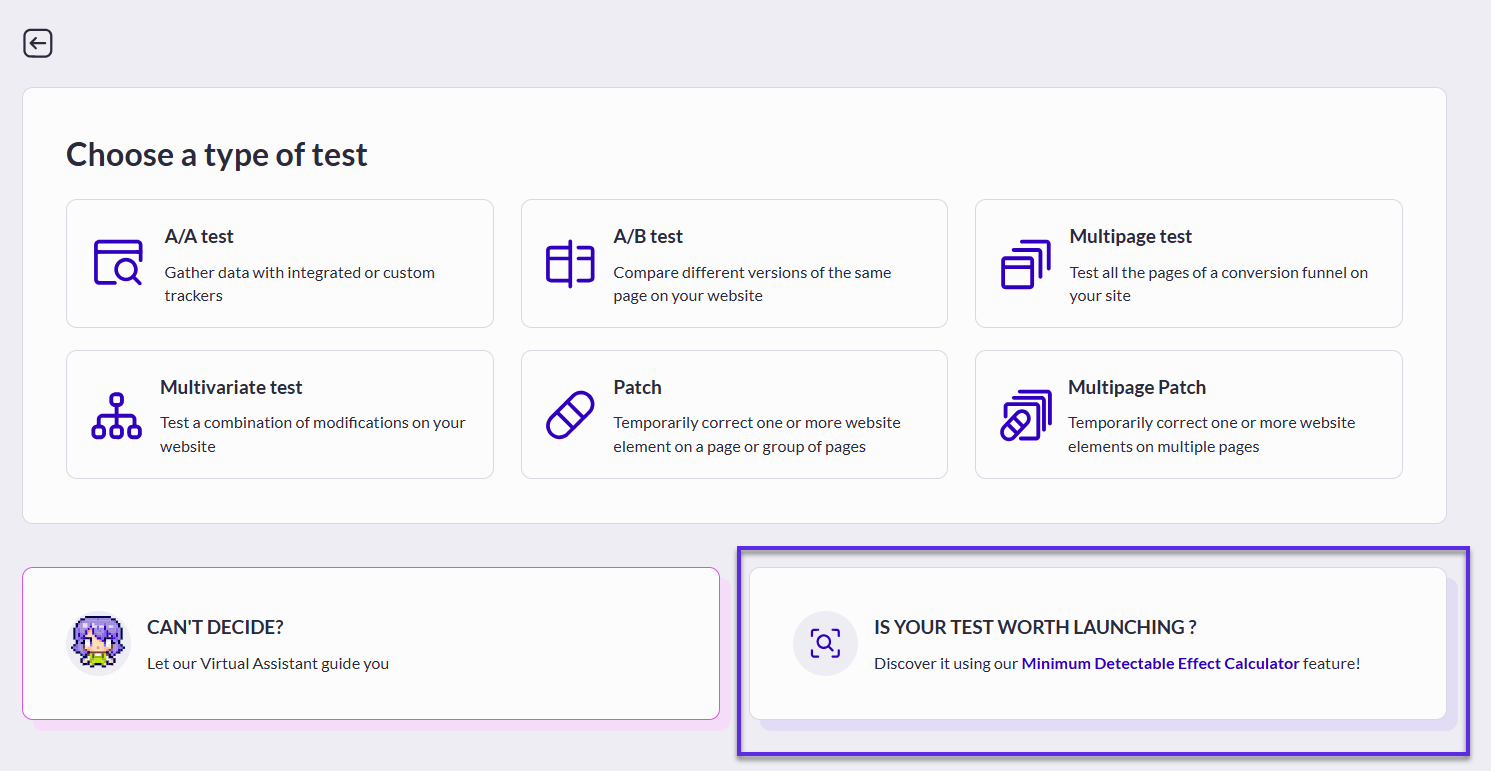
A Minimum Detectable Effect (MDE) is the minimum uplift you should reach in a given timeline to consider the results of a campaign as statistically significant.
MDE is important in the implementation of an A/B test because it directly influences how long the test needs to run and how large a sample size is required.
The MDE can be calculated using open-source tools, but you can also base it on data calculated directly by AB Tasty.\
## MDE calculation methods
You can either choose to rely on data AB Tasty collected on your previous experiments (that have been live and collected data), **or** enter data you want to let AB Tasty calculate it manually.
### AB TASTY based Data
#### The form
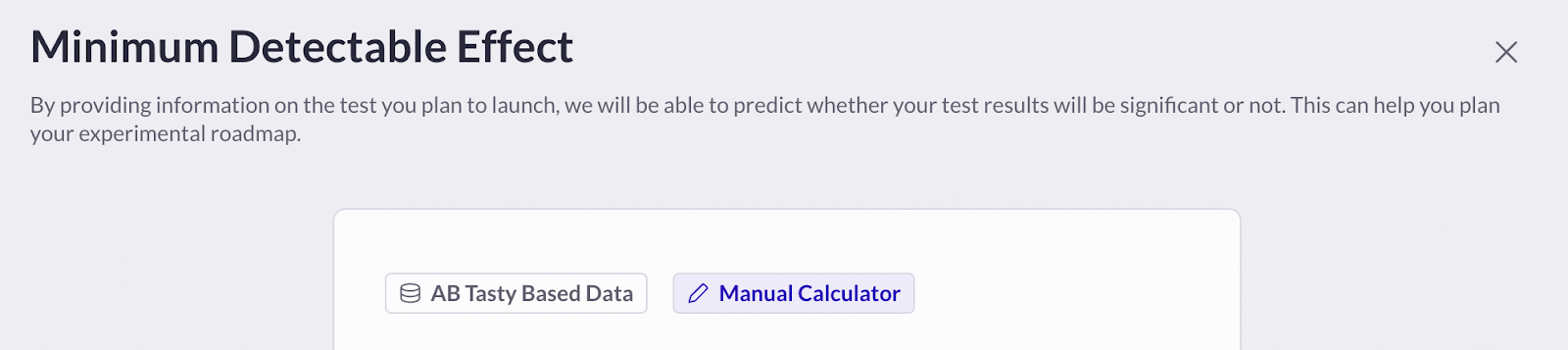
When clicking “**AB Tasty based data**”, you can search for an experiment that has the exact same configuration as the A/B Test you want to launch.
For example:
* Targeting
* URL Sample
* Primary Goal
You can select several already existing targeting such as:
* Saved Page
* Segment(s)
* Trigger(s)
Note that if you select a Saved page, the URL sample won’t be selectable anymore.
URL Sample is designed to be a "is". Meaning that MDE calculation will compute all the URL containing this Sample. So if you enter , all URLs containing this sample whether or not they include other parameters will be computed in the research. ([https://www.abtasty.com?test=1](https://www.abtasty.com/?test=1), [https://www.abtasty.com?test=2](https://www.abtasty.com/?test=2), [https://www.abtasty.com?test=3](https://www.abtasty.com/?test=3), etc.)\
The Primary goal, has to be an already existing goal (already selected in a campaign that had collected data), otherwise, AB Tasty will not have any data to compare with.
#### The research
AB Tasty will then search for all experiments which have been live over the past months with the configuration you selected, and will calculate the MDE based on data collected.
#### The results
The results are accessible directly through the Reporting menu:
There are three possible results here:
1. Among all the experiments that have been running, we have found a match (A/B test with the same configuration) with enough data to calculate a proper MDE. In this case, you will see a graph with the results. (See an example below)
2. We have found an experiment with the same configuration, but not enough data. We advise you to either create an A/A Test to start collecting data, try another configuration, or manually calculate it using the “Manual calculator” option.
3. We haven’t found any experiment with the same configuration. You can still create an A/A Test to start collecting data, try another configuration or manually calculate it using the “Manual calculator” option.
The value indicated by the curve is the growth you should reach if you want your test to be statistically significant in the given timeline. Considering that, you might ask yourself if you can reach 6.75% growth in 35 days. If it’s not the case, your experiment might not be worth launching.
#### Next steps
After analyzing your MDE results, you can create a campaign from the configuration you chose to base the calculation, **or** you can try another configuration.
You can also link the MDE to a specific campaign.
{% hint style="info" %}
Linking a MDE to a campaign enable you to retrieve the MDE calculation inside the report.
* You can link a MDE to only one campaign
* A campaign can have only one MDE linked
Note that if you create the test from the MDE calculation results, it is automatically linked to the AB Test created.
{% endhint %}
### Manual Calculation
#### The form
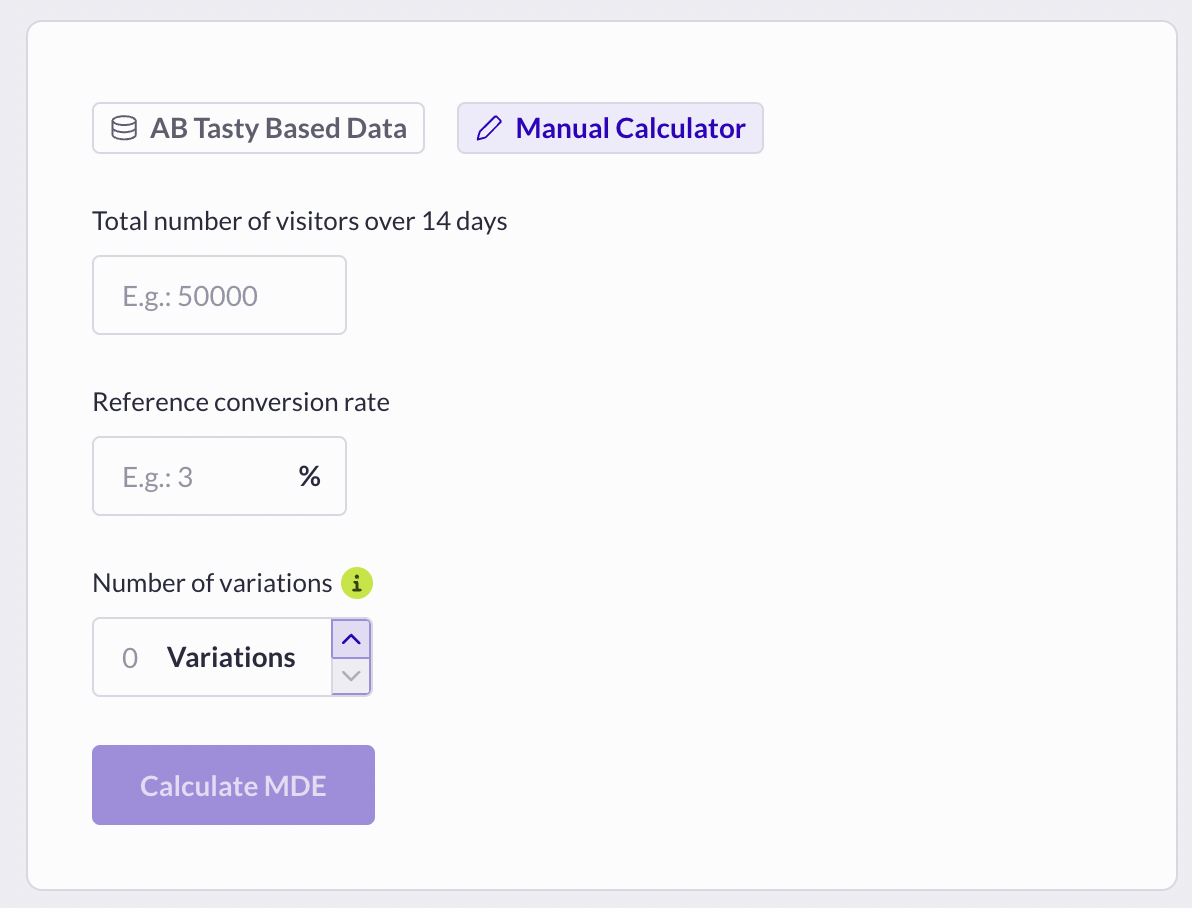
You can still manually calculate the MDE of your future experiments by providing data you can have in your third party tools.
You must indicate the following data:
* Total number of visitors of 14 days
* The reference Conversion rate on your primary goal
* The number of variations you want for your future A/B test
#### The results
The calculation results are displayed as a graph. Its structure is the same as the AB Tasty Based data calculation.
The value indicated by the curve is the growth you should reach if you want your test to be statistically significant in the given timeline. Considering that, you might ask yourself if you can reach 6.75% growth in 35 days. If it’s not the case, your experiment might not be worth launching.
#### The next step
After analyzing your MDE results, you can either create a campaign or try another configuration and start the process again.
## Use cases
As a CRO manager, I want to build a test on a specific page of my website, but I’m afraid of the time the statistical significance can take to be reached. Therefore, using the MDE with the AB Tasty based data will help me understand if I should (or shouldn’t) launch my experiment on that perimeter.
---
# Agent Instructions
This documentation is published with GitBook. GitBook is the documentation platform designed so that both humans and AI agents can read, navigate, and reason over technical content effectively. Learn more at gitbook.com.
## Querying This Documentation
If you need additional information that is not directly available in this page, you can query the documentation dynamically by asking a question.
Perform an HTTP GET request on the current page URL with the `ask` query parameter, and the optional `goal` query parameter:
```
GET https://docs.abtasty.com/web-experimentation-and-personalization/campaign-creation-and-dashboard/how-to-use-mde-calculator.md?ask=&goal=
```
`ask` is the immediate question: it should be specific, self-contained, and written in natural language.
`goal` is optional and describes the broader end goal you are ultimately trying to accomplish on behalf of the user. GitBook uses it to tailor the answer towards what is most useful for that goal.
The response will contain a direct answer to the question and relevant excerpts and sources from the documentation.
Use this mechanism when the answer is not explicitly present in the current page, you need clarification or additional context, or you want to retrieve related documentation sections.
 ### AB TASTY based Data
#### The form
When clicking “**AB Tasty based data**”, you can search for an experiment that has the exact same configuration as the A/B Test you want to launch.
For example:
* Targeting
* URL Sample
* Primary Goal
You can select several already existing targeting such as:
* Saved Page
* Segment(s)
* Trigger(s)
Note that if you select a Saved page, the URL sample won’t be selectable anymore.
URL Sample is designed to be a "is". Meaning that MDE calculation will compute all the URL containing this Sample. So if you enter
### AB TASTY based Data
#### The form
When clicking “**AB Tasty based data**”, you can search for an experiment that has the exact same configuration as the A/B Test you want to launch.
For example:
* Targeting
* URL Sample
* Primary Goal
You can select several already existing targeting such as:
* Saved Page
* Segment(s)
* Trigger(s)
Note that if you select a Saved page, the URL sample won’t be selectable anymore.
URL Sample is designed to be a "is". Meaning that MDE calculation will compute all the URL containing this Sample. So if you enter 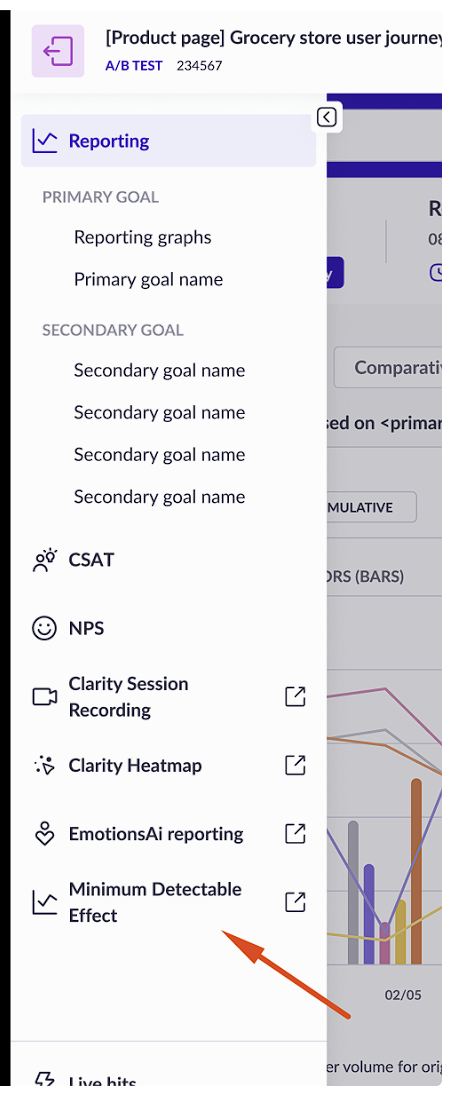 There are three possible results here:
1. Among all the experiments that have been running, we have found a match (A/B test with the same configuration) with enough data to calculate a proper MDE. In this case, you will see a graph with the results. (See an example below)
2. We have found an experiment with the same configuration, but not enough data. We advise you to either create an A/A Test to start collecting data, try another configuration, or manually calculate it using the “Manual calculator” option.
3. We haven’t found any experiment with the same configuration. You can still create an A/A Test to start collecting data, try another configuration or manually calculate it using the “Manual calculator” option.
There are three possible results here:
1. Among all the experiments that have been running, we have found a match (A/B test with the same configuration) with enough data to calculate a proper MDE. In this case, you will see a graph with the results. (See an example below)
2. We have found an experiment with the same configuration, but not enough data. We advise you to either create an A/A Test to start collecting data, try another configuration, or manually calculate it using the “Manual calculator” option.
3. We haven’t found any experiment with the same configuration. You can still create an A/A Test to start collecting data, try another configuration or manually calculate it using the “Manual calculator” option.
 #### The results
The calculation results are displayed as a graph. Its structure is the same as the AB Tasty Based data calculation.
#### The results
The calculation results are displayed as a graph. Its structure is the same as the AB Tasty Based data calculation.
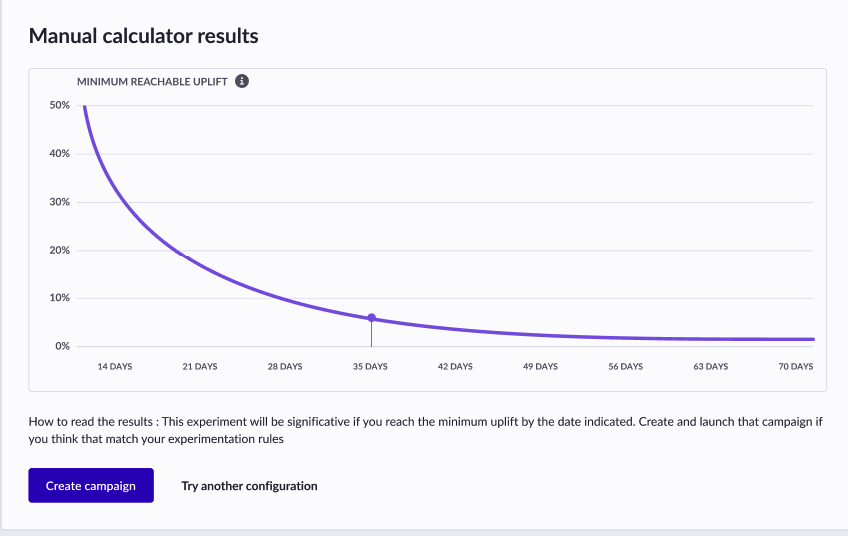 The value indicated by the curve is the growth you should reach if you want your test to be statistically significant in the given timeline. Considering that, you might ask yourself if you can reach 6.75% growth in 35 days. If it’s not the case, your experiment might not be worth launching.
#### The next step
After analyzing your MDE results, you can either create a campaign or try another configuration and start the process again.
## Use cases
As a CRO manager, I want to build a test on a specific page of my website, but I’m afraid of the time the statistical significance can take to be reached. Therefore, using the MDE with the AB Tasty based data will help me understand if I should (or shouldn’t) launch my experiment on that perimeter.
---
# Agent Instructions
This documentation is published with GitBook. GitBook is the documentation platform designed so that both humans and AI agents can read, navigate, and reason over technical content effectively. Learn more at gitbook.com.
## Querying This Documentation
If you need additional information that is not directly available in this page, you can query the documentation dynamically by asking a question.
Perform an HTTP GET request on the current page URL with the `ask` query parameter, and the optional `goal` query parameter:
```
GET https://docs.abtasty.com/web-experimentation-and-personalization/campaign-creation-and-dashboard/how-to-use-mde-calculator.md?ask=
The value indicated by the curve is the growth you should reach if you want your test to be statistically significant in the given timeline. Considering that, you might ask yourself if you can reach 6.75% growth in 35 days. If it’s not the case, your experiment might not be worth launching.
#### The next step
After analyzing your MDE results, you can either create a campaign or try another configuration and start the process again.
## Use cases
As a CRO manager, I want to build a test on a specific page of my website, but I’m afraid of the time the statistical significance can take to be reached. Therefore, using the MDE with the AB Tasty based data will help me understand if I should (or shouldn’t) launch my experiment on that perimeter.
---
# Agent Instructions
This documentation is published with GitBook. GitBook is the documentation platform designed so that both humans and AI agents can read, navigate, and reason over technical content effectively. Learn more at gitbook.com.
## Querying This Documentation
If you need additional information that is not directly available in this page, you can query the documentation dynamically by asking a question.
Perform an HTTP GET request on the current page URL with the `ask` query parameter, and the optional `goal` query parameter:
```
GET https://docs.abtasty.com/web-experimentation-and-personalization/campaign-creation-and-dashboard/how-to-use-mde-calculator.md?ask=