> For the complete documentation index, see [llms.txt](https://docs.abtasty.com/llms.txt). Markdown versions of documentation pages are available by appending `.md` to page URLs; this page is available as [Markdown](https://docs.abtasty.com/web-experimentation-and-personalization/campaign-flow-advanced-options.md).
# Advanced Options step
The Advanced options is a mandatory step during your campaign configuration. It enables you to configure advanced settings relate to the integrations, the tag performance or your campaign's future performance.
## Third-party Integrations (analytics)
You can link your campaign to your analytics tool. This way, you’ll be able to analyze your campaign data in your own dashboards. We’re integrated with a lot of analytics tools.
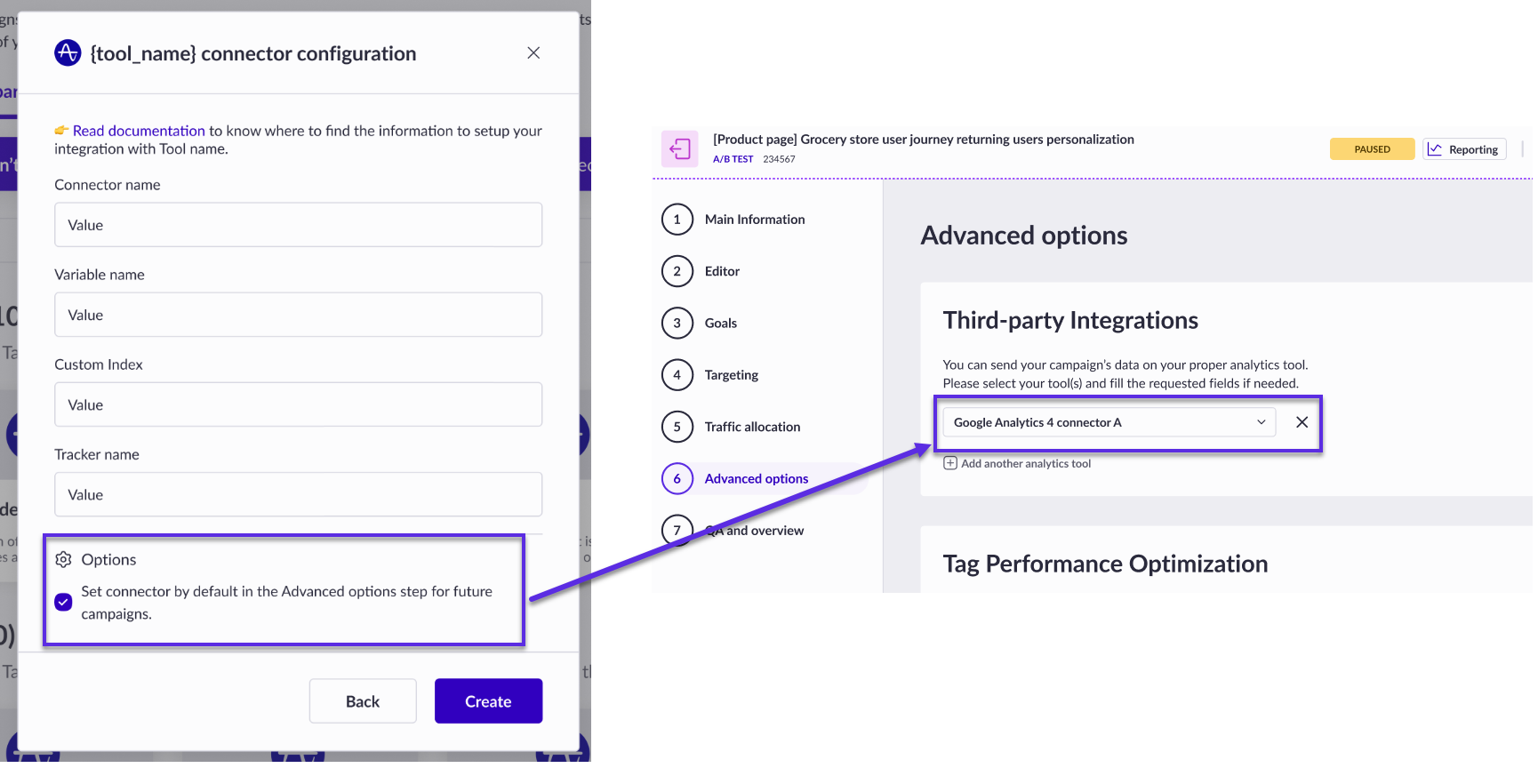
When you create a connector for a third-party tool, you can check a box to automatically add this connector to the Advanced step of all your future campaigns (it's not retroactive).\
In this case, when arriving on the *Advanced step* of any new campaign you create, the connector will be automatically selected.
If you leave this box unchecked (keep default behavior), the connector won't be selected in the campaign step. To send campaign data to your connector, go to the *Advanced step* of your campaign and select the desired connector from the dropdown.\
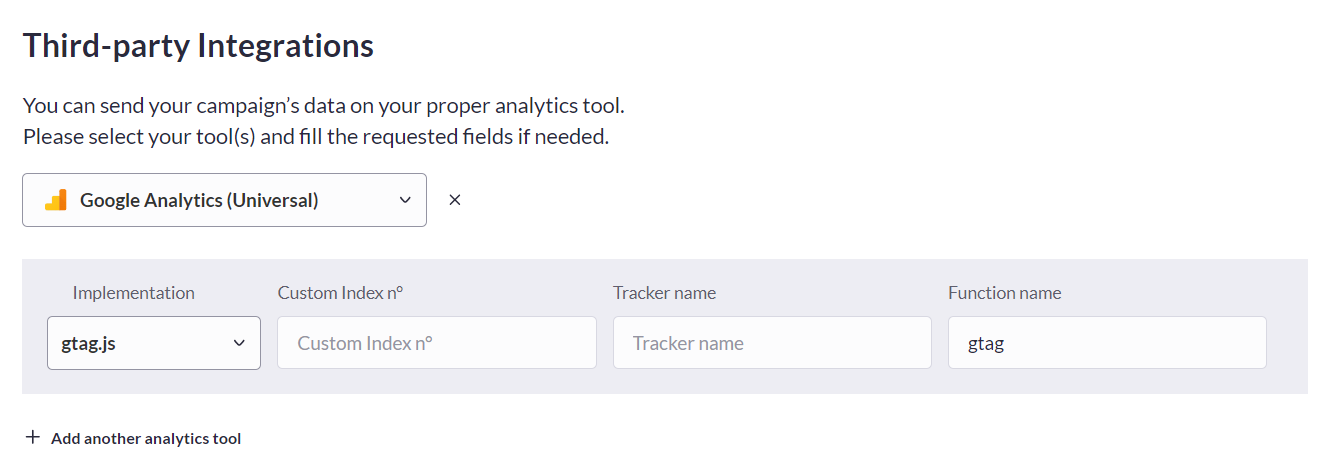
Some analytics tools might require additional settings, which appear in a form panel after selecting the tool. Once launched, your campaign will start sending data to the connectors you have selected.
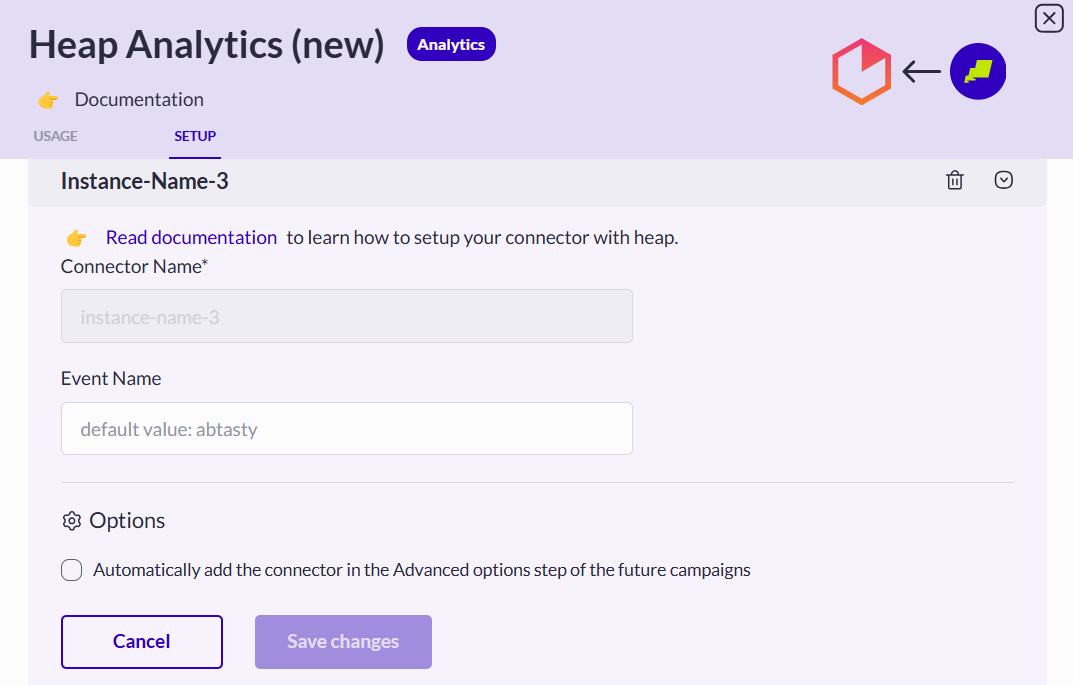
You can also decide to send campaign data to your connector from the connector list of a third-party tool. To do so, go to the Integration Hub, click on the tool card and go to the *setup* tab, unfold the desired connector, tick the box and save your changes.
For more information on third-party tools, refer to [Integrations general information](/integrations/integrations-general-information.md).\\
## Tag Performance Optimization
In this section, you can set up advanced functions to optimize tag performance on the campaign. By default, your campaign is set to *deferred* but you can switch to *loading* using the toggle button.

To learn more about this option, refer to [Campaign loading (deferred/ instant)](/web-experimentation-and-personalization/campaign-creation-and-dashboard/campaign-loading-deferred-instant.md).
## Sequential Testing Alerts
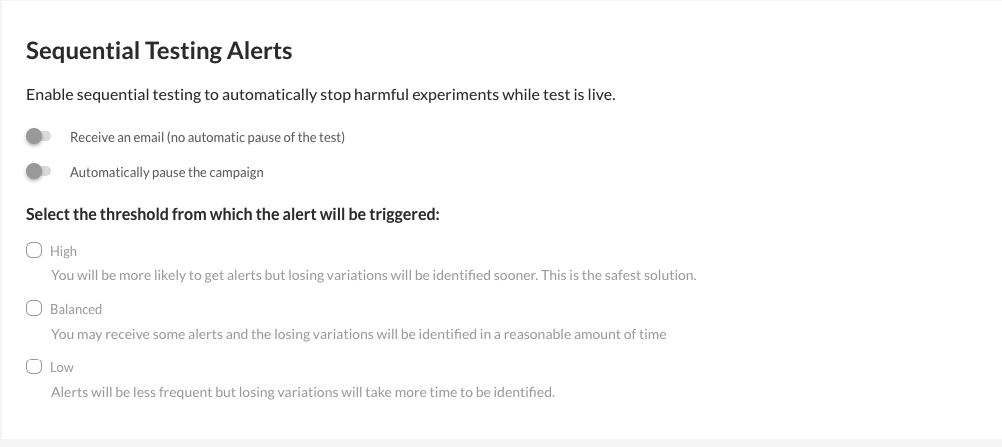
The Sequential Testing algorithm enables you to detect if your experiment will not be successful at all based on your Primary goal results.
Your Primary goal has to be based on a Conversion/Transaction Rate in order to feed the Sequential Testing algorithm.
Only Users and upper roles will receive email alerts if and only if they didn’t disable it in their profile, **Notification center section**.
To learn more about our Sequential Testing Alerts, refer to [this article](#id-01jadq0afqfr278ms2q6y5ywv7).
---
# Agent Instructions
This documentation is published with GitBook. GitBook is the documentation platform designed so that both humans and AI agents can read, navigate, and reason over technical content effectively. Learn more at gitbook.com.
## Querying This Documentation
If you need additional information that is not directly available in this page, you can query the documentation dynamically by asking a question.
Perform an HTTP GET request on the current page URL with the `ask` query parameter, and the optional `goal` query parameter:
```
GET https://docs.abtasty.com/web-experimentation-and-personalization/campaign-flow-advanced-options.md?ask=&goal=
```
`ask` is the immediate question: it should be specific, self-contained, and written in natural language.
`goal` is optional and describes the broader end goal you are ultimately trying to accomplish on behalf of the user. GitBook uses it to tailor the answer towards what is most useful for that goal.
The response will contain a direct answer to the question and relevant excerpts and sources from the documentation.
Use this mechanism when the answer is not explicitly present in the current page, you need clarification or additional context, or you want to retrieve related documentation sections.
 If you leave this box unchecked (keep default behavior), the connector won't be selected in the campaign step. To send campaign data to your connector, go to the *Advanced step* of your campaign and select the desired connector from the dropdown.\
Some analytics tools might require additional settings, which appear in a form panel after selecting the tool. Once launched, your campaign will start sending data to the connectors you have selected.
If you leave this box unchecked (keep default behavior), the connector won't be selected in the campaign step. To send campaign data to your connector, go to the *Advanced step* of your campaign and select the desired connector from the dropdown.\
Some analytics tools might require additional settings, which appear in a form panel after selecting the tool. Once launched, your campaign will start sending data to the connectors you have selected.
 You can also decide to send campaign data to your connector from the connector list of a third-party tool. To do so, go to the Integration Hub, click on the tool card and go to the *setup* tab, unfold the desired connector, tick the box and save your changes.
 Only Users and upper roles will receive email alerts if and only if they didn’t disable it in their profile, **Notification center section**.
To learn more about our Sequential Testing Alerts, refer to [this article](#id-01jadq0afqfr278ms2q6y5ywv7).
---
# Agent Instructions
This documentation is published with GitBook. GitBook is the documentation platform designed so that both humans and AI agents can read, navigate, and reason over technical content effectively. Learn more at gitbook.com.
## Querying This Documentation
If you need additional information that is not directly available in this page, you can query the documentation dynamically by asking a question.
Perform an HTTP GET request on the current page URL with the `ask` query parameter, and the optional `goal` query parameter:
```
GET https://docs.abtasty.com/web-experimentation-and-personalization/campaign-flow-advanced-options.md?ask=
Only Users and upper roles will receive email alerts if and only if they didn’t disable it in their profile, **Notification center section**.
To learn more about our Sequential Testing Alerts, refer to [this article](#id-01jadq0afqfr278ms2q6y5ywv7).
---
# Agent Instructions
This documentation is published with GitBook. GitBook is the documentation platform designed so that both humans and AI agents can read, navigate, and reason over technical content effectively. Learn more at gitbook.com.
## Querying This Documentation
If you need additional information that is not directly available in this page, you can query the documentation dynamically by asking a question.
Perform an HTTP GET request on the current page URL with the `ask` query parameter, and the optional `goal` query parameter:
```
GET https://docs.abtasty.com/web-experimentation-and-personalization/campaign-flow-advanced-options.md?ask=