> For the complete documentation index, see [llms.txt](https://docs.abtasty.com/llms.txt). Markdown versions of documentation pages are available by appending `.md` to page URLs; this page is available as [Markdown](https://docs.abtasty.com/web-experimentation-and-personalization/targeting-step/how-to-use-the-replicate-targeting-option.md).
# How to use the replicate targeting option
## What is the replicate targeting option
The **Replicate targeting option** enables you to copy the targeting configuration of a subtest or a scenario and to paste it into other subtest(s) or scenario(s). It's available on [**Multipages Tests**](/web-experimentation-and-personalization/campaign-creation-and-dashboard/how-to-create-a-campaign/experimentations/how-to-create-a-multipage-test.md), [**Multipages Personalizations**](/web-experimentation-and-personalization/campaign-creation-and-dashboard/how-to-create-a-campaign/personalizations/how-to-create-a-multipage-personalization.md) and [**Multiexperiences Personalizations.**](/web-experimentation-and-personalization/campaign-creation-and-dashboard/how-to-create-a-campaign/personalizations/how-to-create-a-multi-experience-personalization.md)
The option is available on the top right of the page.
It **saves you from having to configure targeting independently for each scenario and each subtest** and allows you to save time.
## What is the replicate targeting option
To use the Replicate targeting option, **you must configure targeting for at least one subtest/scenario first**. It can be any subtest/scenario.\
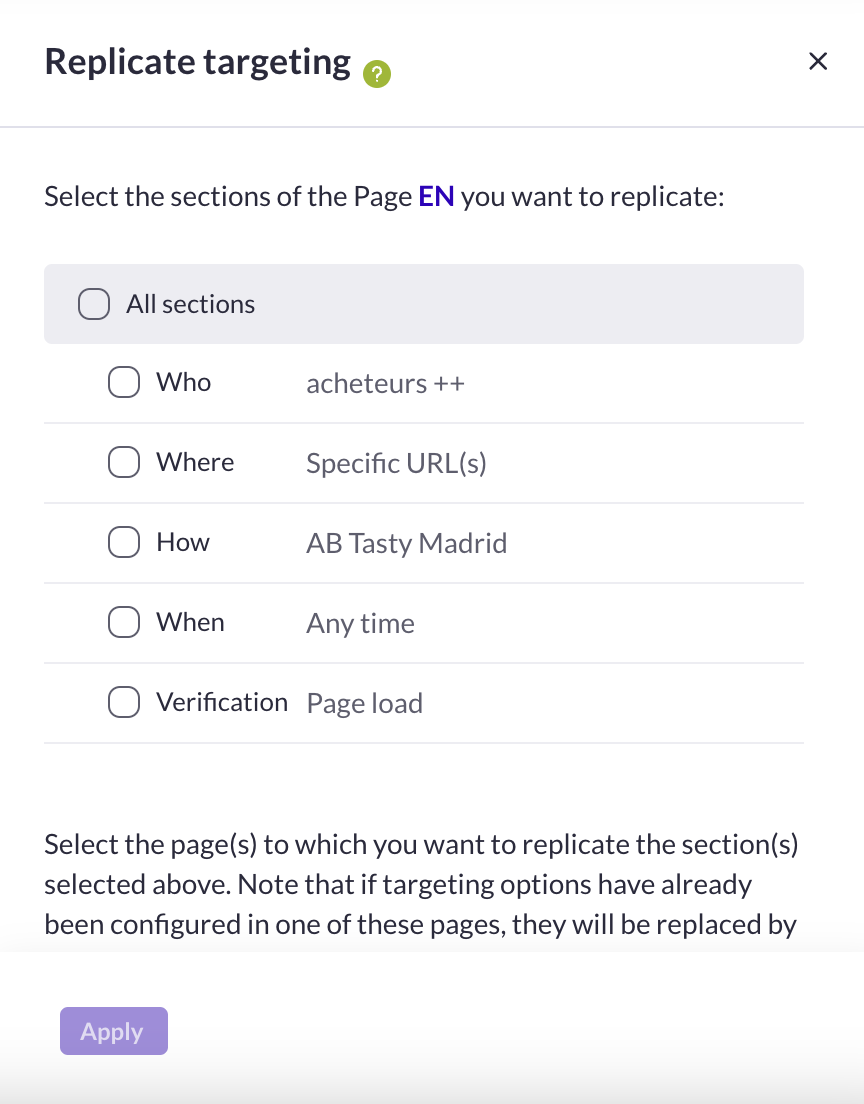
To replicate one or several sections of this subtest/scenario to one or several subtests/scenarios, select the sections of the current subtest/scenario you want to copy. It can be the Who, Where, How sections. You can also select all sections if you want to replicate the whole targeting configuration of your current subtest/scenario.
{% hint style="warning" %}
**🚩 Heads up**
* If a section is made of several criteria, you cannot select individual criteria. The entire section will be replicated.
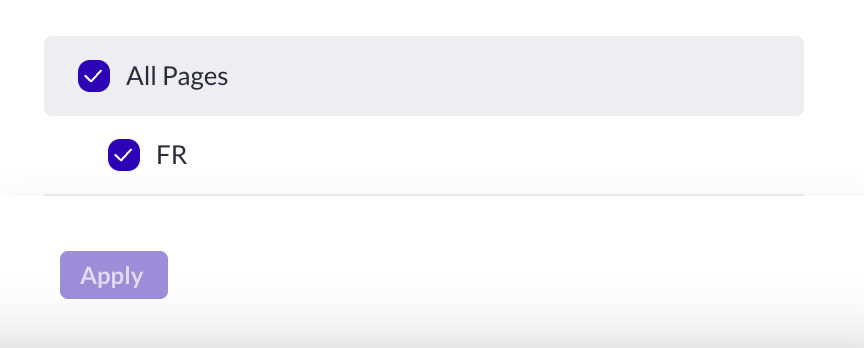
Then, select the subtest(s)/scenario(s) into which you want to copy the selection and click *Apply*.
* If the subtest/scenario you want to replicate your selection to already have some targeting configured, **the former configuration will be overwritten and replaced with the new one**.
You can then edit any section of any subtest/scenario to fit your needs. Don’t forget to save the targeting step each time you edit the targeting configuration of a subtest/scenario.
{% endhint %}
{% hint style="info" %}
**⭐ Good to know**
From the dropdown list, you can change the reference subtest/scenario from which you want to replicate the targeting section(s).
{% endhint %}
## Use cases
The Replicate targeting options is available for the following campaign types:
* [**Multipage test**](/web-experimentation-and-personalization/campaign-creation-and-dashboard/how-to-create-a-campaign/experimentations/how-to-create-a-multipage-test.md)[:](https://support.abtasty.com/hc/en-us/articles/4709681586332) usually, the **Who** (segment of visitors) and **How** (triggering rules) sections **are the same for all subtests**. Only the targeted pages (Where section) differ. We recommend configuring the Who and How sections in the first subtest, before replicating them directly in all subtests. Then, you can configure the Where section independently for each subtest.
* [**Multivariate test**](/web-experimentation-and-personalization/campaign-creation-and-dashboard/how-to-create-a-campaign/experimentations/how-to-create-a-multivariate-test.md): the targeting configuration must be **exactly the same in all subtests**. We recommend configuring targeting in the first subtest, and replicating it directly in all subtests.
* [**Personalization**](/web-experimentation-and-personalization/campaign-creation-and-dashboard/how-to-create-a-campaign/personalizations.md): usually ,the **Where** and **How** sections **are the same in all scenarios**. Only the visitor segment (Who section) differs. We recommend configuring targeting for the Where and How sections in the first subtest, and replicating them directly in all scenarios. Then, you can configure the Who section independently for each scenario.
Let’s say you plan to display a promotional message on the Homepage, the product pages and cart page for clients who purchased more than 5 times in the past year (20% discount) and for clients who purchased less than 5 times in the past year (15% discount). In this case, your personalization campaign is made up of two scenarios. First, configure targeting for the first scenario as follows:\
**Who**: *Purchase Frequency* > The visitor purchased more than *5* times *within 365* days.\
**Where**: is > | is > | is >
**How**: Any time\
Then, click *Replicate targeting* from the current scenario (1) and select the *Where* and *How* sections. Select *All scenarios* (as you only have two scenarios) and click *Apply*. Go to scenario 2 and configure the Who section: *Purchase Frequency* > The visitor purchased less than *5* times *within 365* days. Click *Save step*.
---
# Agent Instructions
This documentation is published with GitBook. GitBook is the documentation platform designed so that both humans and AI agents can read, navigate, and reason over technical content effectively. Learn more at gitbook.com.
## Querying This Documentation
If you need additional information that is not directly available in this page, you can query the documentation dynamically by asking a question.
Perform an HTTP GET request on the current page URL with the `ask` query parameter, and the optional `goal` query parameter:
```
GET https://docs.abtasty.com/web-experimentation-and-personalization/targeting-step/how-to-use-the-replicate-targeting-option.md?ask=&goal=
```
`ask` is the immediate question: it should be specific, self-contained, and written in natural language.
`goal` is optional and describes the broader end goal you are ultimately trying to accomplish on behalf of the user. GitBook uses it to tailor the answer towards what is most useful for that goal.
The response will contain a direct answer to the question and relevant excerpts and sources from the documentation.
Use this mechanism when the answer is not explicitly present in the current page, you need clarification or additional context, or you want to retrieve related documentation sections.
 {% hint style="warning" %}
**🚩 Heads up**
* If a section is made of several criteria, you cannot select individual criteria. The entire section will be replicated.
Then, select the subtest(s)/scenario(s) into which you want to copy the selection and click *Apply*.
{% hint style="warning" %}
**🚩 Heads up**
* If a section is made of several criteria, you cannot select individual criteria. The entire section will be replicated.
Then, select the subtest(s)/scenario(s) into which you want to copy the selection and click *Apply*.
 * If the subtest/scenario you want to replicate your selection to already have some targeting configured, **the former configuration will be overwritten and replaced with the new one**.
You can then edit any section of any subtest/scenario to fit your needs. Don’t forget to save the targeting step each time you edit the targeting configuration of a subtest/scenario.
{% endhint %}
{% hint style="info" %}
**⭐ Good to know**
From the dropdown list, you can change the reference subtest/scenario from which you want to replicate the targeting section(s).
{% endhint %}
## Use cases
The Replicate targeting options is available for the following campaign types:
* [**Multipage test**](/web-experimentation-and-personalization/campaign-creation-and-dashboard/how-to-create-a-campaign/experimentations/how-to-create-a-multipage-test.md)[:](https://support.abtasty.com/hc/en-us/articles/4709681586332) usually, the **Who** (segment of visitors) and **How** (triggering rules) sections **are the same for all subtests**. Only the targeted pages (Where section) differ. We recommend configuring the Who and How sections in the first subtest, before replicating them directly in all subtests. Then, you can configure the Where section independently for each subtest.
* [**Multivariate test**](/web-experimentation-and-personalization/campaign-creation-and-dashboard/how-to-create-a-campaign/experimentations/how-to-create-a-multivariate-test.md): the targeting configuration must be **exactly the same in all subtests**. We recommend configuring targeting in the first subtest, and replicating it directly in all subtests.
* [**Personalization**](/web-experimentation-and-personalization/campaign-creation-and-dashboard/how-to-create-a-campaign/personalizations.md): usually ,the **Where** and **How** sections **are the same in all scenarios**. Only the visitor segment (Who section) differs. We recommend configuring targeting for the Where and How sections in the first subtest, and replicating them directly in all scenarios. Then, you can configure the Who section independently for each scenario.
Let’s say you plan to display a promotional message on the Homepage, the product pages and cart page for clients who purchased more than 5 times in the past year (20% discount) and for clients who purchased less than 5 times in the past year (15% discount). In this case, your personalization campaign is made up of two scenarios. First, configure targeting for the first scenario as follows:\
**Who**: *Purchase Frequency* > The visitor purchased more than *5* times *within 365* days.\
**Where**: is >
* If the subtest/scenario you want to replicate your selection to already have some targeting configured, **the former configuration will be overwritten and replaced with the new one**.
You can then edit any section of any subtest/scenario to fit your needs. Don’t forget to save the targeting step each time you edit the targeting configuration of a subtest/scenario.
{% endhint %}
{% hint style="info" %}
**⭐ Good to know**
From the dropdown list, you can change the reference subtest/scenario from which you want to replicate the targeting section(s).
{% endhint %}
## Use cases
The Replicate targeting options is available for the following campaign types:
* [**Multipage test**](/web-experimentation-and-personalization/campaign-creation-and-dashboard/how-to-create-a-campaign/experimentations/how-to-create-a-multipage-test.md)[:](https://support.abtasty.com/hc/en-us/articles/4709681586332) usually, the **Who** (segment of visitors) and **How** (triggering rules) sections **are the same for all subtests**. Only the targeted pages (Where section) differ. We recommend configuring the Who and How sections in the first subtest, before replicating them directly in all subtests. Then, you can configure the Where section independently for each subtest.
* [**Multivariate test**](/web-experimentation-and-personalization/campaign-creation-and-dashboard/how-to-create-a-campaign/experimentations/how-to-create-a-multivariate-test.md): the targeting configuration must be **exactly the same in all subtests**. We recommend configuring targeting in the first subtest, and replicating it directly in all subtests.
* [**Personalization**](/web-experimentation-and-personalization/campaign-creation-and-dashboard/how-to-create-a-campaign/personalizations.md): usually ,the **Where** and **How** sections **are the same in all scenarios**. Only the visitor segment (Who section) differs. We recommend configuring targeting for the Where and How sections in the first subtest, and replicating them directly in all scenarios. Then, you can configure the Who section independently for each scenario.
Let’s say you plan to display a promotional message on the Homepage, the product pages and cart page for clients who purchased more than 5 times in the past year (20% discount) and for clients who purchased less than 5 times in the past year (15% discount). In this case, your personalization campaign is made up of two scenarios. First, configure targeting for the first scenario as follows:\
**Who**: *Purchase Frequency* > The visitor purchased more than *5* times *within 365* days.\
**Where**: is >