> For the complete documentation index, see [llms.txt](https://docs.abtasty.com/llms.txt). Markdown versions of documentation pages are available by appending `.md` to page URLs; this page is available as [Markdown](https://docs.abtasty.com/client-side/custom-widgets/widgets-getting-started/custom-widgets-form.md).
# Custom Widgets Form
The configuration form allows the end user of your Custom Widget to customize it easily, even without any technical knowledge.
## Properties
Defined properties to display forms:
`type`: *String*, defines the type of form that will be displayed. Here is the [list of allowed types](https://docs.abtasty.com/web-experimentation-and-personalization/editors-and-widget/list-of-widgets/custom-widget/custom-widgets-list-of-propname-fields-and-their-specificities)
`propName`: *String*, it is the key that will be used in DATA object in order to get the value.
`label`: *String* or *Object*, defines the label of your form, it will be displayed to help the final user understand what is the purpose of the form. It supports strings but also objects to translate in following languages : en, fr, es, de.
`value`: *Any*, it is the value the form will have by default.
Here is an example with a simple text type input :
```javascript
const buttonTextForm = {
type: "text",
propName: "buttonText",
label: `Button's text`,
value: "This is a simple text input",
};
```
## Conditions management
```javascript
const triggerEventClick = {
type: "selectelement",
label: "Select the element that will trigger the Custom Widget on click",
propName: `triggerElementClick`,
value: "body",
condition: (DATA) => DATA.triggerType === "click",
};
// or using destructuring
const triggerEventClick = {
type: "selectelement",
label: "Select the element that will trigger the Custom Widget on click",
propName: `triggerElementClick`,
value: "body",
condition: ({ triggerType }) => triggerType === "click",
};
```
The `condition` function takes the whole `DATA` object as parameter, meaning it contains all key/values from it. Simply return true or false depending on your custom condition and the form will display or hide your conditional input accordingly.
Displaying a field in the form based on a condition can be done by adding the `condition` key with a function as value. This condition will only hide the field from the widget's form, and the property will still exist with its value saved in the `DATA` object.
## List of propName fields and their specificities
### areainput
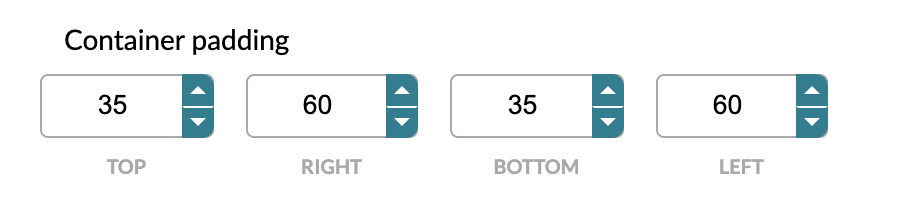
Displays a list of input numbers, it is mostly used to define box-model dimensions (top, right, bottom, left) for many usages, margin, padding, positioning, etc.
`value`: *Array* containing an *Object*, the number of elements in your object will define the number of inputs. Input labels are *Object* keys and the values are the key/values from the object.
```javascript
const paddingForm = {
type: "areainput",
label: "Container padding",
propName: "containerPadding",
value: [{ top: 35, left: 60, bottom: 35, right: 60 }],
};
```
### checkbox
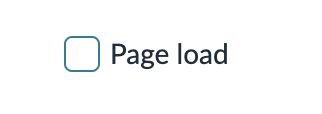
Displays a checkbox in the form.
Checkboxes don't have value property but a `checked` property instead, which is a *Boolean*.
```javascript
const triggerOnPageLoadForm = {
type: "checkbox",
label: {
en: "Page load",
fr: "Au chargement de la page",
es: "Al cargar la página",
de: "Beim Laden der Seite",
},
propName: "pageLoad",
checked: true,
};
```
### codeeditor
Displays a code editor input, you can specify the code type (js or css).
`value`: *String*.
Specific property:
`rows`: *Number* allowing you to define the number of rows to display by default in the UI.
```javascript
const triggerEventCustomScript = {
type: "codeeditor",
label: "Custom Trigger JavaScript Code",
propName: `TriggerEventCustom`,
value: `
async function launchIfScroll() {
return new Promise(resolve => {
document.addEventListener('scroll', () => resolve(true), {once: true});
});
}
const result = await launchIfScroll();
return resolve(result);`,
rows: 15,
};
```
### colorpicker
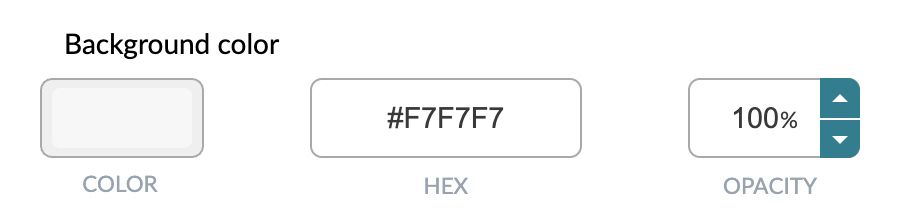
Displays a color picker to users.
`value`: *String*.
```javascript
const backgroundColorForm = {
type: "colorpicker",
label: "Background color",
propName: "backgroundColor",
value: "rgba(247, 247, 247, 1)",
};
```
### datepicker
Displays a simple date picker.
`value`: *Date* object or valid *String* date.
DATA value: Date.tostring()
```javascript
const inputDate = {
type: "datepicker",
label: "Pick a date to display",
propName: "date",
value: new Date(),
};
```
### datetimetimezonepicker
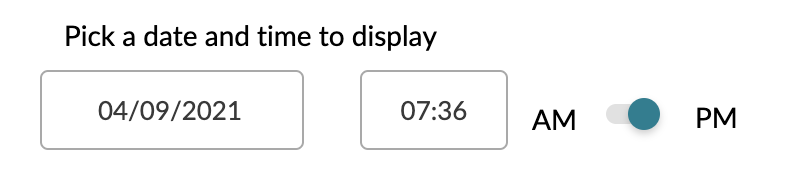
Displays a datetimepicker with, in addition, a collapsed group to set some more information :
* A toggle to follow the sun (Will end at this time in each timezone or not)
* A select input to choose a timezone when needed (When the "follow the sun" toggle is off)
`value`: *Object* with 2 properties at init :
* `type`: That you should set to `'init'` on the form part.
* `value`: Same as datetimepicker but also allows a GMT Timezone *String*.
DATA value: A complete *Object*
* `previewTimestamp`: timestamp *Number* (Value to use for the editor preview when the "follow the sun" toggle is on)
* `type`: *String* `'local'` or `'global'` depending whether the "follow the sun" toggle is on or off.
* `timecomponents`: *Object* containing as *Number* the following: `minute`, `hour`, `day`, `month`, `year`
* `raw`: *Object* with all data :
* `followTheSun`: *Boolean*
* `previewTimezone`: *String* for geolocation timezone, ex: `'Europe/Paris'` (Value to use for the editor preview when "follow the sun" toggle is on)
* `timedef`: *Object*, same as `timecomponents`
* `timezone`: *String* for geolocation timezone, ex: `'America/Los_Angeles'`
* `userContext`: *Object* with complete data related to the current user:
* `isInDST`: *Boolean* describing whether the user is currently in daylight saving time or not.
* `local`: *Object* like `timecomponents` but with current user date and time values.
* `offset`: *Number* resulting of getTimezoneOffset
* `timestamp`: timestamp *Number*
* `timezone`: *String* for geolocation timezone, ex: `'Asia/Tokyo'`
```javascript
const inputDateTimeTimeZone = {
type: "datetimetimezonepicker",
label: "Pick a date and time to display",
propName: "datetimeTimezone",
value: {
type: "init",
value: "+0100",
},
};
```
### group
Display a group of forms, this is a visual change only, all props from children of it will be accessible directly in DATA at the end.
This is not a form, it does not have a value property but a children one which contains an array of objects, these objects are supposed to be fields.
List of specific properties :
`children`: *Array* of objects
`collapsible`: *Boolean* (default: false) Define if the group can be collapsed or not.
`collapsed`: *Boolean* (default: true) In case collapsible is true, define the initial state of it.
Read me!
As children of this input you can use any input except `replicable` and `group` input types.
```javascript
const textStylesGroup = {
type: "group",
label: "Text styles",
collapsible: true,
collapsed: false,
children: [
{ ...textAlignmentForm },
{ ...textColorForm },
{ ...textFontForm },
],
};
```

### replicable
Display a group of inputs that you can replicate to get multiple values for 1 type of information required.
This is not a form, it does not have a value property but a children one which contains an array of objects, these objects are supposed to be fields.
List of specific properties :
`children`: *Array* of objects `min`: *Number* (optional) used to set a minimum number for the amount of times the children will be replicated (default is `1`) - the form will not let you remove any more replicated groups when this limit is reached `max`: *Number* (optional) used to set a maximum number for the amount of times the children will be replicated (default is `4242`) - the form will not let you add any more replicated groups when this limit is reached `headerLabel`: *String* (optional) - used to label each set of replicable groups `addButtonLabel`: *String* (optional) - used to label the button used to add replicable groups
You'll then be able to access `actiontracking` array and get `name` and `from` key/values in each item.
{% hint style="info" %}
Read me!
As children of this input you can use any input except `replicable` and `group` input types.
{% endhint %}
```javascript
const atSettings = {
propName: "actiontracking",
type: "replicable",
category: "conditions",
children: [
{
type: "text",
propName: "name",
label: "Tracker name",
defaultValue: "More than 5 seconds",
},
{
type: "number",
propName: "from",
label: "Time a user has to spend on the page to trigger the goal (sec)",
min: 0,
defaultValue: 5,
},
],
};
```

### hidden
Allows you to have a hidden input.
`value`: *String*
```javascript
const hiddenInput = {
type: "hidden",
value: window.innerHeight,
propName: "innerHeightSetup",
};
```
### inlinenotification
Allows you to inform the users about a specificity of your form or Custom Widget.
This element doesn't need a value property.
List of specific properties :
`label`: *String* as the message you want to display.
`hrefUrl`: *String* of url type you want the user to redirected to.
```javascript
const documentationNotification = {
type: "inlinenotification",
label: "Click here to access documentation",
hrefUrl: "https://developers.abtasty.com/",
};
```

### number
Displays an input number type.
`value`: *Number*
You're also able to provide more properties:
`min`: *Number* (default is 0)
`max`: *Number* (default is 9999)
`step`: *Number* (default is 1)
```javascript
const zindexCustomForm = {
type: "number",
label: "Custom z-index value",
propName: "zindexCustom",
value: 1,
min: -2147483647,
max: 2147483647,
};
```

### paragraph
Simply displays some text into the form, it can be used for many reasons: to inform, alert, and so on.
No value in that case, put your content in `text` property: *String*
```javascript
const styleHelper = {
type: "paragraph",
text: `In that part you can add styles to your Custom Widget.`,
};
```
### radio
Displays a radio input with multiple radios.
`value`: *String* || *Number* || *Boolean*
Specific property for radio: `options` \[Array of Objects: `{label: type label, value: same as value}`]
```javascript
const insertPositionForm = {
type: "radio",
label:
"Select where to insert the Custom Widget compared to selected element",
propName: "insertPositionType",
value: "afterbegin",
options: [
{
label: "Before selected element",
value: "beforebegin",
},
{
label: "At the begining of selected element",
value: "afterbegin",
},
{
label: "At the end of selected element",
value: "beforeend",
},
{
label: "After selected element",
value: "afterend",
},
],
};
```

### radioImage
Display a radio input with images/icons as buttons
`value`: *String*
Specific property: `options` like radio and `style`: *String* `big` or `little` depending on the desired button size.
```javascript
const textAlignmentForm = {
type: "radioImage",
label: "Text alignment",
propName: "textAlign",
value: "center",
style: "little",
options: [
{
label: "Left",
value: "left",
src: `https://widgets-images.abtasty.com/style/icon-text-alignLeft.png`,
},
{
label: "Center",
value: "center",
src: `https://widgets-images.abtasty.com/style/icon-text-alignCenter.png`,
},
{
label: "Right",
value: "right",
src: `https://widgets-images.abtasty.com/style/icon-text-alignRight.png`,
},
],
};
```

### searchselect
Displays a select that includes a search input for selects that have several values.
`value`: *String*
Special property: `options` like radio
Special options properties:
`filterable`: *String*, have to be similar to default value
`placeholder`: *String*, text to show when the search field is empty
```javascript
const textFontNameForm = {
type: "searchselect",
label: "Select font",
propName: "fontName",
value: "inherit",
filterable: "inherit",
placeholder: "Search for a font",
options: [
{
label: "Inherited from element",
value: "inherit",
description: "",
},
{
label: "Roboto",
value: "Roboto",
description: "12 styles",
},
{
label: "Open Sans",
value: "Open Sans",
description: "10 styles",
},
{
label: "Lato",
value: "Lato",
description: "10 styles",
},
{
label: "Montserrat",
value: "Montserrat",
description: "18 styles",
},
],
};
```

### select
Displays a select
`value`: *String*
Special property: `options` like radio
```javascript
const backgroundPositionForm = {
type: "select",
label: "Background position",
propName: "backgroundPosition",
value: "center",
options: [
{
label: "Top",
value: "top",
},
{
label: "Bottom",
value: "bottom",
},
{
label: "Center",
value: "center",
},
{
label: "Left",
value: "left",
},
{
label: "Right",
value: "right",
},
],
};
```

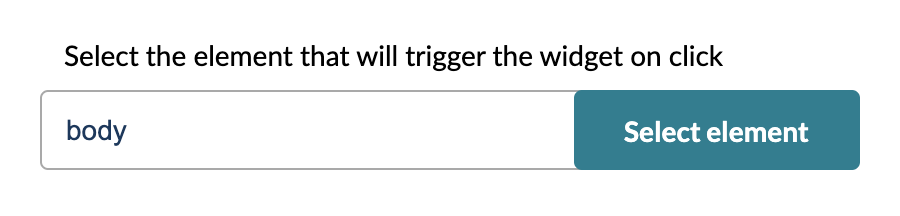
### selectelement
`value`: *String* (more likely formatted as a css selector)
Displays an input used to fill selectors containing a button. It will allow the user to select a website element.
```javascript
const triggerEventClick = {
type: "selectelement",
label: "Select the element that will trigger the Custom Widget on click",
propName: `triggerElementClick`,
value: "body",
};
```
### slider
Displays a slider to select a number as a value.
`value`: *Number*
Special properties: `min` and `max` of type *Number*, both are optionals, default values are 0 and 100.
```javascript
const borderWidthForm = {
type: "slider",
label: "Border width",
propName: "borderWidth",
value: 2,
min: 0,
max: 50,
};
```

### switch
Displays a switch that allows the user to select an option.
`value`: *Boolean*
```javascript
const displayCloseButtonSwitchForm = {
type: "switch",
label: "Display close button",
propName: "closeButton",
value: true,
};
```

### textarea
Displays a textarea that allows users to put text in it.
`value`: *String*
Special property: `rows` of *Number* type to define the number of rows of your textarea.
```javascript
const textContentForm = {
type: "textarea",
label: "Text to set in your Custom Widget",
propName: "textContent",
value: `Your message goes here.
Keep it short and to the point. Make short sentences.
Invite your users to consider your idea.
You can do multi-line messages.`,
rows: 6,
};
```

### text
Displays a simple text input.
`value`: *String*
```javascript
const buttonTextForm = {
type: "text",
propName: "buttonText",
label: `Button's text`,
value: "See the offer",
};
```

### url
A text type input dedicated to the URL, format verification and error handling are managed by default.
`value`: *String*
```javascript
const linkForm = {
type: "url",
label: `Button's URL`,
propName: "redirectionUrl",
value: window.location.origin,
};
```

### wysiwyg
A textarea input improved with text styling functionalities
`value`: *String*
Give an example for each
```javascript
const customWidgetTextContent = {
type: "wysiwyg",
label: "Text",
propName: "content",
value: `Your message goes here. Keep it short and to the point. Make short sentences. Invite your users to consider your idea.
You can do multi-line messages.`,
};
```

---
# Agent Instructions
This documentation is published with GitBook. GitBook is the documentation platform designed so that both humans and AI agents can read, navigate, and reason over technical content effectively. Learn more at gitbook.com.
## Querying This Documentation
If you need additional information that is not directly available in this page, you can query the documentation by asking a question.
Perform an HTTP GET request on the following URL with the `ask` and `goal` query parameters:
```
GET https://docs.abtasty.com/client-side/custom-widgets/widgets-getting-started/custom-widgets-form.md?ask=&goal=
```
`ask` is the immediate question: it should be specific, self-contained, and written in natural language.
`goal` is what the user is ultimately trying to achieve, the reason they need the answer. Sharing it helps GitBook give you a better, more relevant answer. A goal is most helpful when it describes the outcome the user wants rather than restating the question. For example, with `ask=how do I create an API token`, a goal like `automate deployments from our CI pipeline` lets GitBook tailor the answer to that use case.
The response will contain a direct answer to the question and relevant excerpts and sources from the documentation.
Use this mechanism when the answer is not explicitly present in the current page, you need clarification or additional context, or you want to retrieve related documentation sections.