> For the complete documentation index, see [llms.txt](https://docs.abtasty.com/llms.txt). Markdown versions of documentation pages are available by appending `.md` to page URLs; this page is available as [Markdown](https://docs.abtasty.com/onboarding/web-experimentation-and-personalization-quick-start-guide/measure-and-learn.md).
# Measure and Learn
With AB Tasty you can leverage your campaigns with ease:
* During campaign: [analyze your **live hits**](#monitor-live-hits) to monitor real-time user interactions
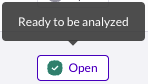
* At the end of campaigns: ensure your results are statistically significant and actionable, wait for [**Readiness**](#ensure-your-campaign-report-readiness)**.**
* After campaigns: [**analyze your reports**](#analyze-your-reports-our-best-practices), learn from them, and iterate to keep improving your CRO
## Access your reporting
{% stepper %}
{% step %}
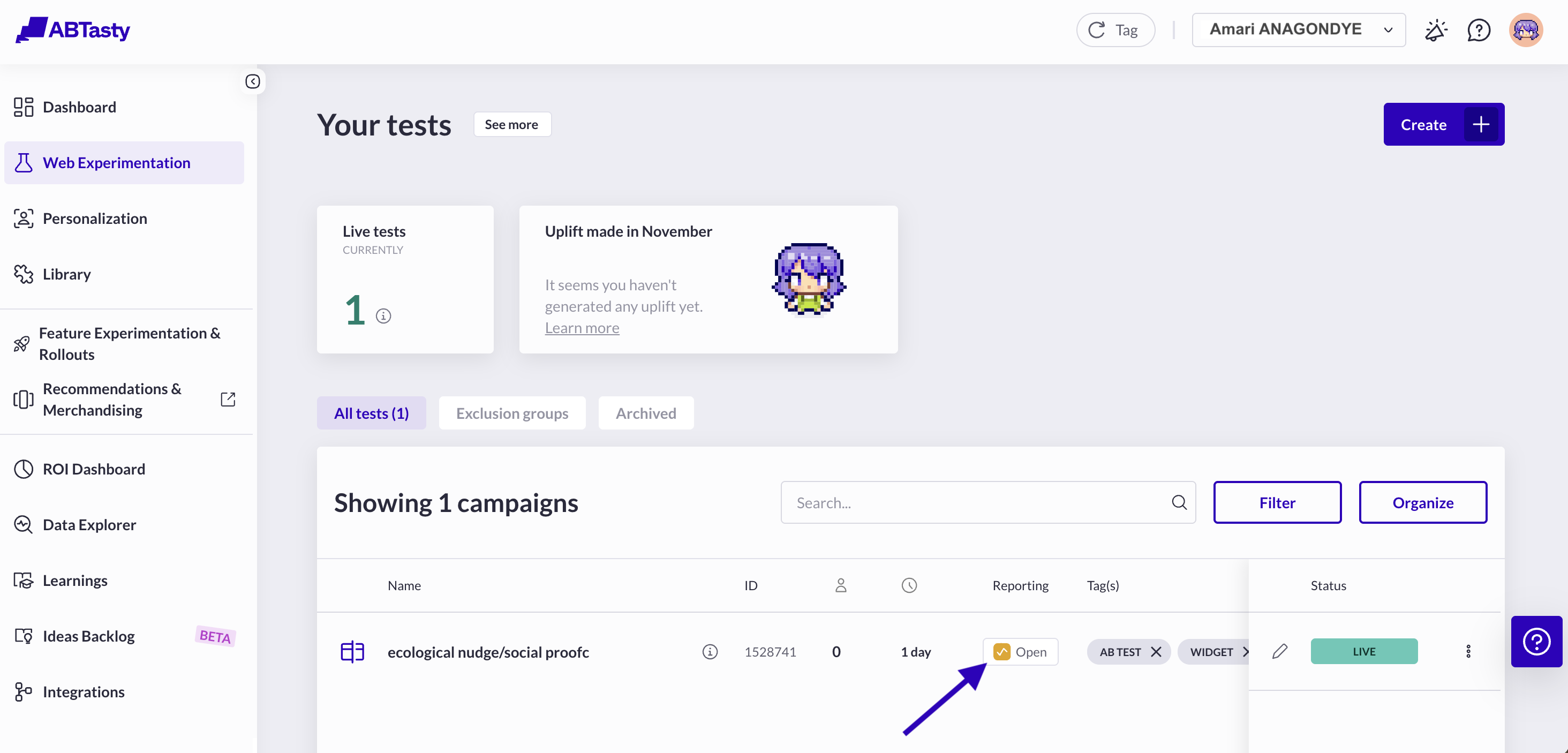
Go to your campaigns dashboard.
{% endstep %}
{% step %}
Click **open** your campaign reporting.
{% endstep %}
{% endstepper %}
## Monitor live hits
The Live Hits feature in AB Tasty allows you to monitor real-time user interactions on your campaigns. This is especially useful for quality assurance (QA) and for verifying that your campaign is tracking the right events before you start collecting data for analysis.
{% stepper %}
{% step %}
In the reporting page, at the bottom of the left side panel, click on the **live hits** button (Thunderbolt icon).
The request can take up to 30 seconds to be approved. The button then changes to **Live hits ready**.
{% endstep %}
{% step %}
Click on "View live hits" to access the window displaying with current hits.
{% hint style="info" %}
Hits are displayed in the window for 10 minutes, after which they disappear.
{% endhint %}
{% endstep %}
{% step %}
Monitor your live hits.
{% hint style="success" %}
Each type of hit is easily identified thanks to a visual label.
When it is detected, the primary goal is highlighted on the page.
Tracking down your primary goal should be your main point of interest when analyzing a campaign
{% endhint %}
{% endstep %}
{% endstepper %}
Read our [Live hits on the reporting](/reporting-and-performances/reporting/metrics/live-hits-of-the-reporting.md) article to have more details on this specific reporting view.
## Ensure your campaign report readiness
The *campaign readiness indicator* is based on the **campaign’s primary goal** performance. When the primary goal is ready, meaning that it has reached the required number of days, conversions, and visitors, **the campaign is considered ready as well and reliable**.
{% hint style="success" %}
We recommend waiting for your campaign to be ready before analyzing its results.
{% endhint %}
When the campaign results are reliable, the reporting button in the campaign dashboard changes to display a green check mark instead of grey or orange graphic bars.
Read our [Reporting Readiness](/reporting-and-performances/reporting/understand-the-statistics-behind-your-reports/reporting-readiness.md) article to have more details on this feature and learn how to read each goal readiness.
## Analyze your reports: our best practices
{% hint style="success" %}
Our AI-based functionality can help you better understand your reports to make the best data-driven decision. \
[Analysis copilot](https://docs.abtasty.com/) and [Reporting copilot](/reporting-and-performances/reporting/campaign-reporting/reporting-copilot.md) are available for all our paid plans. Get in touch with your CSM.
{% endhint %}
{% stepper %}
{% step %}
### **Check experiment health before you interpret results**
* Status and scope: included pages, targeted audience, devices, traffic allocated per variant
* Volume and coverage: enough users/events in the analysis window; include at least one full business cycle (often one to two weeks with a weekend)
* Data quality
* Primary objective is tracked correctly (for example, purchase, lead, key click)
* No tracking degradation during the experiment (release, consent, tag changes)
* No obvious anomalies (bot spikes, errors)
* Sample ratio mismatch (SRM): the traffic share per variant should be close to the planned allocation. If there is a large gap, investigate before deciding
{% endstep %}
{% step %}
### **Read the summary card: five numbers that matter**
* Exposures and conversions: users (or sessions) exposed per variant and conversions on the primary KPI
* Conversion rate (CR): conversions / exposures
* Relative uplift
* Absolute impact (for clarity): extra conversions per 1,000 visitors
* Business value (if available): revenue per visitor, average order value, margin
{% endstep %}
{% step %}
### **Read the statistics:**
* Probability to be best (chance to win)
* Credible interval around the uplift
* Simple rule: probability ≥ 95% and stable data → you can consider a decision
{% hint style="success" %}
Make sure that
* The interval (credible or confidence) does not cross zero if you want a clear winner conclusion
* The duration covers at least one full business cycle to avoid seasonality or novelty effects
{% endhint %}
{% endstep %}
{% step %}
### **Monitor guardrail metrics before you ship**
* Check that secondary indicators do not degrade (for example, error rate, performance, bounce, complaints, margin)
* If the primary KPI is positive but a guardrail is significantly negative, prefer iterating over a blunt rollout
{% endstep %}
{% step %}
### **Review segments for consistency**
* Look at two to three key cuts: device (mobile/desktop), new vs returning users, traffic source
* Do not decide based only on a segment if your targeting was not segmented from the start
* If a major segment reacts differently, capture the insight for a future targeted personalization
{% endstep %}
{% step %}
### Apply simple decision rules
* **Ship = ask your team to develop it or transform your test into personalization**
* Positive uplift and statistical threshold met (probability ≥ 95% or p ≤ 0.05)
* Sufficient duration (at least one business cycle)
* Guardrails are fine
* **Hold**
* Result is near the threshold, trend is not stable, or volume is still low
* **Iterate**
* No detectable difference and/or the minimum detectable effect (MDE) is not reachable soon; revisit the hypothesis, design, or targeting
* **Roll back or stop**
* Negative impact with threshold met, or a data issue (SRM, tracking)
{% hint style="info" %}
Risk tip: for sensitive changes, use a progressive rollout with a feature flag and monitor guardrails thanks to our FE\&R solution
{% endhint %}
{% endstep %}
{% step %}
### Document the learning so you can reuse it
Document:
* Hypothesis, winning variant, uplift, interval, notable segments
* Decision taken, and the next experiment to run
{% hint style="info" %}
Both the Learning Library and Ideas Backlog help you document hypotheses, results, and next steps for each experiment. For more details, see our documentation on [experiment learnings ](/learnings.md)and [backlog](/ideas-backlog.md) management.
{% endhint %}
{% endstep %}
{% endstepper %}
## Airvoyage's example
After running the A/B test for a full week, Amari opens the **AB Tasty reporting dashboard** to analyze the results of the **Social Proof widget experiment** on the flight booking page.
The data looks promising.
| **Metric** | **Variant A (Control)** | **Variant B (Social Proof)** |
| ------------------- | ----------------------- | ------------------------------------- |
| Visitors | 50,000 | 50,200 |
| Conversion Rate | 5.0% | 5.6% |
| **Uplift** | | **+12%** |
| **Absolute Impact** | | **+6 conversions per 1,000 visitors** |
In practical terms, this means that for every 1,000 visitors, the Social Proof widget generated **6 additional bookings** compared to the original page.
#### **Statistical Summary**
Amari reviews the statistical confidence of the results directly within AB Tasty:
* Chances to win: **97%**
* confidence interval for uplift: **\[+3%, +20%]**
**Guardrail metrics** (such as bounce rate and page load time) remained stable throughout the experiment.
>  *“That’s great news. The widget boosted bookings without any negative side effects on performance or engagement.”*
#### **Amari’s Decision**
Based on the data, Amari confidently decides to **ship** the winning variation across all hotel property pages.\
The uplift is significant, the impact clear, and the experience stable.
> *“With this kind of lift, I can demonstrate tangible ROI for our optimization efforts — and make a strong case for scaling behavioral design tactics.”*
Encouraged by the results, Amari also plans a **follow-up mobile personalization experiment**, since early data suggests the **gain was even stronger among mobile users**.
> *“Next step: adapt the Social Proof message for mobile travelers. Quick wins like this can add up fast.”*
## Common pitfalls to avoid
* Stopping too early (peeking) before the trend stabilizes
* Ignoring an SRM or a tracking issue
* Concluding from an unplanned micro-segment
* Confusing relative and absolute uplift
* Ignoring quality or service metrics (guardrails)
## Quick glossary
* **Exposure:** a user who saw a variant
* **Conversion**: completion of the objective (purchase, lead, key click)
* **Primary KPI**: main success metric
* **Secondary KPI or guardrail**: safety metrics to monitor for side effects
* **Uplift**: relative improvement of the primary KPI
* **Interval (confidence or credible)**: plausible range of the effect
* **p-value or probability to be best**: indicators of statistical strength
* **SRM**: abnormal traffic split between variants
* **MDE (minimum detectable effect)**: smallest effect you plan to detect given your volume
---
# Agent Instructions
This documentation is published with GitBook. GitBook is the documentation platform designed so that both humans and AI agents can read, navigate, and reason over technical content effectively. Learn more at gitbook.com.
## Querying This Documentation
If you need additional information that is not directly available in this page, you can query the documentation by asking a question.
Perform an HTTP GET request on the following URL with the `ask` and `goal` query parameters:
```
GET https://docs.abtasty.com/onboarding/web-experimentation-and-personalization-quick-start-guide/measure-and-learn.md?ask=&goal=
```
`ask` is the immediate question: it should be specific, self-contained, and written in natural language.
`goal` is what the user is ultimately trying to achieve, the reason they need the answer. Sharing it helps GitBook give you a better, more relevant answer. A goal is most helpful when it describes the outcome the user wants rather than restating the question. For example, with `ask=how do I create an API token`, a goal like `automate deployments from our CI pipeline` lets GitBook tailor the answer to that use case.
The response will contain a direct answer to the question and relevant excerpts and sources from the documentation.
Use this mechanism when the answer is not explicitly present in the current page, you need clarification or additional context, or you want to retrieve related documentation sections.
*“That’s great news. The widget boosted bookings without any negative side effects on performance or engagement.”*
#### **Amari’s Decision**
Based on the data, Amari confidently decides to **ship** the winning variation across all hotel property pages.\
The uplift is significant, the impact clear, and the experience stable.
> *“With this kind of lift, I can demonstrate tangible ROI for our optimization efforts — and make a strong case for scaling behavioral design tactics.”*
Encouraged by the results, Amari also plans a **follow-up mobile personalization experiment**, since early data suggests the **gain was even stronger among mobile users**.
> *“Next step: adapt the Social Proof message for mobile travelers. Quick wins like this can add up fast.”*
## Common pitfalls to avoid
* Stopping too early (peeking) before the trend stabilizes
* Ignoring an SRM or a tracking issue
* Concluding from an unplanned micro-segment
* Confusing relative and absolute uplift
* Ignoring quality or service metrics (guardrails)
## Quick glossary
* **Exposure:** a user who saw a variant
* **Conversion**: completion of the objective (purchase, lead, key click)
* **Primary KPI**: main success metric
* **Secondary KPI or guardrail**: safety metrics to monitor for side effects
* **Uplift**: relative improvement of the primary KPI
* **Interval (confidence or credible)**: plausible range of the effect
* **p-value or probability to be best**: indicators of statistical strength
* **SRM**: abnormal traffic split between variants
* **MDE (minimum detectable effect)**: smallest effect you plan to detect given your volume
---
# Agent Instructions
This documentation is published with GitBook. GitBook is the documentation platform designed so that both humans and AI agents can read, navigate, and reason over technical content effectively. Learn more at gitbook.com.
## Querying This Documentation
If you need additional information that is not directly available in this page, you can query the documentation by asking a question.
Perform an HTTP GET request on the following URL with the `ask` and `goal` query parameters:
```
GET https://docs.abtasty.com/onboarding/web-experimentation-and-personalization-quick-start-guide/measure-and-learn.md?ask=&goal=
```
`ask` is the immediate question: it should be specific, self-contained, and written in natural language.
`goal` is what the user is ultimately trying to achieve, the reason they need the answer. Sharing it helps GitBook give you a better, more relevant answer. A goal is most helpful when it describes the outcome the user wants rather than restating the question. For example, with `ask=how do I create an API token`, a goal like `automate deployments from our CI pipeline` lets GitBook tailor the answer to that use case.
The response will contain a direct answer to the question and relevant excerpts and sources from the documentation.
Use this mechanism when the answer is not explicitly present in the current page, you need clarification or additional context, or you want to retrieve related documentation sections.