> For the complete documentation index, see [llms.txt](https://docs.abtasty.com/llms.txt). Markdown versions of documentation pages are available by appending `.md` to page URLs; this page is available as [Markdown](https://docs.abtasty.com/onboarding/web-experimentation-and-personalization-quick-start-guide/launch-your-first-experiment.md).
# Launch your first experiment
{% hint style="info" %}
Discover Airvoyage example at the end of the article.
{% endhint %}
## Create a campaign
{% stepper %}
{% step %}
In your AB Tasty dashboard, choose **Web experimentation** (for experiments) or **Personalization** (for targeted experiences).
{% endstep %}
{% step %}
On the right upper corner, click on **Create**.
{% endstep %}
{% step %}
Choose your campaign type[.](/web-experimentation-and-personalization/campaign-creation-and-dashboard/types-of-campaigns.md)
{% hint style="info" %}
[To learn more about campaign type, read our dedicated article.](/web-experimentation-and-personalization/campaign-creation-and-dashboard/types-of-campaigns.md)
{% endhint %}
{% endstep %}
{% step %}
Fill in the campaign's main information.
{% hint style="info" %}
[You can use our Hypothesis helper to help you create a campaign aligned with a mesurable target.](/web-experimentation-and-personalization/campaign-creation-and-dashboard/how-to-set-up-main-information-step.md#h_01j8hdmamarwfbwmyk1xyx2f40)
{% endhint %}
{% endstep %}
{% step %}
To open the **Visual Editor,** click **Save & Go to next step**.
{% endstep %}
{% step %}
Depending on your campaign goal you can:
* Select the element you want to modify:
* Hover it and click
* or select it in the page structure
* Add a widget:
1. In the right hand tool bar, click on **Add Widgets**
2. Select the relevant template.
3. Click **Add**.
{% endstep %}
{% step %}
Use our WYSIWYG options to apply your desired modifications.
{% hint style="info" %}
[For a comprehensive tour of our editor, please visit this article. ](/web-experimentation-and-personalization/editors-and-widget/visual-editor/discovering-the-visual-editor.md)
[You can also read below one example for the creation of a social proof widget A/B test.](#airvoyages-example)
{% endhint %}
{% endstep %}
{% step %}
When you are done, save your changes.
{% endstep %}
{% endstepper %}
## Set up goals and targeting
When you're done with the edition:
{% stepper %}
{% step %}
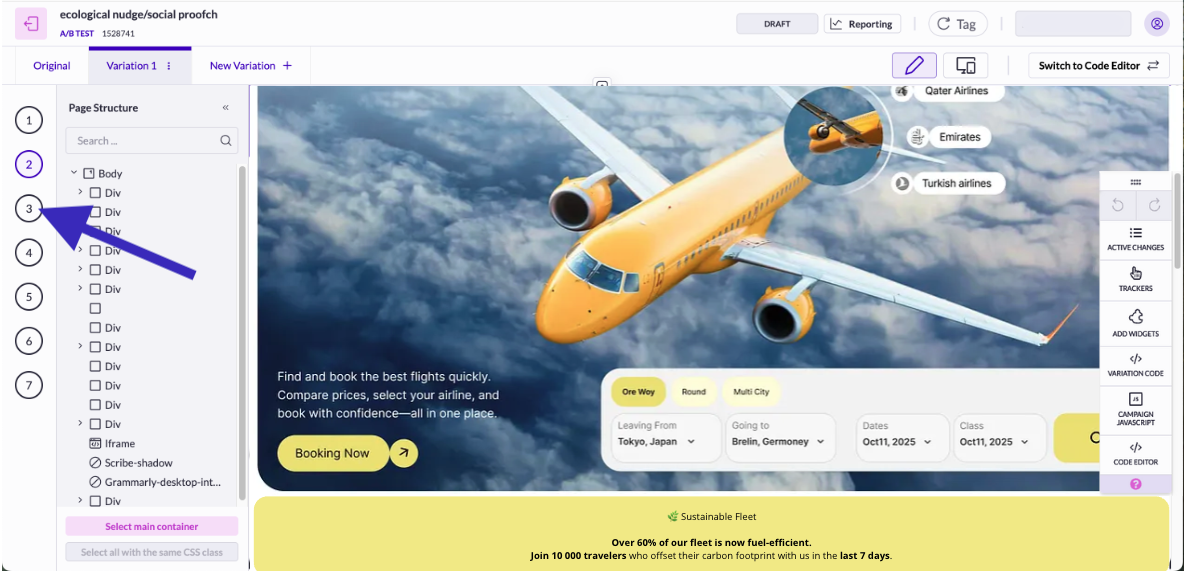
On the left panel, click on step 3.
{% endstep %}
{% step %}
Select your trackers.
{% hint style="info" %}
AB Tasty provides a pre-set of trackers, especially if you have chosen to add a Widget, but you can add your own. Some metrics (like page views or URL-based goals) are retroactive, but others (like click tracking or custom events) are not. Plan ahead to ensure all relevant data will be available in your report.\
[To learn more about tracking steps and trackers, read our dedicated article](/web-experimentation-and-personalization/campaign-flow-goals-step.md).
{% endhint %}
{% endstep %}
{% step %}
Click on **Next step**
{% endstep %}
{% step %}
Define your audience based on segments (e.g., all visitors, mobile users, or eco-conscious travelers identified through browsing behavior).
{% hint style="info" %}
For your first campaign the only available segment is "All visitors" but you can refine it by creating your own segment. \
[Read this article to know how to create and manage segments](/assets-library/creating-and-managing-segments.md).
{% endhint %}
{% endstep %}
{% step %}
Define Triggers and Frequency.
{% hint style="info" %}
For your first campaign, the only available trigger is "Any time" but you can refine it by creating your own trigger.
[Read this article to know how to create and manage trigger](/assets-library/creating-and-managing-triggers.md)s.
{% endhint %}
{% endstep %}
{% step %}
If you have chosen an experiment, split your visitors between your variations.
{% hint style="info" %}
We recommend allocating the traffic evenly for better statistical results.
{% endhint %}
{% endstep %}
{% step %}
When you are done setting up your campaign you can go to QA & Overview step
{% endstep %}
{% endstepper %}
## QA
The QA mode enables you to choose the method(s) used to perform the QA of your campaign.
{% stepper %}
{% step %}
In the **QA & Overview** page> **Step 1: Select how to display the campaign to QA**, select, **Targeting by IP.**
{% hint style="info" %}
**Targeting by IP** is the easiest and fastest way to QA your campaign. It enables you to QA your campaign on all devices.
{% endhint %}
{% endstep %}
{% step %}
Click **Save**.
{% endstep %}
{% step %}
In **Step 2: QA the campaign**, click **Open QA Assistant.**
{% endstep %}
{% step %}
Select a device.
{% endstep %}
{% step %}
Check the result of the analysis.
{% hint style="info" %}
[For more information on QA Mode and QA assistant, please read our comprehensive documentation. ](/web-experimentation-and-personalization/qa-step/qa-mode--qa-assistant.md)
{% endhint %}
{% endstep %}
{% step %}
When you ensure your campaign works properly, in **Step 3: Finish the QA process**, click **Stop QA.**
{% endstep %}
{% step %}
Select a status.
{% hint style="warning" %}
If you click on **Live**, your campaign will be immediately visible by your visitors.
{% endhint %}
{% endstep %}
{% step %}
Click on **Validate**.
{% endstep %}
{% endstepper %}
## Set a campaign to live
{% hint style="info" %}
If you have selected the status Live after QA test, you are done: your campaign is already live.
{% endhint %}
{% stepper %}
{% step %}
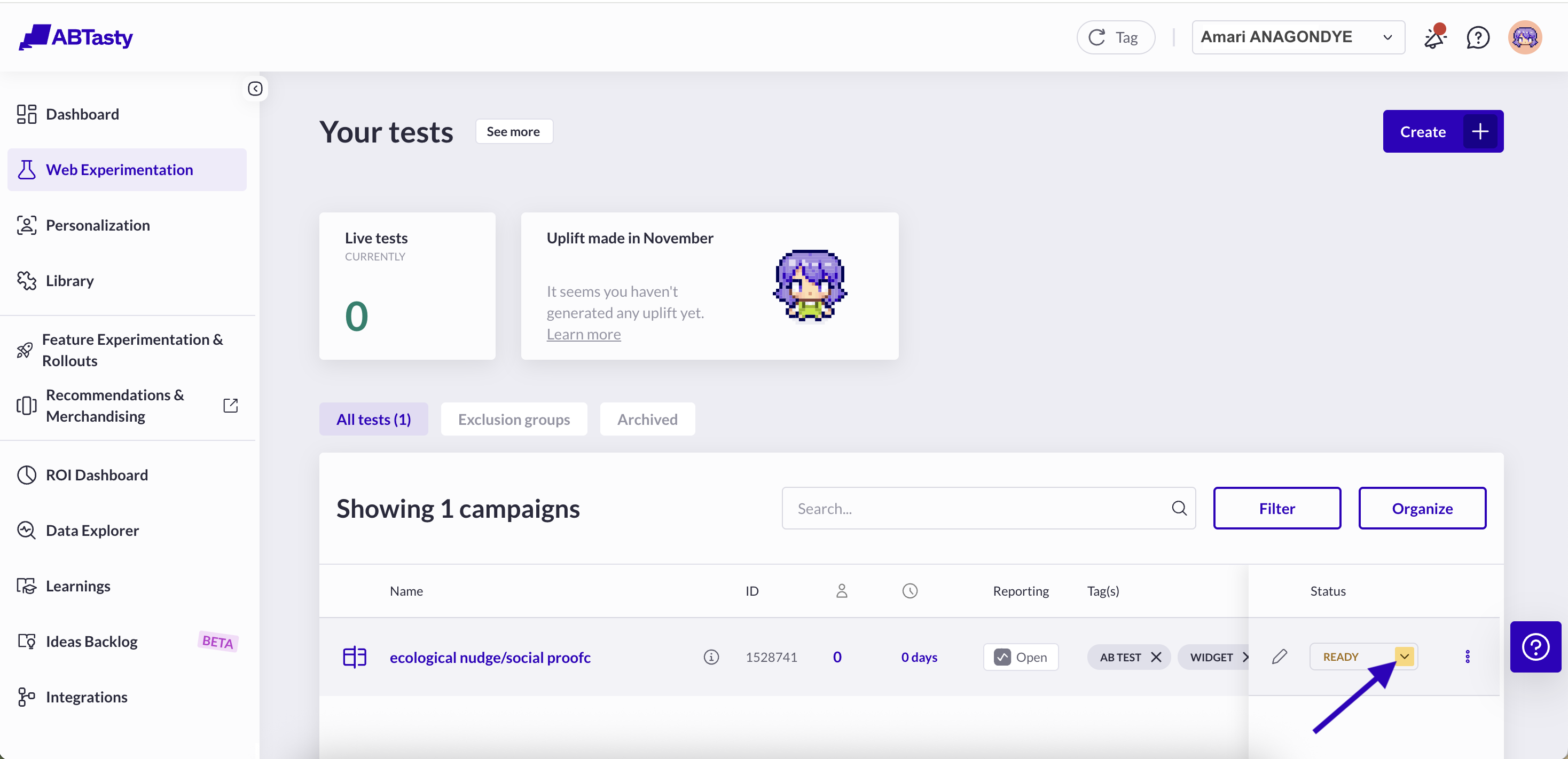
In the campaign dashboard, click on your campaign status.
{% hint style="info" %}
If you have chosen to create an experiment, select [**Web experimentation**](https://app2.abtasty.com/experiments) in AB Tasty menu to reach the appropriate Dashboard.
If you have chosen to create a personalization, select [**Personalization**](https://app2.abtasty.com/customizations) in AB Tasty menu to reach the appropriate Dashboard.
{% endhint %}
{% endstep %}
{% step %}
In the drop-down menu, select **Play the campaign**.
The status displays Live, and the tag is automatically compiled to display your campaign on your website.
{% endstep %}
{% endstepper %}
## Airvoyage's example
Here is Amari's Journey to create a social proof widget on Airvoyage's flight results page that appeals to travelers' values, highlighting their sustainability efforts to see if it increases bookings among eco-conscious customers.
{% stepper %}
{% step %}
I have chosen **Web experimentation** as I want to try it first and then apply it as a personalization if the results are encouraging.
{% endstep %}
{% step %}
I clicked on **Create**.
{% endstep %}
{% step %}
I have chosen an A/B test campaign.
{% endstep %}
{% step %}
I have filled the following information:
* **Name:** ecological nudge/social proof
* **Hypothesis:** I used the hypothesis helper to come up with the following: "If I add a social proof widget on the flight results page that emphasizes our sustainability efforts for eco-conscious travelers, then it will increase bookings by resonating with their values and encouraging more conversions."
* **Sample URL**:
* **Type of editor**: Visual editor
{% endstep %}
{% step %}
I have clicked **Save & Go to next step**.
{% endstep %}
{% step %}
I have added a widget:
1. In the right hand tool bar, I clicked on **Add Widgets**
2. I have selected the **Social proof** template.
3. I clicked on **Add**.
{% endstep %}
{% step %}
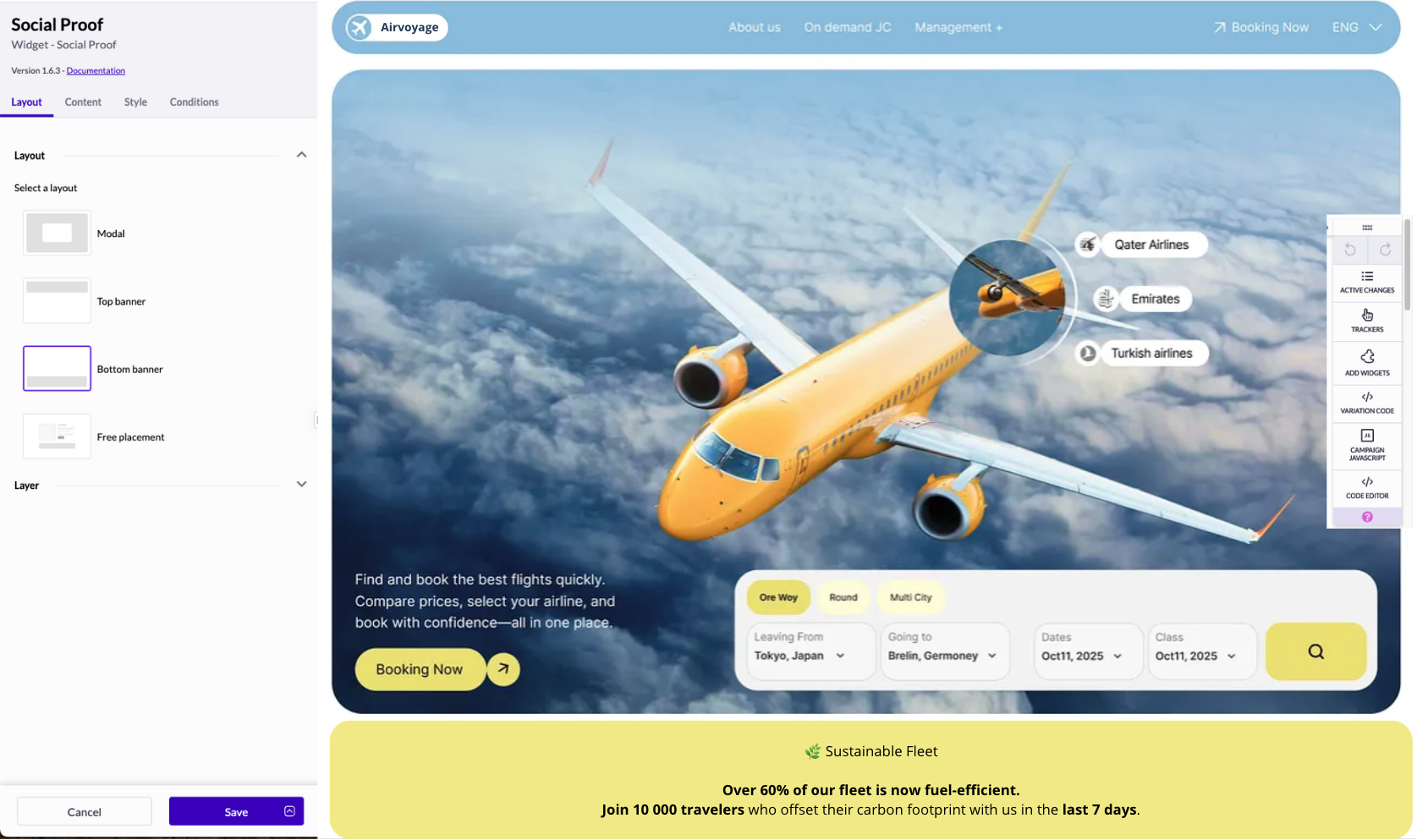
In the editor left panel, I applyed these changes:
* **Layout**
* Layout: Bottom banner
* Layer: Default
* **Content**
* Variable to display: Number of visitors
* Period to display: In the last 7 days
* Content: I used a genAI to help me add HTML an make my text catchier:
```
🌿 Sustainable FleetOver 60% of our fleet is now fuel-efficient.
Join !visitorsQty! travelers who offset their carbon footprint with us
in the last !period! !unit!
{% endstep %}
{% step %}
I have saved my changes.
{% endstep %}
{% step %}
On step 3, I have chosen the following trackers:
* Primary: Booking completion rate
* Secondary: CTA click rate, AOV, Exit rate
* Guardrails: Bounce rate, Page load time, RPV
* Segments: Mobile vs desktop, Visitor type (new/returning)
> “By combining conversion, engagement, and quality metrics, I can tell not just if the widget worked, but how and for whom.”
> {% endstep %}
> {% endstepper %}
---
# Agent Instructions
This documentation is published with GitBook. GitBook is the documentation platform designed so that both humans and AI agents can read, navigate, and reason over technical content effectively. Learn more at gitbook.com.
## Querying This Documentation
If you need additional information that is not directly available in this page, you can query the documentation dynamically by asking a question.
Perform an HTTP GET request on the current page URL with the `ask` query parameter, and the optional `goal` query parameter:
```
GET https://docs.abtasty.com/onboarding/web-experimentation-and-personalization-quick-start-guide/launch-your-first-experiment.md?ask=&goal=
```
`ask` is the immediate question: it should be specific, self-contained, and written in natural language.
`goal` is optional and describes the broader end goal you are ultimately trying to accomplish on behalf of the user. GitBook uses it to tailor the answer towards what is most useful for that goal.
The response will contain a direct answer to the question and relevant excerpts and sources from the documentation.
Use this mechanism when the answer is not explicitly present in the current page, you need clarification or additional context, or you want to retrieve related documentation sections.
 {% endhint %}
## Create a campaign
{% stepper %}
{% step %}
In your AB Tasty dashboard, choose **Web experimentation** (for experiments) or **Personalization** (for targeted experiences).
{% endstep %}
{% step %}
On the right upper corner, click on **Create**.
{% endstep %}
{% step %}
Choose your campaign type[.](/web-experimentation-and-personalization/campaign-creation-and-dashboard/types-of-campaigns.md)
{% hint style="info" %}
[To learn more about campaign type, read our dedicated article.](/web-experimentation-and-personalization/campaign-creation-and-dashboard/types-of-campaigns.md)
{% endhint %}
{% endstep %}
{% step %}
Fill in the campaign's main information.
{% hint style="info" %}
[You can use our Hypothesis helper to help you create a campaign aligned with a mesurable target.](/web-experimentation-and-personalization/campaign-creation-and-dashboard/how-to-set-up-main-information-step.md#h_01j8hdmamarwfbwmyk1xyx2f40)
{% endhint %}
{% endstep %}
{% step %}
To open the **Visual Editor,** click **Save & Go to next step**.
{% endstep %}
{% step %}
Depending on your campaign goal you can:
* Select the element you want to modify:
* Hover it and click
* or select it in the page structure
* Add a widget:
1. In the right hand tool bar, click on **Add Widgets**
2. Select the relevant template.
3. Click **Add**.
{% endstep %}
{% step %}
Use our WYSIWYG options to apply your desired modifications.
{% hint style="info" %}
[For a comprehensive tour of our editor, please visit this article. ](/web-experimentation-and-personalization/editors-and-widget/visual-editor/discovering-the-visual-editor.md)
[You can also read below one example for the creation of a social proof widget A/B test.](#airvoyages-example)
{% endhint %}
{% endstep %}
{% step %}
When you are done, save your changes.
{% endstep %}
{% endstepper %}
## Set up goals and targeting
When you're done with the edition:
{% stepper %}
{% step %}
On the left panel, click on step 3.
{% endhint %}
## Create a campaign
{% stepper %}
{% step %}
In your AB Tasty dashboard, choose **Web experimentation** (for experiments) or **Personalization** (for targeted experiences).
{% endstep %}
{% step %}
On the right upper corner, click on **Create**.
{% endstep %}
{% step %}
Choose your campaign type[.](/web-experimentation-and-personalization/campaign-creation-and-dashboard/types-of-campaigns.md)
{% hint style="info" %}
[To learn more about campaign type, read our dedicated article.](/web-experimentation-and-personalization/campaign-creation-and-dashboard/types-of-campaigns.md)
{% endhint %}
{% endstep %}
{% step %}
Fill in the campaign's main information.
{% hint style="info" %}
[You can use our Hypothesis helper to help you create a campaign aligned with a mesurable target.](/web-experimentation-and-personalization/campaign-creation-and-dashboard/how-to-set-up-main-information-step.md#h_01j8hdmamarwfbwmyk1xyx2f40)
{% endhint %}
{% endstep %}
{% step %}
To open the **Visual Editor,** click **Save & Go to next step**.
{% endstep %}
{% step %}
Depending on your campaign goal you can:
* Select the element you want to modify:
* Hover it and click
* or select it in the page structure
* Add a widget:
1. In the right hand tool bar, click on **Add Widgets**
2. Select the relevant template.
3. Click **Add**.
{% endstep %}
{% step %}
Use our WYSIWYG options to apply your desired modifications.
{% hint style="info" %}
[For a comprehensive tour of our editor, please visit this article. ](/web-experimentation-and-personalization/editors-and-widget/visual-editor/discovering-the-visual-editor.md)
[You can also read below one example for the creation of a social proof widget A/B test.](#airvoyages-example)
{% endhint %}
{% endstep %}
{% step %}
When you are done, save your changes.
{% endstep %}
{% endstepper %}
## Set up goals and targeting
When you're done with the edition:
{% stepper %}
{% step %}
On the left panel, click on step 3.
 “By combining conversion, engagement, and quality metrics, I can tell not just if the widget worked, but how and for whom.”
> {% endstep %}
> {% endstepper %}
---
# Agent Instructions
This documentation is published with GitBook. GitBook is the documentation platform designed so that both humans and AI agents can read, navigate, and reason over technical content effectively. Learn more at gitbook.com.
## Querying This Documentation
If you need additional information that is not directly available in this page, you can query the documentation dynamically by asking a question.
Perform an HTTP GET request on the current page URL with the `ask` query parameter, and the optional `goal` query parameter:
```
GET https://docs.abtasty.com/onboarding/web-experimentation-and-personalization-quick-start-guide/launch-your-first-experiment.md?ask=
“By combining conversion, engagement, and quality metrics, I can tell not just if the widget worked, but how and for whom.”
> {% endstep %}
> {% endstepper %}
---
# Agent Instructions
This documentation is published with GitBook. GitBook is the documentation platform designed so that both humans and AI agents can read, navigate, and reason over technical content effectively. Learn more at gitbook.com.
## Querying This Documentation
If you need additional information that is not directly available in this page, you can query the documentation dynamically by asking a question.
Perform an HTTP GET request on the current page URL with the `ask` query parameter, and the optional `goal` query parameter:
```
GET https://docs.abtasty.com/onboarding/web-experimentation-and-personalization-quick-start-guide/launch-your-first-experiment.md?ask=