> For the complete documentation index, see [llms.txt](https://docs.abtasty.com/llms.txt). Markdown versions of documentation pages are available by appending `.md` to page URLs; this page is available as [Markdown](https://docs.abtasty.com/flagship-deprecated/integrations/fe-and-r-tealium/fe-and-r-send-ab-tasty-event-to-tealium.md).
# \[FE\&R] Send AB Tasty event to Tealium
{% hint style="warning" %}
**Visitor ID Requirement**
To make this server-side integration work properly, you need to pass the visitor ID provided by your third-party tool.
What you must do:\
• Create the connector\
• Ensure Tealium knows the visitor ID\
• Retrieve the visitor ID using: *`utag.v_id`*\
• Call the Decision API with this visitor ID, otherwise, the hit will not be sent to the third party
{% endhint %}
### Introduction
The AB Tasty > Tealium Server-Side Connector lets you automatically send experiment data from AB Tasty’s Feature Experimentation platform to Tealium EventStream or AudienceStream. This integration enables you to analyse the impact of specific feature flags and variations on your key metrics directly within Tealium’s ecosystem — without relying on client-side tracking.
Once set up, the connector transmits campaign and variation identifiers as custom events or attributes whenever a decision is made for a visitor. This ensures consistent server-side tracking across both platforms, allowing for unified reporting and more accurate behavioural insights.
### How-to
{% tabs %}
{% tab title="1. On Tealium" %}
#### **1. Define a Flagship Event**
* In the left menu, go to **Event Specifications** (under *Event Data*).
* Click **+ Add Event Specification**.
* Fill in the form:
* **Event Name:** `flagship`
* **Description:** Something like *Triggered when AB Tasty delivers a feature decision.*
* Save the specification.
You now have an empty event definition called flagship that will structure incoming data.
**2. Add Event Attributes**
* Still under *Event Data*, open **Attributes → Event Attributes**.
* Click **+ Add Attribute** twice to create:
* `flagship_campaign` → *String*
* `flagship_variation` → *String*
These attributes tell Tealium what data to expect and how to type it.
{% endtab %}
{% tab title="2. On AB Tasty" %}
#### **Create a Tealium Connector**
On AB Tasty go to **Integration Hub > FE\&R Integrations**
* Look up for Tealium card on the push section and click on create a connector
* [Fill in](#user-content-fn-1)[^1]
* Tealium account
* Tealium Profile
* Create the connector
{% endtab %}
{% endtabs %}
### **FAQ**
**Why include the visitor ID?**\
Tealium needs a known `tealium_visitor_id` to link the event to a visitor profile. Without it, the hit won’t appear in Live Events or trigger connectors.
**How to get it?**\
Retrieve it from `utag.v_id` on the Tealium client and include it when calling the AB Tasty Decision API.
**What if I skip it?**\
The event won’t be processed or visible in Tealium.
**How to check the hit?**\
Go to **EventStream → Live Events** to confirm your `flagship` event was received.
[^1]: 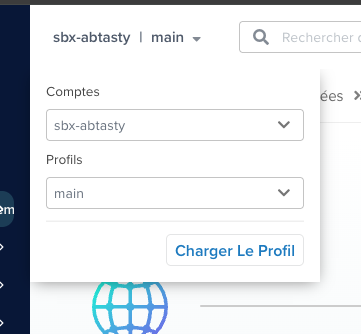 ---
# Agent Instructions
This documentation is published with GitBook. GitBook is the documentation platform designed so that both humans and AI agents can read, navigate, and reason over technical content effectively. Learn more at gitbook.com.
## Querying This Documentation
If you need additional information that is not directly available in this page, you can query the documentation dynamically by asking a question.
Perform an HTTP GET request on the current page URL with the `ask` query parameter, and the optional `goal` query parameter:
```
GET https://docs.abtasty.com/flagship-deprecated/integrations/fe-and-r-tealium/fe-and-r-send-ab-tasty-event-to-tealium.md?ask=&goal=
```
`ask` is the immediate question: it should be specific, self-contained, and written in natural language.
`goal` is optional and describes the broader end goal you are ultimately trying to accomplish on behalf of the user. GitBook uses it to tailor the answer towards what is most useful for that goal.
The response will contain a direct answer to the question and relevant excerpts and sources from the documentation.
Use this mechanism when the answer is not explicitly present in the current page, you need clarification or additional context, or you want to retrieve related documentation sections.
---
# Agent Instructions
This documentation is published with GitBook. GitBook is the documentation platform designed so that both humans and AI agents can read, navigate, and reason over technical content effectively. Learn more at gitbook.com.
## Querying This Documentation
If you need additional information that is not directly available in this page, you can query the documentation dynamically by asking a question.
Perform an HTTP GET request on the current page URL with the `ask` query parameter, and the optional `goal` query parameter:
```
GET https://docs.abtasty.com/flagship-deprecated/integrations/fe-and-r-tealium/fe-and-r-send-ab-tasty-event-to-tealium.md?ask=&goal=
```
`ask` is the immediate question: it should be specific, self-contained, and written in natural language.
`goal` is optional and describes the broader end goal you are ultimately trying to accomplish on behalf of the user. GitBook uses it to tailor the answer towards what is most useful for that goal.
The response will contain a direct answer to the question and relevant excerpts and sources from the documentation.
Use this mechanism when the answer is not explicitly present in the current page, you need clarification or additional context, or you want to retrieve related documentation sections.